Cloud Management & Collaboration App BusyFlow Comes To Android & iOS

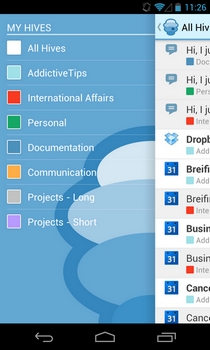
The online nature of several modern-day business models has freed workforces from geographical constraints, allowing them to collaboratively work on projects from any part of the world using the internet. However, with documents, files, calendars and all other required work tools spread across multiple online services, you might feel the need to access them from under one roof, which is exactly what the previously-reviewed web service BusyFlow has to offer. Following the success of the BusyFlow web app, the company has recently launched its companion apps for iOS and Android. Available in iTunes App Store and Google Play Store for free, the official mobile app of BusyFlow helps you stay connected with your most frequently-used online collaboration and cloud services through a single interface. As of now, BusyFlow supports fetching updated content – notifications and changes – from Google Calendar, Dropbox, Google Drive, Trello, Basecamp, GitHub, Google Tasks, and Pivotal Tracker. Read More

Collaborate Online On Design Projects With Marqueed

Collaborating on projects remotely is never easy; the simple process of giving and getting feedback can turn into a long dragged-out conversation. You often face difficulty trying to get your point across or trying to understand what someone else is saying. For designers, this can become a recurring problem if they aren’t using a good collaboration service. Marqueed is built for this very purpose. It’s a simple web service that lets you create public and private ‘Collections’ of images, and work on them in collaboration with others. Let's find out more about the service after the jump. Read More

Screenhero For OS X: Screen Sharing With IM & Multi-User Collaboration

Screen sharing apps can be really handy for getting remote assistance by letting someone else control your computer remotely, or simply showing others something you're doing on your computer while staying in control yourself. Screenhero is a Mac app (with a Windows client still under development) that allows you to share your screen with anyone who has a Screenhero account, while adding a handy feature to the mix. You retain control of your Mac while the person you share your screen with can also control your system if you choose. It might sound confusing to work with, as you will have two cursors moving around on your screen, but Screenhero makes it easy to distinguish the two by adding the name of the user to their cursor. The app allows you to share your entire screen or just a single app’s window. It also features a built-in chat client and you can switch to sharing an app's window during a live session. Read More

Bitrix24 Offers Easy Project Management, Feedback & File Sharing For Web & iOS

In order to ensure that a project runs smoothly, communication between all team members is of paramount importance. All persons involved in a project must be familiar with  their responsibilities, and the tasks for all the team members should be clearly defined. A centralized workspace, especially where a large number of individuals are concerned, where every aspect of current and upcoming tasks are written down and available for all the participants, is a one of the prerequisites of accomplishing the set tasks. Good desktop project management software can provide you with all those things, but you will required to install the software on the computers of all team members. To avoid this hassle, and all the problems that might accompany it, you can turn to an online solution like Bitrix24. Primarily a web app, Bitrix24 lets you to create and manage team-based tasks, share files and get feedback without having to configure any specialized work management solution, and even has an iOS (iPhone and iPad) app for on-the-go management. Read More

Otixo’s Collaboration Spaces Let Users Work Across Multiple Cloud Services [Web]

Last summer, we reviewed Otixo, a web service that allows you to connect multiple cloud storage services and view files you have stored across them in a single place. At the time it was reviewed, Otixo was young and supported Dropbox, Google Docs, Box.net, MobileMe and FTP servers. Over the past year, the people behind Otixo have been hard at work adding new features and improving the ones that existed back then. Of the many changes at Otixo, the recent introduction of Collaboration Spaces has been noteworthy. Given that you’ve connected one or more of your cloud storage services, it only makes sense that you would want to be able to share them easily. While cloud services allow you to share files, Otixo gives you that same feature with the flexibility of sharing files from one service to another. Read More

QikPad: Create, Modify & Share Documents In A Collaborated Environment

When dealing with large volumes of work whether at a small setup or large scale organization, effective team management depends on work distribution and coordination. It is essential to maintain a collaborated environment where the supervisor analyzes the overall team effort. Moreover, individuals look for guidance from fellow co-workers while playing a meaningful part in achieving the set goals and tasks. QikPad is an online collaboration tool that empowers individuals to create, maintain and modify information in a collaborated environment. Using author color codes, one can easily identify the source of changes in accordance with the relevant color assigned to a particular team member. The EtherPad Lite Timeslider function allows you to track each change by viewing activity. With comprehensive sharing options (using popular services like Facebook, Twitter, Google+ and the like), exporting in the form of plain text, HTML and Wordle documents coupled with an integrated chat bar, it will surely increase overall work productivity. Read More

Azendoo: Elegant Web App For Collaborative Workspace Management

With the increasing popularity of the social media and the importance of collaborative teamwork, businesses are merging the two for increasing overall work productivity. Azendoo is a web application that strives to keep your input valuable to the entire team by instantly sharing your plans via profiles, workspaces, subjects, tasks, and team members. With its modern interface, managing tasks, enhancing team performance and accessing information, on the go, had never been this easy. You can also share and prioritize projects while sending emails and messages to relevant individuals. The emphasis here is not only to link a group of individuals in fulfilling objectives leading to successful task completion but to also connect work with the relevant tasks in order to encourage high value content sharing for the betterment of the team. Read More

Oogwave: Plan, Coordinate And Execute Collaborated Tasks & Projects

Managing teams and projects with deadlines in mind, usually compel the system managers to download and pay sizeable amounts for utilities that facilitate in achieving coordination and collaboration for the better. You may have downloaded a project management tool, a chat client coupled with online storage for effective monitoring till the rightful task completion. Oogwave is a free web application that provides you with a wide range of services in a user-friendly, integrated manner. With work and project planner, internal communication, personal tools for tasks and notes, team chat and details, you are in a much better position to increase overall work productivity. Moreover, group discussions, commenting and alerting features add life to your workspace, while the group timeline lays out tasks with time for the entire team, enabling accomplishment of collective goals. Read More

Brosix: Chat & Collaborate For Secure Project Management Across Multiple Platforms

When managing teams and projects, most of the time and energy of capable individuals is spent on coordination and collaboration for better work distribution. Instant Messengers aim to enhance cooperation between team members. Brosix is a powerful, cross-platform Instant Messenger that allows you to chat and share sensitive data with the concerned individuals in a fully protected, private channel. From the individual to large scale organizations, the importance of this application in achieving productivity is commendable. In addition, it supports all popular operating systems, whether on your Smartphone or your system PC. Workers can keep in touch by using features like swift screen and file sharing, online white-board, co-browsing, audio/video chat and conferencing to improve the collective good. Read More

Proximity-Based Group Collaboration App Kibits Released For Android

Kibits is a cross-platform group collaboration and socializing app for Android and iOS-powered devices. The app, having made its mark among iOS users, has just hit the Google Play Store. Using Kibits, users can easily and instantly create private conversation groups (called Kibits), and invite their friends or nearby users with whom they can share text messages, photos, videos, music files, URLs, locations, and notes etc over the internet. Whether it’s about indulging in private file-sharing activities with just your family members, or collaborating with your workforce that is scattered in various parts of the world, Kibits has you covered. There is no restriction on the number of different groups that can be created or joined, and for all the activities going on within each individual group, the app keeps you apprised through real-time notifications. Read More

Thinkbinder: Create Study Groups, Share Files & Collaborate In Real Time [Web]

ThinkBinder is a web application that aims to change the way you study with your friends by offering you a study group environment that is built around a set of useful tools designed to increase productivity. The service lets you have group discussions, share notes and provides you with real-time interactions. Creating a study group on Thinkbinder only takes a few seconds and all you have to do is create an account in a few easy steps or login via Facebook. Once you're logged in to the service you will be able to add members, upload files, create events and share ideas on a whiteboard. You can invite friends through e-mail or Facebook and once they are all in, you can collaborate with them through chat, private messages, and more. Moreover, you can share links, files and work on problems together through a whiteboard in real time. Read More

Set Task Reminders For Your Friends With Get Tofu For iPhone

You can use the iPhone’s stock Reminders app to keep track of things you are supposed to do, and there are many popular third-party alternatives available as well. However, there are many things we simply can’t do alone, and have to depend on other people to get them done. One way is to continuously remind them via phone calls, email or text messages, or you can make full use of your iOS device and Get Tofu. It is an app which will let you create reminders, but not for yourself - for your friends. Once you are connected with a person via Get Tofu, you can set Missions for them, and when they have accomplished the assigned task and marked it as done, you will be notified immediately. Read More

LiquidPlanner Brings Feature-Packed Project Management App To Android

LiquidPlanner is a fast-flourishing project management-based web service that provides its clients with simple yet very effective tools to schedule organizational tasks, collaborate with teams and task groups, track project and task times, share files with required team members, and prepare detailed reports regarding project progress; all in real-time. The service also has a dedicated client for Android and iOS-powered devices through which you can always stay in sync with the updated LiquidPlanner content, and view all your projects, manage tasks, create new projects, tasks and subtasks, check and reply to comments, set milestones, indulge in team conversations, track task time and progress via graphical representation, assign project deadlines, and view file attachments on the go. In addition, the app lets you balance team resources, check any deadlines that are approaching the risk levels, and manage your team portfolios regarding any projects/tasks that you've already prioritized. Read More

Updated Google Docs For Android Brings Collaborative Editing & More

The official Google Docs mobile client for Android was released almost a year ago, and ever since, it has been updated with new and improved features at frequent intervals. However, the latest update that the client has received can be cited as a massive leap in making your document editing and sharing experience via mobile much innovative and collaborative. Apart from sporting several handy UI tweaks and text formatting tools, the updated Google Docs app for Android now supports real-time editing of documents by multiple users, which means that you, along with your colleagues, can now simultaneously work on a shared document – a feature that the web variant of Google Docs has been offering for quite a while now. Changes made by any user can be seen by all other participants almost instantly. In addition, the app also brings rich text formatting support, multi-touch pinch-to-zoom gestures for convenient document editing, and several layout tools, including numbered/bulleted lists and indentation etc. Read More

WorkFlowy Helps You Organize Thoughts & Collaborate With Others [Web]

WorkFlowy takes simplicity to a whole new level and provides you with a better way to organize your brain. It is a perfect tool for distraction task listing and outlining. The web app basically mimics the way you naturally think, and gives you one place to manage all the information in your life. WorkFlowy comes with blank interface with no guidelines or categories, whatsoever. You can start by adding new items, notes, tags and more. Moreover, mark tasks as complete, edit notes, export or delete tasks. Once a task has been marked as completed, it is crossed out. WorkFlowy lets you stay organized, and makes it incredibly easy for you to keep track of lists. It makes it easier to focus on tasks rather then getting distracted with categories, label, topics and other irrelevant content. Read More

Mingle Comes To Android, Now Find & Connect To Professionals On The Go

With the advent of technology, and introduction of faster communication means, businesses are no longer confined to just a specific location, nor is it always simple to find the appropriate skills required to help your cause from within a rather restricted pool of available options around you. For this particular reason, businesspersons, professionals and students often feel the urge to collaborate across the borders in order to find (or even lend) help to get several tasks accomplished successfully. Mingle is a multi-platform location-based smartphone app for Android and iOS-powered devices, that helps people find and connect to professionals from almost all spheres of life to get their problems resolved. Through it's simple and extremely user-friendly interface, Mingle provides with you an ideal social networking platforms to connect to your clients, employees and even employers on the go. While the iOS variant of the app was released in the iTunes App Store quite some time ago, the Android variant has just seen light of the day. Read More

BaiBoard: Whiteboard For Collaborating With Other Macs On Your Network

There are plenty of drawing tools available for Mac, and many of them are feature rich. However, what you won’t find as easily as a drawing tool is a collaboration board. BaiBoard is a free whiteboard app for Mac that you can use to collaborate with anyone in your network. The app isn’t something that you’d expect to create art with, since the color choice is limited, but as a mind mapping tool, this is fairly good. The app lets multiple users draw at the same time and share files with each other. Your drawings are saved to the app’s cloud, and each drawing is distinguishable through its unique board number, and can be saved to your local system in PDF format. Read More

Collaborative Drawing Tool Lets You Connect And Draw From Mac & iPhone

Whiteboard Collaborative Drawing for Mac is a collaboration tool for Mac that lets you connect your iPhone over Wi-Fi. The app is fairly basic, and lets you draw in a wide spectrum of colors. From your iPhone, you can snap photos, share them to your Mac, and begin drawing. The app allows you to draw from your Mac and iPhone at the same time, and changes are reflected quickly on both ends. It comes with a drawing and an erase tool. You can save images to your phone or desktop, and and similarly import them from your phone or hard disk for collaboration. Read More

Panmind – Manage, Share & Collaborate On Files & Projects

Project management and mind mapping are different things but if the two were to come together, what you’d get is something that would look roughly like Panmind. This web service serves as a means of project management by keeping everyone involved in a particular project updated about any changes. It’s also a great way to share files and keep everyone posted on when a new file has been added or a file has been modified. The service has an additional features that allows all members to post comments on projects, thus facilitating consistent feedback.

Read More

Create Flow Charts & Design Website Wireframes With LucidChart

You can find a reasonable number of web apps that will let you create organograms, process flow charts and wire frame diagrams but you rarely find a single web service that lets you make just about every kind of diagram or flow chart you might need. Lucid Chart is a web service that is one off those rare all-in-one diagram and process editors. It lets you create drawings, flowcharts, Mind Maps, Network Diagrams, Organization Charts, Software and Web diagrams, UMLs and more. The service has both a free and paid version; you can add contacts and collaborate with them using the built-in chat feature. The paid account allows you to add more team members and has the added feature of importing and editing documents from MS Visio.

Read More