SoundControl Adds Pandora Playback Controls & Notifications To Chrome

Extensions for controlling YouTube are very common and some of them can be quite powerful. What’s odd is that there aren't nearly as many extensions made for services like Pandora, Grooveshark, or Soundcloud, Pandora possibly being the most left out of the three. If you’re trying to find a convenient way to control Pandora, SoundControl Beta for Pandora might be the perfect solution . It’s a Chrome extension that gives you one button to play, pause, and skip songs. The button must be clicked a certain number of times to execute the function associated with it, and is customizable. SoundControl Beta for Pandora also gives you desktop notifications when a new song plays, and lets you select the volume of the ads and directly switch to the tab you have Pandora open in. The extension remembers the last song you were listening to, along with its last position during playback, so if you close Pandora, the same song that you were last listening to will resume from where you left off, the next time you open it. Read More

Pokki Gets A Full-Featured Pandora App With Desktop Notifications

Many of us get tired of our daily hectic work routine, and listening to music is a great way to keep oneself going all day and replenish that relaxation meter again. Speaking of music, there are countless number of services that let you listen to your favorite tunes. Services like Spotify, Last.fm & Pandora offer fascinating solutions to stream music off the internet at zero charge. If you’re an avid Pandora listener, Pandora for Pokki is a great app to use the service without firing up its webpage. This gorgeous app enables to sign in to your Pandora account to access your profile, playlists, radio stations and then some. Read More

Completely Control Pandora Playback From iPhone Lock Screen With ThumbsUp

Pandora users, rejoice! What the famous service hasn't been able to do for its iPhone app has been accomplished by a third-party developer and released at the Cydia store. Pandora for iOS has always - rather annoyingly - lacked lock screen controls. You can keep listening to music from Pandora while using other apps or even when on the lock screen, but you have to launch Pandora itself every time you need to skip a track, add it to your bookmarks or give it a thumbs up. A lot of people have been demanding support for lock screen controls and now you can have them, thanks to a Cydia tweak by the name of ThumbsUp. The tweak lets you take full control of Pandora playback without ever having to open the app again and again. The buttons added to the lock screen are pretty neat, and look like they have been added to your iPhone by the Pandora client itself. Read More

Gather & Play Music From Multiple Sources Under One Roof With Songdrop

We listen to music from a lot of different sources; SoundCloud, Grooveshark, Pandora, YouTube, Last.fm, the list just goes on and one. At times, the services we use decide to play nice with each other and allow us to transfer our preferences from one to the other. At other times, we can use apps to help us connect these services and consolidate our listening experience in just one service. Songdrop is one such web service that acts as a song aggregator. It allows you to add songs to groups, which the service calls Mixes, from any website. There is a small catch though: you can drop a song (add it to the service) only from the song's own page. In addition to creating your own mixes, you can search other users’ mixes too and if you like the songs they have, you can drop them into your own collection. The service also has a dedicated Chrome extension, while users of other browsers can use the service’s bookmarklet to add songs. Read More

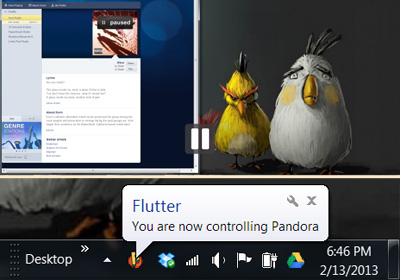
Use Hand Gestures To Control YouTube, Netflix, Pandora & Grooveshark In Chrome With Flutter

Flutter is an amazing app available for Mac and Windows that lets you control iTunes, Windows Media Player, Spotify, Powerpoint, Netflix and more by using your webcam and hand gestures. We have previously reviewed both Flutter for Mac and Flutter for Windows, and if you aren’t using this app, you’re missing out on a great ninja-like way to change whatever music you’re playing without even touching your computer. The Flutter desktop app controls desktop apps for the aforementioned services but for those of you who listen to music or watch videos in your browser, there is the Flutter Chrome extension. To use the extension, you must have the Flutter desktop app already installed. The extension allows the app to control YouTube, Grooveshark, Netflix, and Pandora regardless of which tab or window they are open in. Read More

Unblock Hulu & Pandora Access With Media Hint For Chrome & Firefox

Some of the best online services are restricted to select locations. If you don’t live in the right part of the world, you are barred access to web services like Pandora and Hulu, which make for a great online radio and TV experience respectively. The workaround for most people in this case is to use a proxy that unblocks websites that restrict their viewers geographically, or that have been restricted by court ruling within a country. The only problem with proxies is that, with time, they start to stream slowly when the servers can't handle the influx of users and insert ads on websites that normally don’t have them. A Virtual Private Network (VPN) might give you better results, but only if you have a paid plan. Free VPN services are limited on bandwidth, and as their usability is spread across all internet traffic, they tend to slow everything down. Media Hint is a proxy service with a dedicated Firefox add-on and Chrome extension meant to unblock Hulu and Pandora only. Read More

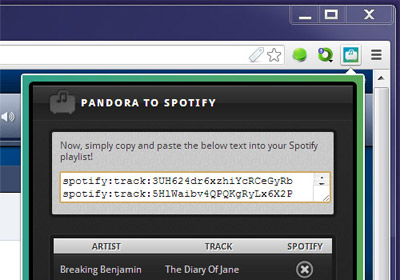
Easily Import Songs From Pandora To Your Spotify Playlist [Chrome]

Managing music is never easy, especially if you have several devices that you like to listen to Music. It gets even more complicated when you’ve subscribed to several different services. Music services are rarely built to play nice with each other, since they have to compete. You will occasionally find a way to scrobble tracks from Last.fm to Grooveshark, but that is about as lucky as you get. Pandora to Spotify Playlist Converter is a Chrome extension that allows you to easily import the tracks from Pandora to Spotify. The extension doesn’t automate the process nor does it connect your Pandora account to your Spotify one. What it does is analyze the tracks you’ve liked on Pandora and find the Spotify link for each one. You can then use the link to easily add those songs to your Spotify playlist. Read More

Pandora Windows Brings Pandora Online Radio Streaming To Windows 8

The name Pandora needs no introduction in the world of online radio. We all love listening to music and Pandora has been providing us with quick access to our favorite music for quite a while now. If you have recently switched to Windows 8 and are looking for a way to access Pandora radio in a Modern UI environment, then Pandora Windows is probably your best bet. The application is designed to let you sign in to your Pandora account and synchronize your radio stations with the app's playlist. It boasts an elegant interface, ease of use and fast streaming, lets you add radio stations to your library and stream music via the integrated media player. You can add stations by Artist, Song, Genre and Album, quite similar to how the Pandora web interface itself works. Read More

Control Music Playback For YouTube, Google Music, Rdio & Others From Chrome Toolbar

If you like listening to music from various popular services, such as YouTube, Google Music, Rdio, or Grooveshark, pausing or switching between songs can sometimes get difficult, specially when you’ve got a bunch of tabs open and are working on something else. Music Controller is an extension for Chrome that places a simple control panel on your toolbar that quickly allows you switch, pause/play songs or mute all background music at once, regardless of which tab the song is in. With it, you no longer have to be worried about whether you’re playing music in Pandora, Google Music, Grooveshark or any other service, as you may easily pause, skip or thumbs up for a song from the pop-up in your toolbar. The only requirement for the extension's working is that the music playing  tab should be in the same Chrome window. Read More

Control Grooveshark, Pandora & Other Music Playback From Chrome Toolbar

Unity Player is a Chrome extension that allows you to control music for various popular services, such as Pandora, Grooveshark , Google Music, SoundCloud and more. With it, you can control music from multiple sites from one handy pop-up. Now you no longer have to be worried about whether you're playing music in Pandora, Grooveshark or any other service, as you may easily pause, skip, rewind, thumbs up or check out the cover art from the pop-up in your toolbar. Another great feature of the service is that you can quickly focus the current site that is playing your song by clicking the album art cover photo, and if you start playing music from another source, the current one will pause itself as the new one starts. Read More

Pandora for Chrome: Control & Rate Pandora Music From Browser Toolbar

Pandora is an online radio station that lets you listen to a variety of songs from popular artists, but switching between songs and controlling Pandora while you work online can be a bit tiring. Pandora For Chrome, an extension for Chrome, allows you to control Pandora right from the browser's toolbar. It gives you full control of Pandora, and all you have to do is click the button in the toolbar and launch the service from the compact pop-up. Once launched, you can switch between songs, play/pause songs and like/dislike songs. A useful feature of the extension is that, it works seamlessly even when Pandora is open in a different tab or window. It allows you to work and listen to music at the same time without any disruptions. The pop-up displays the song title, artist name and a sharing option. Read More

Elpis: Desktop Client To Manage & Listen To Pandora Radio

With each passing day, more and more web based services are beginning to appear on the internet. A lot of simple functions, from opening and editing text files to listening to music and watching movies, can be performed directly in your browser without having to download anything to your computer. Pandora is an online radio service that allows you to listen to music by visiting its home page. You are not required to download anything to your computer, if the service is supported in your country and you have an account registered with it, you can listen to thousands of songs. Now, someone has been kind enough to develop an open source desktop client for Pandora, named Elpis, that allows you to easily manage your account, add stations to your account, and listen to your favorite bands and artists. It allows you to view, sort and select stations, as well as play, pause, skip, thumbs up, thumbs down and mark a song when you tired of it and want to stop it from appearing in the list again. Keep reading to find more about Elpis. Read More

Radio Controlled Is A Free Pandora Client For Windows Phone 7

Pandora is a music streaming service with quite a lot of followers. For such a popular service, it makes sense that some of its users must be on Windows Phone 7. Unfortunately, there is no official Pandora app for WP7 yet, despite the presence of a considerable WP7 contingent among Pandora’s subscribers. However, what isn’t available officially on the Mango platform, usually makes its way to the Marketplace via third-party clients. Same is the case with Pandora, which has now got Radio Controlled, an app that will let you do just about anything related to your Pandora account, and while listening to its radio, you aren’t likely to feel that you are not using Pandora’s official app. Read More

PianoPub: Stream Music From Pandora & Manage Stations On Desktop [Mac]

Music junkies are always looking for something new to listen. Even if you’re very particular about what music you like and what you don’t, searching for a certain music genre is most probably how you find new music. Regardless of tastes, internet radio in general, and Pandora in particular, is a good way of discovering new music. The new Pandora HTML5-based interface is, of course, excellent, but if you might not want to search among tabs and windows when you want to change stations or skip songs in Pandora, PianoPub is a Mac app that puts a simple music player on your desktop. It allows you to listen to songs from Pandora, add or remove stations, skip songs and rate them as good or bad. Read More

RadioEnhancer: Get Track Change Alerts & Remove Ads From Pandora [Chrome]

Pandora is a famous online radio and music recommendation service that includes every type of music, but the visual ads on newly designed HTML 5 based Pandora interface can be really annoying. RadioEnhancer,formerly known as PandoraEnhancer, is a Chrome extension to get rid of all visual advertisements from the revamped HTML 5 interface. Additionally, it comes with features to send desktop notifications for song changes, select and copy lyrics to clipboard, remove "Are you still listening" dialog, disable tooltips, conceal header ribbons & promobox, and extend station listing. Read More

Remove Listening Cap From Pandora With Unlimited Pandora App [Android]

Pandora Internet Radio is the most customizable radio service that streams free music to your phone. If you are an Androider with special interest in Music, then Pandora is probably installed on your Android phone already. Recently Pandora placed a “listening cap” on their service. According to creators of Pandora, the “listening cap” has been introduced to keep control “costs”. Many folks don’t really agree to Pandora’s point of view and in retaliation to that, there is now a modified Pandora App available without any listening cap or limit. Phia, XDA Member and developer, has released this unlimited Pandora app that lets you listen to your favorite music without worrying for streaming limits. According to Phia, he tinkered with the app for himself and is now making it public in order to help folks get their music all month long. We aren’t sure how Pandora will react to this one, but until it is available; its worth a shot!

Read More

Pandora Desktop Notification: Get Song Change Notifications [Chrome]

Online radio stations and services are a great way of listening to music and discovering new artists. Pandora is one of the most popular online radio services with a whole bunch of features that makes it convenient to listen, share and buy songs. Of the many good things about the service, one is that all you need is a web browser to listen to songs. Pandora Desktop Notification is a simple, single feature extension for Chrome that gives you a desktop notification whenever a new song starts playing. Read More

FindThatBand – Search Artists On Popular Sites From Right Click Menu

FindThatBand is yet another extension that will enhance the options in the right click context menu in Chrome. Similar to the FastTrack extension for Firefox in function, this extension offers more choice and customization. Once installed, you can select an artist name or song on any site and search for it on Grooveshark, iTunes, Pandora, YouTube and more. The extension was built not for finding songs but for information on artists or bands which is why the list of sites also includes Wikipedia. Read More

Tunnelbear – Free VPN To Access Popular Blocked Websites Around The World

I really hate that obnoxious text line which reads something like "this website cannot be accessed from your current location". Okay, no worries, we can use a VPN to gain access. There are many paid services which provide VPN and proxy services to access restricted websites like Hulu, Pandora, Spotify, etc., from anywhere. However, seldom do we come across free applications which have the potential of bypassing restrictions imposed by location restricted websites. TunnelBear is a VPN application which gives US and UK based IPs to allow direct access to popular location restricted websites, without causing any streaming hiccups. When you use TunnelBear, your network traffic is routed through the Tunnel Bear VPN to disguise your actual location. Using TunnelBear, we were easily able to access location restricted websites like Hulu, Spotify and Pandora. Another noteworthy aspect of TunnelBear is that it is not an ad-supported application like other applications of its kind, such as, HotSpot Shield. Read More

Access Location Restricted Websites In Firefox With Blue Box Proxy

There are websites that are blocked outside a country or region due to copyright issues and some are blocked in certain countries for political reasons. This is a common annoyance that leaves many users stranded and deprived of access to quality content and web platforms. Blue Box Proxy is a Firefox extension that allows instantly accessing blocked websites in your area. All you need to do is to choose the Open With Blue Box Proxy option from right-click context menu, in order to gain access to a blocked website. Read More