FlyingWindows Keeps Only One Mac App Window In Focus To Help You Concentrate Better

Working without distractions isn't easy unless you make a deliberate effort to minimize them in the first place. As far as distractions created by people around you are concerned, you could perhaps hang a Do Not Disturb sign outside your room or office, but that still won’t stop the distractions that appear on your Mac’s screen in the form of emails, instant messages or even your web browser. FlyingWindows is a free Mac app that helps you stay focused in an unconventional way. Most apps that help you stay focused do so by restricting access to certain unnecessary apps or blocking websites like Facebook, Twitter, and Reddit. What FlyingWindows does is that it keeps only a single app’s window to in focus, and minimizes all the rest. This ensures that while you're working, all other apps are kept out of sight. You can choose to either minimize apps or hide them. Now, you might need more than a single app to work with, and would prefer if they were not minimized or hidden, which is why you have the option to whitelist certain apps to keep them from being minimized. Read More

WindowPad: Arrange Application Windows At 9 Different Screen Positions Using Hotkeys

Dealing with multiple programs and organizing them in an efficient manner requires a worthy utilization of the screen space available. Although the AeroSnap feature introduced with Windows 7 attempts to address this need, utilities like TickClick for Windows and reSizer for Windows enhance this mobility capability. WindowPad is a useful application that has a negligible impact on your PC performance, yet provides you with the ability to use hotkeys, command line and window dragging options to move, resize and organize program windows for handling multiple tasks simultaneously. Sitting silently in the system tray, WindowPad can easily enter into Debug, Suspend and Reload mode with a single click, as per requirement in sync with a dynamic hotkey command support feature. Just like aforementioned tools, it associates numpad keys with screen areas, allowing you to easily snap active window at the required side of the screen. Read More

Asus Multiframe Utility: Resize & Snap App Windows To 9 Screen Regions Per Monitor

Although Windows 7 Aero Snap feature lets users quickly snap windows to required side of the screen, it doesn’t allow adjusting more than 2 application windows. For this reason, users need to manually minimize the passive applications, and then adjust the required windows on the screen. If you’ve been looking for an easy to use application that lets you arrange active application windows in upto 9 regions of the screen, take a look at Asus Multiframe Utility after the jump. Read More

TileWindows Lite – Snap Windows At Left Or Right Side Of Screen In Mac

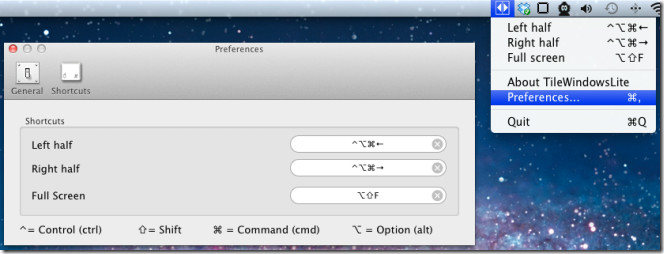
Mac OS X 10.7 offers a handful features to manage multiple active workspaces; you can switch between virtual desktops, view applications in full-screen mode, send and manage multiple application windows in Mission Control. In contrast to Windows 7 which allows user to quickly snap active windows at left and right side of the screen to view both app windows side by side, Mac OS X 10.7 doesn’t provide options to snap windows to both sides of the screen. TileWindows Lite is a small yet useful application which brings this very snapping feature to Mac desktop. TileWindows Lite is designed to move and resize application windows to view them side by side. Apart from having Windows 7 aero snap feature, it can resize the active application to fill complete screen area. Read More

Python Windows Tiler – Tile Windows And Hide Headers To Get More Space

Application window adjustment and management utilities generally allow user to snap active applications at required sides of the screen without actually saving precious screen space. The only way to save screen space is to use an app that can remove the unnecessary parts of the windows, such as scrollbars, menu bar, etc. PWT (Python Windows Tiler) is a python based Windows 7 tiler, i.e. application workspace adjustment tool which is equally good in saving screen space by removing active applications’ headers. Read More

Drag Active Windows To View Underlying Windows With GhostWin

Do you have the problem of flipping back and forth between overlapping windows? Do you often require checking the progress of an application process by switching windows, (such as a video converter)? Why not make your current window transparent. We have reviewed two apps before which can do this job; Vitrite and See Through Windows. However, both of them can turn windows transparent using a hotkey. If you want the same feature but different functionality, then GhostWin will definitely help. It makes any window partially or completely transparent when you move it across the screen, so that you may be able to see the underlying windows. Read More

Save Visual Studio 2010 Windows And Tool Panes Layouts With Perspectives

The window management plugin in Eclipse (famous Software IDE) called, Perspectives, allows developers to save windows positioning and layout for multiple purposes. Perspectives gives a convenient way to view files of your project and organize the windows as you see fit. If you’re struggling with organizing windows and file views manually in Visual Studio 2010, try Perpectives. It’s a small add-in that brings the very same Eclipse Perspective feature for Visual Studio 2010 users. With Perspectives, you wont have to manually set each UI component on the screen manually nor does it require you to find which window got displaced. Just select the saved perspective from the menu to bring back the saved windows with same position and layout. The add-in offers a simple window configuration manager to create new perspectives, and replace and delete existing ones. Read More

SizeWell Brings Extra Window Resize And Zoom Options To Mac

If you’ve started using Mac just recently, you must’ve noticed that it severely lacks in application window management. Unlike Windows 7, Mac Snow Leopard need an additional window management plugin or a third party application to bring window adjustment options. SizeWell is a window adjustment application for Mac which maps a handful of window resizing and zooming options to user-specified hotkey combinations. Unlike other windows snapping applications, it takes a novel approach to adjust active windows application to make your daily work more productive. You can for instance use one of its in-built window adjustment function to keep active application always in center of screen. Likewise, other functions let you pin window to bottom right corner, keep aspect ratio of active app window constant, and keep width or height of the active window same while window is being resized. Read More

Change Transparency To See Underlying Windows With See Through Windows

Netbook users, generally, rely on window adjustment utilities, such as, WinMixumumize, WinSplit Revolution, WinNumpad Positioner, etc., to manage and snap multiple application windows and workspaces at different sides of the screen. Since windows adjustment apps require you to first map keys with different screen positions, you can, alternatively, use an application to control the active window transparency in order to take a quick look at the underlying windows. See Through Windows is developed for this very purpose. While it eliminates the need of snapping active applications at different corners of screen, you just have to use a single hotkey combination over active application to toggle its opacity On / Off. Unlike previously featured Liquid Drag, which changes the transparency of windows only when they are being dragged, it can keep window transparent as long as you want to. Read More

DM2 Is Windows Enhancer To Give More Control To Users, Goes Portable

Back in days of Windows XP, you must have tried many application windows enhancement applications to save taskbar space by minimizing the opened applications to system tray. The one I liked the most was open source DM2 which, aside from an awesome windows management tool, brought a massive set of features to enhance the way of organizing active applications on desktop. For those who are not familiar with DM2, it is an application to perform numerous windows management functions, such as, minimize apps to system tray, keep app windows always on top, roll to caption, resize, align to screen border, dock windows at 8 different screen positions, and importantly, minimizing app windows to desktop as floating (dragable) icons. Recently, it was picked up to create a portable version of DM2 for all versions of Windows, including Windows 7. The Portable DM2 deploying wizard asks you to specify a folder where all the files and related user preferences data are to be stored, so that you can carry it on USB drives with all the registered hotkey combinations. Read More

Haze Over Applies Fade Effects On Inactive Windows To Reduce Distraction [Mac]

If you’re doing some project work which compels you to deal with multiple workspaces, it becomes quite a nuisance when you have to move from one app to another to cross-check some references, compare lists, etc. With newly developed Haze Over app, you can pretty much mitigate the loss that multiple active applications may incur over your focus. It is menu bar app for Mac which is responsible to fade underlying (not active) windows, so users can keep their focus straight on current workspace while keeping tab on other windows but with less distraction. As a result, this increases the overall productivity. Read More

Vitrite – Change Windows Transparency To View Underlying Windows

Netbook and laptop users, generally, find it quite challenging to move application windows across the screen to check what is going on in underlying applications, as notebooks come with a small screen and with tiny touchpad which makes moving windows quite a task. If you’ve faced difficulty in adjusting multiple windows on laptop screen, it would be better to use an application which, while making use of Windows 7 Aero Glass, can change windows opacity. Vitrite is such a utility which does nothing except allowing user to change the open windows transparency to see process(es) being performed in underlying windows. Read More

Liquid Drag – See Windows And Applications Underneath While Dragging

Application window managers provide the best way to adjust open windows on the screen, but there is one important aspect of windows management which has been overlooked by many windows managers, and that is, making windows translucent while dragging. This can signifantly increase the overall work productivity especially when you are dealing with multiple windows and applications at a time and want to know what is the, lets say, transfer rate of some file copy operation being performed in underlying window or the position of other windows. Liquid Drag is an application that sits in the background and only activates itself once the window or application is moved around. The only task of this application is to make sure the dragged window and the background windows become transparent. Read More

Use Hotkeys To Position And Resize Windows With FP-WindowManager

Are you dealing with multi-monitor setup and need an application windows management tool which can optimize both size and position of active windows? FP-WindowManager offers you just that. It is a small open source window manager which lets user configure a list of pre-registered hotkeys to make use of multiple types of window management features, including, restore original size and position of active window, set window on top, stack all active applications, increase/decrease height & width, arrange windows side by side and so on. Since it works through numerous hotkey combinations, you have option to change hotkeys and add your own to prevent any sorts of conflicts. Read More

Snap Application Workspaces At 9 Positions On Mac Desktop With BetterSnapTool

BetterSnapTool is a freshly-baked workspace snapping tool for Mac which is quite similar to Windows OS-based WinNumpad Positioner and TickClick. Andreas Hegenberg, the developer behind Mac’s BetterTouchTool – an application that not only adds but let users customize mouse/touchpad gestures, offers only workspace snapping features of BetterTouchTool in this new product. The idea behind it is to provide only snapping functions for those who just need to snap active application workspaces. The good part is that it is highly customizable. The application comes with 9 different screen position which can be mapped with user-defined hotkeys. Adding more, it also enables user to retain original size or position of any selected workspace back, you can for instance add an exception for an application to disable usage of designated hotkeys. Read More

Maximize Active Application Windows To Remove Empty Space Between Them

Adjusting multiple windows can become quite a headache when your are working with more than 3 applications at a time. Even though we have covered a lot of tools in the past that makes it easier to quickly adjust windows, such as, WinNumpad Positioner, WinSplit Revolution, Window Manager, and AltDrag, none of them offers filling up empty/available space between windows. WinMixumumize is a tiny portable application which does noting except adjusting windows in a way that all the empty space on the screen gets filled. Read More

Use NumPad Keys To Position Application Windows With WinNumpad Positioner

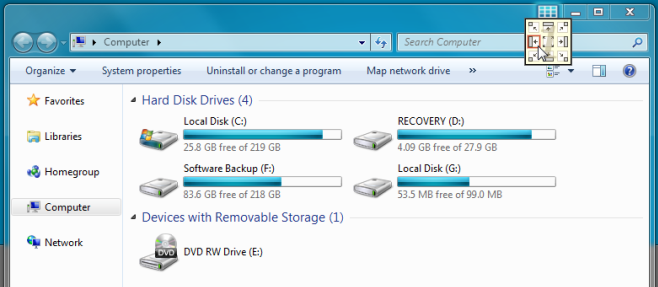
We have previously reviewed TicClick – a Windows AeroSnap supported application which lets user easily adjust active application windows to different sides of the screen, it offers 9 positions in total with a small on-screen position adjuster to select the position of the window. Nonetheless, the only downside of TicClick is that it doesn’t offer hotkey combinations for adjusting windows, therefore users have to bring up its adjuster and then select the position. WinNumpad Positioner offers what TicClick doesn’t – simple hotkey combinations to adjust windows quickly. As it name implies, it enables user to dock window at any side through Numpad keys combinations. All the Numpad keys are mapped with the screen positions. You can for instance press Win + 5 to bring active window to center of the screen, using 7 instead 5 will dock the window at upper-left corner. Read More

Windy Brings ‘Divvy For Mac’ To Windows

Managing application windows in Mac OS can be a mess, most users tend to use workspace manager to easily resize and dock active workspaces at required side of the screen. Out of all the available tools, Divvy (for Mac) offers the best way to quickly resize and move the windows at user-defined positions. Today we discovered Windy – a free application for Windows that brings equivalent ease to “divvy up’ open/active workspaces application windows. It offers the very same way to manage, move and resize the active windows as Mac counterpart. The Windy panel emulates the Divvy’s grid layout, which you can bring it up on any active application to change its position or resize it as per your requirements. Read More

TicClick: 9 Positions To Quickly Adjust Active Windows On Desktop

Previously we have covered two efficient windows adjustment tools namely WinSplit Revolution and Window Manager, which assists user to quickly adjust the active windows on the screen. Window Manager offers nice grid interface to select the position while WinSplit Revolution can manage up to 8 different active windows positions. TicClick is however small but can handle 9 active windows positions with an ease. Read More

Window Manager Enhances Windows Aero Snap Functionality

Couple of days back we have covered an awesome application windows manager called WinSplit Revolution, which can handle and adjust positions of up to 8 multiple windows instantly. Window Manager is a remake of eminent Windows build-in application Aero Snap. For those who don’t know, Aero Snap is a free Windows build-in application which quickly set position of windows by providing various drag & drop and windows snapping behaviors. It takes the same phenomenon to the next level by allowing user to set position of open windows seamlessly.
Update: Windows Manager for Windows has been discontinued. However, you can use WindowsPad or aforementioned WinSplit Revolution.
Read More