Force-Stop All Inessential Or Malicious Windows Processes Using KillEmAll

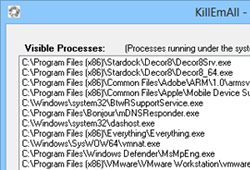
No matter how powerful and effective your security software may be, new malicious threats like viruses and spyware can still find their way into your system, compromising your private data without you even knowing. Some malware can even prevent you from running your applications (including antivirus or antimalware programs), making it fairly difficult to take them down. This is where apps like KillEmAll come to rescue. Sporting a user-friendly interface, this tiny desktop app for Windows is aimed to stop all the currently running processes and programs with a single click, including those that run in background or are auto-executed by viruses, spyware, or other rogue applications. KillEmAll can also prove to be useful to swiftly terminate unstable processes and applications that lead to system crashes or hiccups. Details to follow after the jump. Read More

Batch Upload Files & Running Processes To VirusTotal For Scanning

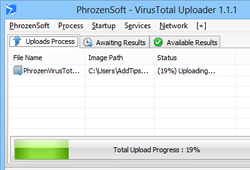
VirusTotal is a robust online security tool that lets you scan suspicious files through a series of tests using a host of antivirus engines such as TrendMicro, McAfee, BitDefender, Kaspersky, DrWeb, and a truckload of others. It’s a powerful cloud-based malware and virus scanning solution that has pretty much eliminated the need for running a dedicated antivirus or antimalware app on your computer for the purpose of scanning individual files (though you should still be running one nevertheless for your system's protection in background). If you rely on VirusTotal for checking suspicious files on the fly and find it to be a safe and convenient way for the said task, you'll have to admit that having to upload your files individually from the web interface isn't the most convenient method for the task. Though things are going to get a bit easier in that department for you, thanks to PhrozenSoft VirusTotal Uploader. It’s an awesome Windows application that lets you upload files to the service right from your desktop, thus eliminating the need for opening the site in a web browser. Lets take a closer look. Read More

9-Lab Removal Tool Is An On-Demand Virus, Rootkit & Registry Scanner

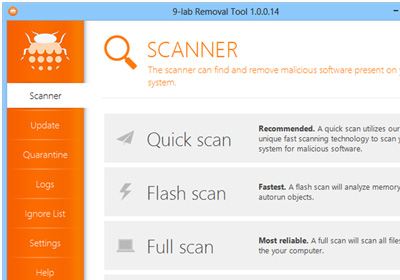
As malware continually evolving, so are the security firms that are fighting back with equally robust, top-notch security solutions. And thanks to an increased awareness, so is the end users' knowledge and expertise to keep their PC safe from malicious threats. 9-Lab Removal Tool is an advanced anti-malware app for Windows designed to take care of shady software lurking on your computer. The application effectively removes malware including viruses, trojans, rootkits, malicious registry keys, spyware  and other harmful or potentially unwanted items from your machine. The application comprises of a simple UI and boasts an advanced protection engine that can detect and remove malware from every nook and corner of your PC, including hidden locations and services launched at system startup. Read More

Autorun Angel Is A Cloud-Based Security Analyzer For Startup Items

My first hand experience tells me that Windows Task Manager is not the most efficient way to find out the integrity of currently running processes or applications that auto execute during Windows logon. Although it allows you to kill unresponsive applications or disable them entirely from running, you can never be so sure whether a process or service is malicious, or harmless to your system. This is where tools like Autorun Angel really shine. This nifty little app scans your computer for autorun entries against its own cloud database, and highlights only those services or autorun programs that seem dangerous to your system or may be the root cause of an ongoing problem. This can include all sorts of malware including spyware, adware, trojans, viruses et al. According to the developer, the scan engine is powered by NictaTech Antivirus Engine, which is the company’s native cloud engine for checking for viruses. Read More

Advanced Mobile Care For Android Gets Anti-Theft, Call Blocking & More

Some time back, we covered an Android optimization app named Advanced Mobile Care that houses a plethora of mobile maintenance features wrapped in a fancy and intuitive UI. Originally sporting features such as 1-tap performance boost, virus protection, privacy protector and more, the app later received an update bringing in support for cloud backup, a very slick privacy adviser, and a revamped App manager. The app's development team seems to be a serious believer in there always being room for improvement, as  Advanced Mobile Care has just received another major update, bringing in newer features and some improvements to existing ones. The app now houses a new Anti-theft system, call blocker, and improved battery saver, and adds supports for Android tablets including the Nexus 7. Let's take a look at all that's new in Advanced Mobile Care after the break! Read More

Bitdefender Releases Compact Rootkit Removal Tool For Windows

Rootkits can often be hard to hunt down. They can snoop on to your PC, steal confidential information and even take control of various administrative privileges, without you even knowing. Although they most often make their way into a machine via software installations from unreliable sources, rootkits can be injected through other means as well, such as malicious web scripts, email scams and so on. A while ago, we covered a Windows app called Malwarebytes Anti-Rootkit that helps you in terminating even the most obnoxious of rootkits around using the step-by-step instructions provided by its a wizard-based interface. However, if you’re looking for a minimalist solution that provides one-click rootkit removal, give Bitdefender Rootkit Remover a try. The software is developed by Bitdefender Labs - a widely acclaimed security firm known for creating excellent antivirus solutions and other security tools. Read More

Bitdefender Antivirus Now Available Free Of Cost For Home Users

Bitdefender has long reigned the consumers’ wallets with its various security applications, including its ever-popular antivirus software. Though the trend of using a paid antivirus has started to decline lately, apparently because companies like Avira, AVG and Microsoft are offering their antivirus solutions without costing a dime. This has finally compelled BitDefender maker to release a free edition of its own that - apart from looking gorgeous and apparently performing better than its arch rivals - is ready to combat even the most obnoxious of malware including viruses, trojans, spyware, rootkits and other threats. More on Bitdefender Antivirus Free Edition after the jump. Read More

USB-AV Offers You Complete Malware Security For USB Flash Drives

In the course of a day, many of us attach several USB flash drives to our computers. Even though almost every computer has an antivirus solution installed on it nowadays, there is still a chance that attaching a random USB drive containing a virus that the antivirus is not be able to detect yet will result in an infected computer. Also, some of us who practice safe downloading habits and choose not to keep a full antivirus software running in the background are also subject to catching viruses from USB flash drivers of our friends that we may connect to the computer for transferring some files. Many of these viruses don’t even require you to access the drive, and can spread through the system as soon as the auto run feature kicks in. USB-AV is an application for Windows that allows you to keep a check on all the connected USB drives and scan them for malware as soon as you plug them in. Read More

Security Score Analyzes & Rates Your PC’s Protection Against Malware

Action Center in Windows is designed to notify the user about all the important Security and Maintenance related messages. It collects all the messages that need the user’s attention and displays them in a single corner making it easier for the user to keep an eye on the current state. Since no antivirus software is able to detect each and every virus out there, system security is a major problem nowadays. The fact that new viruses are being created everyday, makes it difficult for users to get complete protection and if, by chance, a virus does get into your system, it creates a real mess. So how can you determine if your computer is safe enough? Read More

Malwarebytes Anti-Rootkit Is Powerful Rootkit Scanner And Remover

Our computer is like a car. Just like your car needs frequent maintenance, the performance of a PC deteriorates with the passage of time and needs periodic system scans to get rid of any viruses or malicious scripts. Rootkits are one of those harmful software, which make their way into your computer through application installations from unreliable sources. Rootkits are obnoxious for executing certain undetectable processes in the background, the purpose of which is to steal pivotal information and send it en route to the attacker’s system. They provide attackers with certain administrator privileges, so they can take complete control of your system. It’s quite difficult to detect such rootkits, and many antivirus or anti-malware tools simply overlook them. Read More

Restore Browser Settings & DNS When Changed By Malware

One of the things that many malware and viruses do while attacking the computer is enable dead or inactive TCP/UDP ports to start listening to malicious external requests. This process sometimes involves shutting down browsers' native antivirus security features, which are specifically incorporated to prevent users from like threats. So, unless you deploy a smart malware detection solution, you may not be able to find and remove the bugs that surreptitiously deteriorate your browser's performance. Most antivirus suites are programmed to detect the malware only when they are accessed or moved to main memory as a part of the basic application operation request. Even if it's not loaded into the memory, it can change the browsers' native features that help prevent external attacks. Developed by Anvisoft, Browser Repair offers a robust solution to tackle malware and threats that attempt to change browsers’ native features. As of now, it supports only Internet Explorer, but has some options, which can resolve issues that you may be facing in other browsers as well. Read More

Kingsoft Antivirus Is Yet Another Cloud Based Anti-Malware Solution

A few days ago, I reviewed the latest and greatest offering from Panda Security – Panda Cloud Antivirus 2.0 – which brought many new enhancements to the table, including Behavioral Analysis Engine and 50% faster scan speed. Then, just a couple of weeks back, Avira also announced their own flavor of Cloud Antivirus with the release of an early Technical Preview. As cloud computing is on the horizon, every major company is taking a part in it, some with infinite storage promises and others to catch malicious threats right from the cloud. Chinese software company Kingsoft couldn’t resist either, and have released their new cloud based antivirus solution called Kingsoft Antivirus 2012. Albeit not new, the latest build is called Cheetah SP4, and so far, seems pretty good. Its interface isn’t the only thing that will catch your attention, but the efficient scanning engine, too. Obviously, its not comparable to other popular paid antivirus solutions, but surely is one of the best freeware anti-malware around, and may even go toe to toe with MSE. Keep reading for more details after the break. Read More

Panda Cloud Antivirus Updated To 2.0, Brings Better UI & Faster Scanning

Computer security and fighting off the most obnoxious of viruses and malwares, is quite crucial. Thankfully, we have various Antivirus software solutions for that. Panda Security needs no introduction in the realm of Antiviruses Suites, as they provide robust and acclaimed computer security solutions for home users and enterprises. Panda Cloud Antivirus is probably the company’s much used antivirus software, of which we took an inside look back in 2009 (along with a brief introduction to what Cloud Antivirus is) – when the software was new and in early beta. In short, cloud antivirus run entirely from the internet, and scan your files on the company’s own server, thus reducing work load on your PC. Since its inception, the application has been completely overhauled with new look and new features. Panda Security has now pulled the curtain on Panda Cloud Antivirus 2.0, with 50% faster scan performance over its predecessor, reliable virus definitions and an improved scan engine. There is now ‘Behavioral Analysis Engine’ on free version as well (previously, it was only available on Pro variant). Along with that there's a reworked offline functionality, a new Firewall (Pro only), a new cloud-based disinfection engine and improved scan benchmarking over version 1.6. Read More

Crystal AEP Protects Your System Against Drive-By (Unintended) Download Exploits

From home-based users to large scale industrial organizations, the relevance of the Internet has exposed systems to a variety of vulnerabilities where viruses, malware and hackers easily penetrate through firewalls to gain and exploit root access of the systems. Usually, a conventional antivirus compares programs and data with a database of known ‘bad’ programs to detect and kill viruses, but, on the internet, an unsuspecting user may follow directions on a website of interest, yielding installations, which actually fall through the security cracks of the system. Another popular penetration method used by malware is through ‘drive-by downloads’. These exploits aren't caused by any user interaction and come into effect due to malicious websites, escaping through internet-exposed software (such as your browser) to the system. Crystal Anti-Exploit Protection prevents attacks that originate without any user interaction and works in coordination with your anti-virus to present a highly secure usage experience. Read More

Mirage Anti-bot: Detect, Remove & Block Malware Like ZeuS & SpyEye

Do you think installing a popular antivirus program will protect you from all evil eyeing your valuable data? Ever wondered why your high speed internet doesn’t provide you with the promised speed? Let it be known that malware like ZeuS, SpyEye, Palevo, TDL3 and the like have made themselves known to penetrate through your system security layers, stealing your credentials, may it be on social media sites like Facebook, Twitter etc., or bank accounts or email access details. These malware belong to the family of botnets, and Mirage Anti-bot protects you against them, effectively. With this powerful tool, you can add an extra layer of protection to your system with a negligible effect on performance and enable foolproof security for your PC. Read More

Detect & Remove Fake Antivirus Scams From Your Windows PC

Computer viruses come in all shapes and sizes – ranging from malware and spyware to trojans and worms - but the most dangerous ones are guised under an Antivirus banner themselves. Yes, that’s true; perhaps you didn’t imagine, but viruses can even attack your PC in the form of an antivirus, which are usually termed 'fake antivirus'. Various companies make money by deceiving people into believing their PC is infected by a virus (which, in most cases, it is not), and then try to sell a fake antivirus (or more of a Pro version of an already abysmal free version). This not only hurts your wallet, but such antivirus security applications create a nagware, seriously disturbing your PC workflow, if you don’t buy the full application. To combat this problem, today we have a software for you labelled Fake Antivirus Remover. Developed by Trend Micro, the famous Japanese computer security company, the software is designed to help you detect and remove fake antivirus applications from your system. The software is currently in its Beta release, and comprises an easy to use interface. Trend Micro claims that the software can successfully detect and remove plethora of different fake antiviruses off your machine – Additional Guard, Advanced Defender, AKM Antivirus, AlphaAV, Anticare, Antivir64, BitDefender, BlueFlare Antivirus, bug doctor, BootCare, CleanV, Cyber Security, Data Protection, Ddos Clean, Dr, Guard, Easy Scan, HDD Fix, Infor-Safe, Malware Defense, LightClean, Privacy PC – just to name a few. Read More

System Security Guard Rates Files & Running Processes By Level Of Threat

System security is a major problem nowadays, but no antivirus software is able to detect each and every virus out there. Add the fact that new viruses are being created everyday and you got a real mess on your hands. So how do you protect your computer by yourself? Well, first of all you need information, and that’s precisely what System Security Guard is all about. Based off System Explorer (reviewed here), System Security Guard is a file scanning application that scans your computer for all programs, drivers and running processes. It compares all the detected files with an online database and categorizes them into four groups; Safe, Threat, Unknown and Suspicious files. Read More

Sophos Releases Anti-Malware, Anti-Theft & Privacy Protection App For Android

It is a well-known fact that among all popular mobile platforms, Android is unarguably the one that is heavily plagued with all sorts of malware and other potentially harmful entities. Despite the committed efforts of concerned authorities to make one of the world’s most widely-used mobile OS free of all the various vulnerabilities, new threats keep rearing heads on a consistent basis. Perhaps that’s the reason why Sophos, the trusted security hardware and software provider, has decided to stepped into the foray to provide Android users with a reliable and feature-packed mobile protection tool by the name of Sophos Mobile Security. Currently in Beta, the app vows to offer uncompromised security for your Android device through three nifty and most sought-after device protection and anti-theft tools, namely Scanner, Loss & Theft, and Privacy Advisor. Each individual tool features several handy options that we shall look at in detail. Read More

[Giveaway] ESET Mobile Security For Android Out Of Beta, Now Supports ICS & Honeycomb

The reliable computer and network security solutions provided by ESET are highly regarded among domestic and professional computer users all across the globe. When the company launched the public beta of ESET Mobile Security for the Android platform in June last year (2011), Android users were introduced to arguably one of the most comprehensive protection tools for their devices. This multi-lingual app encompasses several sought-after security features to secure your device and all the underlying data from any sort of unauthorized access. The app's feature set includes real-time device protection from viruses and malware through on-demand (user-requested) and on-access (event-triggered) scanning, specifying blacklists for all incoming calls, SMS, and/or MMS from specific users, integrated security audit to identify the most vulnerable aspects of your Android device, multiple anti-theft tools (SIM matching, specifying a trusted SIM card via its IMSI number), and a built-in task manager. The app just recently shed its beta tag and is now available as a 30-day free trial, after which it requires you to purchase a 1-year license to continue availing all the security features. Read More

Anvi Smart Defender: Powerful Anti-Malware & Performance Optimization Software For Windows

Protecting your system from malware is a daunting task, which should be given utmost priority. In order to prevent systems from getting infected with malware lurking around the internet, the folks over at Anvisoft have developed a smart anti-malware solution called Anvi Smart Defender. This powerful anti-malware utility has the ability to pin a lot of malware types to the ground. Coupled with a stylish-looking interface, the application protects your PC from viruses, tojans, adware, spyware, profiling bots etc. It includes 3 scan modes including Quick Scan, Full Scan, Custom Scan, as well as, a Cloud Scan feature to analyze any suspicious file by uploading it to its online cloud server. Other major features include, real-time protection and system optimization, where the latter provides various tools to optimize your computer's performance. Read More