Nemp Is A Themable Music Player & Media Server With Cover Flow & Built-In Tag Editor

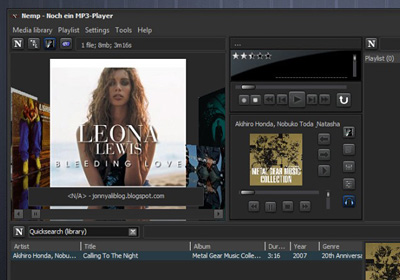
If you start counting the number of audio players available on Windows, you'll probably lose your count sooner than you can imagine. Even here at AddictiveTips, we've covered plenty of media player and music management apps for our readers such as Audacious, Xion Audio Player, and Winyl, just to name a few. If you’re on the hunt for a feature-rich, elegant looking media management application, try Nemp. Abbreviation of Noch ein MP3-Player, it's an open-source app that not only looks quite impressive on the surface, but also carries many advanced features under the hood. Apart from letting you listen to music from your local drive, the application can also act as a web server, enabling users to stream music remotely. In addition, it also allows connecting your Last.Fm account with it to stream music directly from there. Other nifty features include MP3 tag editor, supports for playlists, iTunes-inspired Cover Flow-like feature and more. Read More

Xion Audio Player Offers Powerful Features & A Winamp-Like, PSD-Skinnable UI

If you remember the early 90s, you can probably recall the craze of large tape recorders people used to carry on their shoulders, and Sony’s Walkman line for more discreet music listening. Then came the PC era and audiophiles turned to finding the best audio player on Windows. Fast forward to 2013, we don’t have to carry any extra gadgets anymore - not even our music collection on computers or smartphones, because it can now be streamed straight from the cloud on our smartphones, thanks to music streaming services like Spotify and Last.fm. Though if you’re an avid music listener who still prefers the old ways of keeping an offline music collection, and are on the lookout for an elegant media player for the purpose, try Xion Audio Player. The compact audio player is designed with many advanced features, and its fully skinnable interface is also something to brag about. Read More

Bonis Audio Player Boasts Highest Quality FLAC, WAV & OGG Playback

Being a music lover, I’m always on the hunt for new audio players that can deliver crisp sound and do justice to my ears as well as my high-end Sony headset. I've tried a lot of media players in the past, ranging from Winamp to JetAudio, Media Monkey to MusicBee, and a truckload of others until settling down with iTunes (I know it’s not the best audio player, but it's great if you own an iOS device). Today, I stumbled upon a unique, feature-limited yet powerful media player called Bonis Audio Player and couldn't wait to give it a try. Although the developer touts it as equipped with the latest generation audio engine for highest quality sound decoding, I had my doubts until taking it for a test drive myself. Read More

Hokrain Is A Light, Portable Music Player With Massive Hotkey & Format Support

Listening to music during work or other activities is a common habit of regular PC users including myself. Windows Media Player that comes built-in with Windows takes up a lot of system resources, which can be overkill if all you want to do is play songs. Several third party alternatives such as iTunes and MediaMonkey also face the same memory-hogging problem. Other options such as the open-source Stealth Player offer a much more lightweight experience. However, while consuming lesser memory, most of the lightweight tools face the problem of not offering many useful options such as playlist creation, search, and navigation. Hokrain is a portable and lightweight audio player that allows you to play songs without interfering with your work, while providing you with several useful options related to playlist creation, navigation and hotkeys. Other than the usual MP3, WMA and WAV audio formats, it supports a large number of unusual ones allowing you to use one audio player for all your music needs. Keep reading to find out more about Hokrain. Read More

Floating Audio Player Overlays Music Playback Controls Anywhere On Android

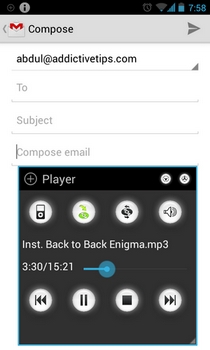
Due to Android's excellent true multitasking support, there is a variety of apps based on the concept of a ubiquitous, movable and re-sizable popup window available in the Play Store. For instance AirCalc comes as a handy floating calculator, Floating Banner expedites multitasking & app launching, Floating Browser Flux! is a multi-window supported web browser, whereas Super Video is a feature-rich video player supporting said concept. Today, we have another floating app for you called Floating Audio Player - a free and fully customizable app for Android 4.0 and higher devices that does exactly what its name suggests. Equipped with all the basic music player tools, this semi-Holo themed app is capable of running actively on top of any screen you’re currently working on. Read More

Downloader Elite: Perhaps The Best, Most Feature-Rich Download Manager For iPhone & iPad

Downloader Elite is the sort of app you can’t really consign to just a single category. Most people will call it a simple download manager or a web browser for iPhone and iPad, but it is actually much more than that. The app includes a decent audio player, can handle a vast variety of video formats (including FLV and HTML5), has a PDF reader, and comes complete with a nice text editor. With support for so many file formats, the app makes everything convenient for users by providing them with a neat download manager. The app is Downloader Elite has AirPlay support, lets you play videos in the background and can be used to open ZIP or Office files. The list of offered features goes on and on, past the break. Read More

Clementine, Now Available With Spotify & Grooveshark Support

Clementine is a cross-platform music player based on Amarok, which provides a quick interface for searching and playing music from a number of websites. Last year we reviewed the Windows version of Clementine. Recently, it has been upgraded with added support for Spotify, Grooveshark, digitally imported di.fm and Sky.fm radio stations, a new global search feature, which enables searching for music and radio, audio CD support, addition of Amazon as an alternative album art cover provider, and more. Read More

Trout: Portable Load & Play Audio Player With Last & Libre.fm Support

While there are several good media players capable of playing audio files, at times you might just want to load and play a list of songs conveniently. Furthermore, many media players do not display tags on the main interface by default, to maintain eye candy. Trout is a portable audio player, designed with standard controls and a simple interface, which allows instantly loading and playing audio files. It has been designed using AutoHotkey, and displays all tags tied to an audio file on the main interface. Moreover, it provides Last.fm and Libre.fm scrobbling, lyrics and album art display, support for internet radio streams, tag editing, as well as support for a large number of audio formats including, FLAC, WMA, WMP, WMV, ASF, MID, MIDI, RMI, KAR, WV, WVC, AAC, MP4, M4A, M4B, M4P, APE, AC3 and many more. Read More

Transcribe: Listen To Audio Files And Conveniently Write Them Out

Transcribing audio is never fun. It is a mundane boring task that involves typing and listening at the same time. Very few audios are easy to transcribe; the speech may be too fast or unclear making you have to go back and listen to a particular part over and over again. Switching between an audio player and a word document to write out some or all the information can be really frustrating, not to mention time consuming. If you use audio and documentaries to write out articles or reviews, then Transcribe is a web app that can assist. This simple service is an audio player and a text input app in one. The point is to have your media player and writing tool in one place so you can stop, rewind and forward the audio without having to switch windows or apps. It also comes with keyboard shortcuts to pause, slow-down, speed-up, rewind or forward the audio clip. Furthermore, it also autosaves your transcribed text, and even works offline. Read More

Audacious Is Lightweight Audio Player For Linux, Supports Drag & Drop

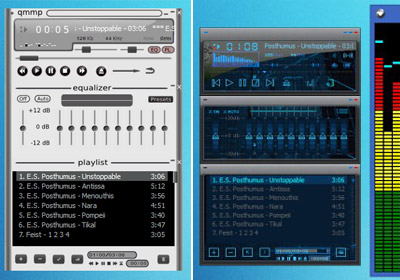
Audacious is an open source audio player for the Gnome desktop which has been designed to provide smooth audio playback with a low memory stamp (approximately 7.3 MB) and decoding correctness. It is compatible with UNIX and Linux operating system with limited support for Windows OS. Audacious is also the default audio player for Lubuntu and  and Ubuntu Studio. It supports a large array of audio formats and also allows creating instant playlists via drag & drop. The playlists can be played and managed within separate tabs instead of a cluttered interface. Audacious also comes with different skins including a Winamp like interface. The supported audio formats include Mp3, FLAC, Ogg, Vorbis, AAC, WAV, TTA, WMA, ALAC and more. Read More

Open Freely – View 100 Different File Types With Just One Application

We require installing a number of applications for opening different kinds of files. Installing too many applications can slows down system performance and can become quite a hassle to install and manage each of them. Open Freely is a standalone application which can open any kind of document, media or compressed file. Once you have installed Open Freely, you will no longer require installing any media player, image or PDF viewer, compressed archive manager, etc. Open Freely can open up to 100 file formats of variable file types, including popular images, video/audio, documents, and compression formats. Other than acting as a file viewer, it also provides a number of other features such as image cropping, document editing, file extraction and the ability to save file types in multiple file formats. Read More

Mirro Is Transparent Audio Player With Windows 7 Aero Glass Look

Previously we reviewed the Mirro Skin and CD Art Display to transform the look of the Windows Media Player. Now a member of the ASK VG team has used the same Skin to create the Mirro Media Player (not to be confused with Miro). Mirro is a fully transparent audio player with complete Windows 7 Aero Glass look. Unlike the formerly reviewed Windows Media Player skin, it is a complete media player and does not require any complex procedure to set up. The installation can be performed from a simple setup file, as it is not a skin for WMP but a standalone audio player. Once installed, you can playback your favorite music files of any format; WAV, Mp4, Mp3, WMV, and MOV,  just to name a few. The best part about Mirro Media Player is the attractive transparent user interface. With auto playlist feature, you can play audio file listing in a loop. Read More

Winyl – Lightweight Audio Player With Simple Playlist Manager

Winyl is an elegant lightweight audio player for those musicphiles who want nothing besides an efficient playlist management system. It is an attempt to bring all the essential audio playing controls with media management and instant search feature in an easy-to-use application.  Along with some obvious characteristics, such as, showing album arts and editing track rating, it has an ability to automatically categorize your music archive into multiple groups, including, Genre, Artist, Year (of release) whilst letting user manage multiple playlists concurrently. Read More

Quisple: Free Desktop YouTube Music Player

Music is said to be the only remedy to sooth your nerves, especially when you are stuck in maze of complex & hard-hitting project. Music enthusiast do have an enormous library but always miss out on something. YouTube is one of the most prominent video sharing site which almost caters all sort of genres & artists, bands, and what not. Whilst stuck with work or project, no one wants to open the browser to start searching for specific artist, song, or for specific genre. Considering this, Quisple is a freeware music player built to search music instantly on YouTube and play it for you without much hassle. Read More