Set Your PC To Auto-Shutdown Or Run A Certain Program When It Is Idle
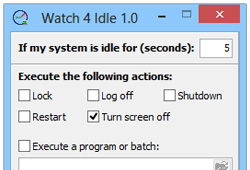
We have covered applications like AllOff, DownOff and ProcOff that are designed to monitor different aspects of running processes such as file downloads, CPU priority etc., and automatically perform certain actions when user-specified conditions are met. For example, if you’re downloading a file and you want your system to automatically power off once the download completes, you can simply use DownOff for the purpose. Similarly, ProcOff essentially monitors system processes and can be used to turn off your PC when a process stops executing. Today, we have another such desktop app for Windows labeled Watch 4 Idle. Well, you might have already guessed half of what the application really does by its name - monitor your system's idle time and take actions based on it. It’s a feature-laden app that can execute a horde of different actions like shutdown, restart or log off, or run a program when your system has been idle for a defined interval of time. Details to follow after the jump.
Read More