FullSync Is A Comprehensive Backup & Sync Solution for Local & FTP Storage

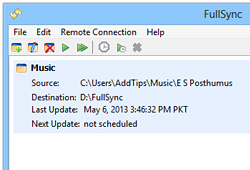
A few months ago, one of my friends lost his steadily working hard drive, which happened to be quite a disaster on him, for not only he had to shell out money on a new one but even worse, he lost all his data as well. When I asked him about any file backups he might have created, what I got in return were those skeptical glances. This is just one of the many such scenarios people often face by not backing up their data in a timely fashion. But if you think that creating backups is a tedious chore, you won’t do so anymore after using FullSync. It’s an open-source application that makes file backups a breeze by letting you create backup profiles, using which you can either automate the whole thing by scheduling the task, or manually executing it whenever needed. It boasts a host of features and lets you create backup to remote locations using FTP, schedule its operations, and perform two-way folder-to-folder synchronization as well. Read More

Iperius Backup Offers Email Alerts, Advanced Scheduling, Filters & Much More [Review]

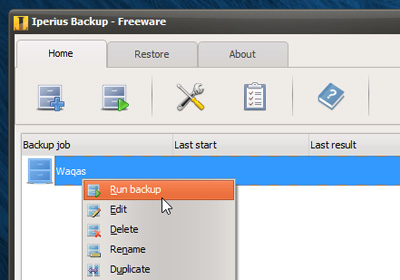
Iperius Backup is a freemium Windows application boasting a host of backup features that enable you to easily save copies of your files to a safe location. The tool allows to create backups from local directories, network drives or even the cloud to any destination folder you prefer. Although many features like cloud support or backing up files from Windows Image Drive are only available in the paid variant, the featured offered in the free version should suffice for a lot of users. It basically lets you create backup jobs for different files and folders, which you can instantly run on the fly. In addition, you can create backup schedules to keep the wheel spinning while you’re not around your PC. Read More

Official Android & iOS Apps Of Cloud Storage Service Klink Released

The number of cloud storage services out there has been increasing at a really fast pacee over the past few years. While the likes of Dropbox, Box and SugarSync have managed to enhance their reputation by frequently introducing innovative features, there have been numerous other candidates vying to compete in this ever-growing market. Relatively new to the scene, Klink is yet another neatly built cloud storage service that aims to impress with its online data backup, restore and cross-platform syncing capabilities. Currently available for Windows, iOS, Android and web, Klink offers each registered member 2GB of free cloud storage space. Using the service’s mobile apps, you can access your cloud files on any device you own. In addition, you can share files from your cloud both publicly and privately. Klink also offers a unified interface for your photos, videos and documents shared from various devices, and lets you search for content by file name, device type, date added, and folders. Read More

Koush’s Carbon Allows Scheduled, Local & Cloud Android App Data Backup [Review]

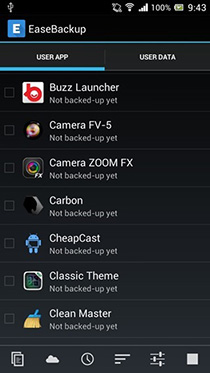
While there are quite a few app data backup and restoration solutions available for Android users, not many allow creating backups of personal app data, and the few that do often require you to have a rooted Android device to fully utilize them, or come with with a price tag. Koushisk Dutta (aka Koush) - the renowned developer of the world-famous ClockworkMod recovery, DeskSMS, TabletSMS, ROM Manager, and Tether - has been quite busy over the past few days prepping an app data backup and sync tool of his own called Carbon. Initially released as a limited beta for just rooted devices, Carbon has now officially made its way to the Play Store with quite a few additional handy options. Let's find out all about Carbon after the jump. Read More

Create Local & Cloud Nandroid Backups Without Recovery Using Orange Backup

A timely NANDROID backup of your Android device can save you from losing your precious mobile data and personalized system settings. Android users have long relied on custom recoveries (such as ClockworkMod Recovery and TWRP) to create NANDROID backups of their devices. However, there are various apps and solutions available these days that can help you create NANDROID backups without having to reboot into recovery. Developed by XDA member snoopy33, Orange Backup is arguably the finest addition to the list of such tools to date, as it supports 1-tap NANDROID backup, zipping and uploading to cloud storage of your choice. Needless to say, Orange Backup is meant to work with rooted devices only. The tool also supports scheduled backup & uploading to cloud, full, incremental or split backups, backing up user-selected partitions only, option to upload data over Wi-Fi and/or while charging only, integrated app & task manager, and lots more. Read More

Data Backuper Offers One-Click System Backup, Disk & Volume Cloning

Normally, data backup applications allow you to create backups of files and folders without saving their original organization structure. For instance, if you have backed up three folders from different partitions, you will have to manually place them in their correct location when you are restoring them. One way to overcome this problem is by using a disk image backup tool that lets you generate a backup of all information on a disk, complete with the locations of files and folders, the Master Boot Record, and even information about the the empty space on your drive. It is the best solution for backing up complex folder structures if you want to be able to restore everything in its original form. Today, we have a backup tool called Data Backuper that allows you to create complete disk backups, partition backups, system backups (to backup system drive) as well as disks and partitions clones. The app's options allow you to check the integrity of a backup image, create bootable media from it, and even mount it to explore the contents via Windows Explorer without having to restore it first. Read More

Advanced Mobile Care For Android Gets Cloud Backup, Privacy Advisor & More

Back in November, IObit debuted their power-packed Android optimization, protection and task management app in the Play Store by the name of Advanced Mobile Care. At the time of its release, the app emerged as one of the few truly multipurpose Android apps supporting several handy system care utilities like real-time virus protection, 1-tap performance boost & system cleanup, multi-mode power saver, app manager, privacy protector and Game Speeder, among others. After barely a couple of months of its release, version 2 of Advanced Mobile Care has been rolled out with even better and more powerful features including multilingual support, Privacy Advisor, Cloud Backup, revamped app manager with support for APK management, a multipurpose 4x1 home screen widget, updated database, and several bug fixes. Read More

Backup & Restore Data Of All Windows 8 Store Apps With A Click

Considering the amount of emphasis put on the new Modern UI apps by Microsoft, it’s fairly clear that these apps are meant to play a pivotal role in the success of Windows 8. While not ready to rival app stores on competing platforms, the Modern UI apps library in Windows Store is steadily growing, with the aim to bring Modern UI variant of all popular apps to the platform. Windows 8 offers a file history option that lets you backup your system but while quite handy, this feature doesn't allow backing up only the app data of Windows Store apps. So if you plan to reinstall Windows 8 and want to retain your progress and settings for the Windows Store apps and games you have installed, you'd be out of luck. Well, not anymore, thanks to Windows 8 Apps Data Backup. It is a lightweight app that lets you backup and restore app data for your Windows Store apps, allowing you to retain your settings and progress, and (manually) sync the data between two Windows 8 computers. Read More

All-In-One Toolkit For Samsung Galaxy S3 GSM

The Galaxy S III seems to be making some really fast progress in terms of third party support for software development for this device. Earlier, we had covered quite a few ways of rooting the device, including installation of ClockworkMod recovery as well. For those who fear flashing files via ODIN, XDA-Developers forum member mskip has just released a Samsung Galaxy S3 Toolkit, making life for inexperienced rooters who just got their hands on a brand new S3, very easy. If you thought the functionality is limited to just rooting, installing recoveries and kernels, the toolkit offers a plethora of functions ranging from installing APK files to pulling or pushing files onto the device. Read on for more information on this invaluable toolkit and how you can use it for your SGS III. Read More

Perform Full, Incremental, Differential & Stack Backup With GFI Backup

GFI is a well-known brand in the world of network security and IT solutions, and has come up with brilliant network solutions over the past few years including GFI EndPointSecurity, GFI LAN Guard, GFI Mail Security, VIPER antivirus and more. Normally, most GFI applications are paid; however, recently they have released a free version for one of their applications known as GFI BackUp. Although the paid version provides more backup and restore options (including support for Hyper V, VMware and SQL Server), the free version is nevertheless good enough to be used as an alternative to native Windows Backup utility. The reason one might find GFI backup to be a good alternative is because it is “arguably” more flexible and can be used to backup data for which Windows backup might give errors. Read More

Mount Windows System Restore Points To Browse And Extract Files

As many of us know, System Restore is a component for Windows which allows rolling back system files, registry settings and applications to a previous state. Although System Restore has a simple creation and restoration procedure, it does not provide an option to extract specific files from the previously stored system state. This means that performing a System Restore can end up altering settings which you may not wish to change. Read More

Backup Large Drive/Volume To Multiple Smaller Volumes With AnyBackup

Consider a scenario where you have to backup 500GB of data to an external drive. The backup itself should be easy if you have an external drive of 500GB or larger, but what if you have two external drives (with two volumes) of 250GB each? In this case, you will want to make the backup of 250GB on each volume. AnyBackup is an open source application designed to backup up one or more large volumes to several smaller volumes. The backup volumes need not be persistent or always connected, as AnyBackup can recognize the drives even if their drive letters are changed later. Read More

Backup And Restore System Data With Sbackup in Ubuntu Linux

It is vital to adapt tool for data backup so as to have a point of recovery in case of accidental deletion of data. Ubuntu Linux has some very useful data backup software. Sbackup is one of the commonly used application for data backup and recovery. It is free and has user friendly graphical interface to manage your backups. It allows you to take backup of your system data any time you want and also lets you schedule the backup process. Read More