Burn CD, DVD and Blu-ray In Ubuntu Easily With Silicon Empire

Silicon Empire is a complete suite to burn, copy, backup and manage your optical discs. It can burn CD, DVD and Blu-Ray discs, and can mount disc images from ISO, NRG, BIN, MDF and IMG formats. The main features include, burning, copying, and erasing discs, along with a built-in image viewer and music player. You will find options to copy, burn , erase, and mount discs and disc images on the main interface. All options are separated in convenient tabs for easy management and identification of each available feature. Read More

7Burn Is Designed For Windows 7 Users To Burn Blu-Ray Disc

Earlier, we wrote about Tiny Burner, which is a portable disc burning software. Just today, we came across 7Burn (available as both portable and installer package), which is a more feature rich application. According to the developer, it is designed to work properly under Windows 7 through IMAPIv2, that enables to use any support for writing discs, including Blu-Ray. Read More

DVDVideoSoft FreeStudio Is Complete All-In-One Multimedia Converter And Burner

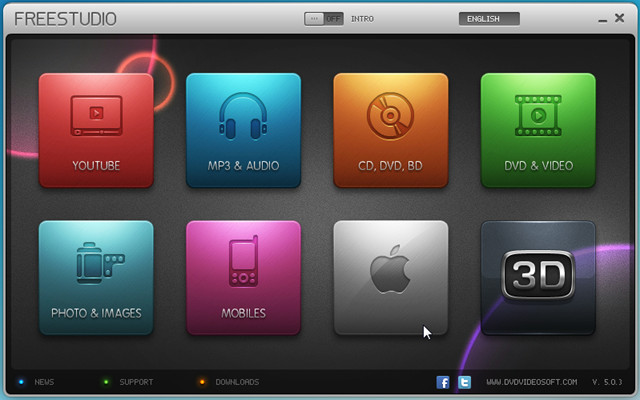
DVDVideoSoft FreeStudio packages more than 40 programs for converting and burning into one eye-candy application. You can convert YouTube videos to MP3, Audio CD to MP3, WAV, APE, and FLAC format, Video to Mp3, Flash, DVD, MKV, AVI, and MP4 format. Despite having a slew of conversion tools, it lets you burn CD/DVD and Blu-Ray discs on the fly. It offers plentiful of disc authoring tools to burn videos, DVD files, audio tracks, and to create Audio CDs from MP3 files. Features list doesn’t end here, image manipulation tools have also been included to convert and resize images, convert video files into pack of JPGs while both 3D photo and video maker are also available. It supports all Apple Devices, allowing you to convert audio and video files into supported formats for Apple TV, iPhone, iPod, and iPad. Apart from supporting all the formats, it has an ability to convert audio and video files into famous portable devices, gaming consoles, and other smart phone formats, including, Andriod, Blackberry, HTC phones, Motorola, Nokia, Xbox, Nintendo, and PSP. Read More

Burn BluRay, DVD, CD Disks With Hamster Free Burning Studio, Better Than NeroBurn Lite

If you’ve been hanging on to Nero Free Lite tool (a stripped-down version of Nero Suite) to write/burn CDs/DVDs, you should consider giving Hamster Free Burning Studio a try. It is a full-featured free application that hosts a great number of disk authoring tools with an ability to write/burn Blu-Ray discs. It also allows users to replicate the disc content while a long list of discs types are supported, including CD-R,CD-RW, DVD RW, and so on. Out of many useful features it bring, what intruded our attention is that it can automatically identify the type of disc inserted into tray, check its capacity and evaluate the most suitable burning speed to prevent any erratic disc writing/burning experience. Read More

BurnAware Free: CD/DVD/Blu-ray Disc Burning Software

BurnAware is a free disc burning application which is capable of  creating and burning audio CDs, video DVDs and ISO images. We first reviewed it back in 2008. You can also use this application to format rewritable discs and copy your CDs/DVDs to ISO images. It offers four different sets of features; creating data CDs, DVDs and Blu-ray discs, burning multimedia files to CDs and DVDs, creating disc images, and formatting discs. Read More

Burn, Read, And Copy Data To CD/DVD With Inscriptio

Inscriptio is a free application for burning and recording data onto optical drives. It offers six widely used disc burning operations which includes; Data Disc, Audio Disc, Video Disc, Write Image, Copy Disc, and Read Disc and provides a detailed view for each operation. Prevalently, you can always maintain a library carrying files & folders which are to be burned in its native format. Read More

Nero BurnLite 10 Review

Nero Burning ROM which is also referred as simply Nero is one of the most celebrated optical disc authoring tool. Nero Burn Lite 10 is a free tool having absolutely no strings attached. Even though it is a stripped-down version of Nero 10 suite yet hosts some basic and useful burning features which includes; data burning, image recorder, disc copying, etc. It also supports long list of media for burning like; CR-R,CD-RW,DVD-RAM, DVD RW, and lot more. Read More

ISOBuddy: Convert & Burn Disc Images (DMG,NRG, IMG, BIN, & more)

ISOBuddy is free utility which lets you convert multiple disk images into ISO image format and then burn it. The demand behind opting this application is primarily comes from different types of users, who frequently needs to create and burn images to optical discs. The shining part is that, you can convert Apple’s disk image: DMG format, Nero’s NRG and a lot of other eminent file formats into ISO image file. Read More

How To Burn ISO Images In Windows 7

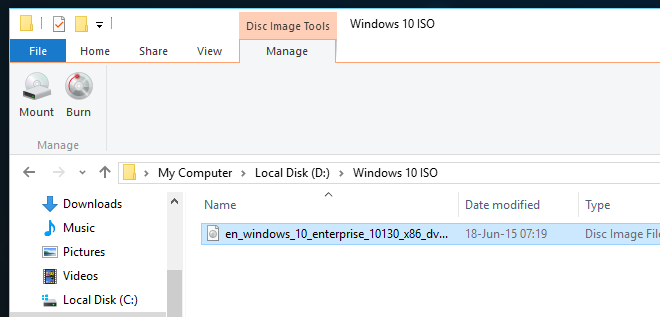
As you all know that ISO image is replica of an entire CD or DVD and the entire contents of a disc can be perfectly represented in a single ISO file. What you do when you download the ISO image file? You burn it to the CD or DVD, right?  You will need to install and use a burning software tool in order to burn ISO file, but not anymore.  Windows 7  has a build-in Disc Image Burner tool that lets you burn images instantly. Read More

Use Brasero to Burn CD/DVD in Ubuntu Linux

CD/DVD burning has been made very easy with the help of Brasero which comes by default in latest Ubuntu releases. It is a well known CD and DVD writing ('burning') application which is famous for its simple interface. Read More

Integrate CD/DVD Burning In Windows Explorer With Explore&Burn

So you want to burn data or an ISO/IMG disc image quickly without having to run some 3rd party CD/DVD burner. Everyone knows the default ‘Burn To Disk’ right-click context menu feature in Windows is not very good at burning data and cannot even burn a disc image, so what’s left? Expore&Burn is a free app for Windows that  integrates into the Windows Explorer context menu. It can burn any type of data including an ISO/IMG disc image in just two clicks. Just insert a writable CD/DVD, select the data or an ISO/IMG disc image, right-click it and select Burn To Disk or Burn Disk Image, depending on what type of data you have selected. Read More

UsefulUtils Discs Studio – Best Freeware Alternative To Nero

If you are looking for a freeware alternative to Nero CD/DVD burning software, give UU Discs Studio a try. It is a free tool for Windows that has failed to gather attention among mainstream bloggers due to language barrier(software is made by a Russian developer). It was originally developed as a paid tool, but the latest version is now free with a whole new interface, HD/Blu-Ray burning support, and tons of new features. It has three main features: Data burning, Audio Burning, and Video Burning. The tabs to access them are given at the bottom of the main window. I have reviewed each of them in details below. Read More

How To Rip And Burn Blu-Ray Disc Quickly

This guide will teach you how to Rip and Burn Blu-Ray Discs using BDDecrypter. BDDecrypter, which stands for Blu-Ray & DVD Decrypter is a free tool for Windows that lets you rip, burn, and emulate the blue-ray discs, we will discuss the later in a separate post. (Update: Mounting Blu-Ray Image as Virtual Drive as been posted here) You can rip the blu-ray disk either to an ISO image file or to the m2ts file set. The same goes for burning, you can burn a writable blu-ray disk either from blu-ray image or blu-ray file set. Read More

Scan A Multi-Page Document, Convert It To PDF, And Burn It To Disk. All With A Single Click

Suppose you have a hardcopy of a document with 20 or 100 pages, you want to convert them to a PDF file and burn it to a disk, what will you do? The most common way would be to first scan the document page by page, then convert the images to PDF format one by one, join them using PDFSam, and finally burn them to a disk. Such a long method can take forever with a 100 pages or more document.
Update: Try using the new proper guide here.
If you have an ADF(Automatic Document Feed) Scanner, then there is an easier way to do it. ADF Scanner is a type of scanner where you insert pages of any document and it will scan them one after one automatically. QQScan2Disc is a free tool for Windows that uses ADF scanner to scan all pages of the document, converts them to a PDF file and finally burns it to a disk, all with a single click. Read More

Quick Burn Video Files To Playable DVD

DVD Flick is a free tool for Windows that can quickly burn videos of any format to a DVD with a few simple clicks. The DVD created can then be played on any DVD Player and Home Cinema Set. Note: DVD Flick is not a new tool, the first version was launched back in early 2007. It is an opensource tool and the developers routinely make changes and fix bugs. I am reviewing this tool here for those AddictiveTips readers who have not heard about it yet. Personally, it is my default tool for burning Videos to DVDs. To begin, first add videos by clicking Add Title. Every DVD can burn 4.3GB of videos, when adding video titles you will see the yellow percentage bar rising on the left side. Read More

How To Record, Edit, And Burn Audio Files With Free Audio Editor 2009

Free Audio Editor 2009 is the most powerful audio editor I have come across that is both free and easy-to-use. I mentioned that it records, edits, and burns audio files, but actually it does a lot more than that. You can crop any piece of audio file and merge two different audio files, apart from that you can record your own audio and mix it with some background music. You can reduce noise with ‘Noise Reduction’ feature or add tons of custom effects. The build-in Text-to-Speech feature actually works pretty well and seamless. Read More

20 Free Software To Create, Mount, Burn, Edit And Extract ISO Image Files

If you are looking for a free ISO software, but cannot decide which one to use? We have compiled a list of top 20 software in random order, each of them have some “pros” and cons”. All ISO software listed here are free and have different capabilities such as to Create, Mount, Burn, Edit(Manipulate the content), and Extract(Copy content to hard disk) an ISO image file. It’s for you to decide which one you want to go for :) Read More