NARR8 For Android & iPad Adds Animation & Interactivity To Comic Book Reading

Comics know no age or genre, which is one of the reasons of their appeal. If you’re a fan of comics, and not just specific series by giants like Marvel or DC, but of the art itself, NARR8 (read ‘narrate’) for Android and iOS will definitely keep you occupied with its collection of amazing graphic novels made by skilled artists and story writers. Most of you probably aren't new to the concept of digital comics, but NARR8 brings something more to the table. Elements like animations, music and sound effects make sure that your experience is more than interactive, much like in Madefire for iOS. NARR8 has been around on the iPad for a while now and recently made its way to Android smartphones and tablets. Read More

Madefire Redefines Comics For iPhone & iPad With Animations & Sound Effects

Comics form a genre of entertainment that has remained largely unchanged for about half a century. The concepts might have evolved with the passage of time, but the basic traits (like illustration style and appearance), are essentially the same. It just doesn’t seem to be a real comic unless the illustrations appear to be handmade, and the fonts are stylized. Although you can read comics on your iPhone or iPad, you'll mostly have to make do with plain digital versions of their printed counterparts (unless you're using the official Marvel or DC apps). Madefire is an iOS app that finally brings some innovation to comics. There aren’t a lot of comic books in the app just yet, but the ones that are will really endear Madefire to its users. The comics available in the app have been designed specially for Madefire by veteran comic creators, and offer a nice mixture of classic and contemporary style in terms of design, but that's not what makes them special. The books have background sounds, panel-by-panel animations and transition effects that will make you want to keep turning pages, and are divided into short episodes for an optimum reading experience. The app was initially released as an iPad-exclusive, but recently went universal with the release of its iPhone variant. Read More

PhotoComic For iPhone Lets Anyone Create Comic Strips With Ease

The release of movies like Avengers, Spiderman and Batman is a real testament to the popularity of comic books. Technology has changed and taken over a lot of things, but comics remain as popular as ever. People might have started reading them online, or on their smartphones, but comic strips still have a huge fan-following all over the world. It is natural to get ideas of your own if you are into comics, but most people never get down to creating these caricatures due to the lack of drawing prowess. PhotoComic is an iOS app that solves this problem, and using it, you will be able to create your very own comic strips. The app just needs you to provide it with a few photos, and all other tools are available within the app. The end result will leave you with a quite authentic-looking comic. The app is also perfect for captioning your photos and sharing them with your friends. Read More

Simple Comic For Mac: Open Multiple Comics & Export Pages As JPG

Simple Comic is an intuitive comic reader for Mac OS X that will enhance your comic reading experience by letting you control the way you want comics to appear. Not only does it allow you to change the page layout, it also lets you change the page order from left to right and vice versa and scale pages to 3 sizes including original size, window fit and horizontal fit.  While it has the ability to open multiple comic archives at the same time, it supports CBZ, CBR, ZIP, RST, TAR, 7Z, LHA and many other types of digital comic formats. Apart from pre-defined page scaling modes, you can zoom in on defined area and use page rotation options to change the orientation of comics. Furthermore, it enables you to extract individual pages from the comics archive; just use command-c hotkey combination and select the page you want to extract to local location as image. Read More

Read Any Comic Strip On Your iPhone/iPad Using ComiMix

There was a time when a lot of people waited for newspapers every morning, just to get hold of their favorite comic strip. But times have changed, and everything is going digital. Comics also took the digital route quite a while back. You can, of course, read almost any comic you want online, or you can use some app for that. But which app? If you are on Android then you can consider the Marvel Comics app we covered a few days ago, but for iOS users, ComiMix is the app for enjoying comic strips to your heart’s content. With over 100 comic feeds available in the app, ComiMix is a must-have app for all comic lovers out there. Read More

Read And Convert Comic Books With Ribbon Inspired Comic Book Reader

Gone are days of purchasing your favorite comics from the nearest book store - you can get them online. CBR (Comic Book Reader) is a portable application to read comic books from CBZ and CBR formats, as well as, compressed ZIP and RAR archives. Inspired from MS Office 2010 ribbon-based UI, Comic Book Reader lets you read comics, manage your comic collection, parse folders and bookmark favorite sections of comic books. It also includes a file converter to convert between PDF, RAR, CBR, CBZ, Image and XPS formats. What makes it different from other variants, such as Comical and QManaga, is that apart from being a comic reader, it can password protect your comic book libraries too. Read More

Upload And View Your Comic Collection Online With All Comics

We have previously reviewed a number of comic reader such as QManaga and ComicRack. While desktop comic readers provide a convenient interface for reading comics, they do not ensure mobility of your comic book collection. This is because of the fact that access to the comic book collection is limited by a number of reasons such as the supported platform (e.g. a particular operating system such as Windows) of the comic reader. It would be much more convenient if one can access the comic book collection on the go from anywhere via web. Read More

Get Daily Comics From Multiple Online Sources With ComicDaily

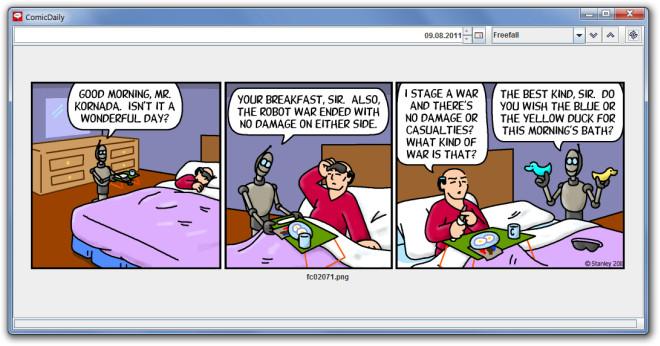
ComicDaily is a Java-based application which provides daily comics from various online sources. It contains a list of comics which can be viewed on a daily basis including famous newspaper comics such as Hagar the Horrible, Peanuts, Calvin and Hobes, Beetle Bailey and others. Unlike previously reviewed ComicRack and Comic Books Reader, it does not display content of CBR or CBZ but rather provides newspaper comics on a daily basis from several online sources. It also has a built-in calendar which allow users to view selected comics (e.g. Peanuts) from previous dates. Since it is a Java based application, it can work with a number of platforms including Windows, Mac and Linux. ComicDaily focuses on being a comics reader which provides famous comics published in daily newspapers. Unfortunately, many comic readers have ignored such comic strips in the past and for this reason ComicDaily serves as a unique and fun application for newspaper comic strip fans. Read More

Jomics Is Lightweight Comics Book Reader For Mac

One of the problems I face with comic readers is that they often stop responding while rendering high quality comic books. Perhaps the solution is to free some memory resources to restore smooth switching between pages of huge comic book. If you come across such issues while reading comics on Mac, you may want to try out Jomics. It’s a lightweight, open source comics reader which supports all those formats in which digital comics are usually distributed, including, CBZ, CBR, and PDF files. While it caches pages of comic books to swiftly navigate between comic book pages, you have option to switch from one-side to two page viewing mode to read comics in book style. Jomics supports numerous image formats as well, which includes, PNG, TIFF, GIF, JFIF and JPEG. Read More

Official DC Comics Android App Lets You Download & Read Your Favorite Issues On The Go

Prep your utility belts and don your capes, DC fans, for the official mobile client for DC Comics is now available on the Android Market. Developed by comiXology, the app comes packed the same Guided View technology and roughly the same interface that governs Comics for Android – comiXology’s acclaimed comics reader. The app lets you browse through, purchase and read all the latest DC Comics right on your Android device. Prices range from $0.99 to $4.99. Additionally, the app features a host of digital comics that can be downloaded for free. Contrary to what one would expect, the reading isn’t awkward at all, courtesy of the aforementioned Guided View feature that allows you to shift from one scene or speech bubble in a comic to the next simply by swiping across the screen and caches your progress through each comic, allowing you to pick up from where you left off every time to reopen them. Read More

MangaRipper Downloads Manga Comics From Manga Websites

We have previously covered many Manga file viewers such as QManga (for Windows) and Comix (for Linux). This time we have an open source Manga downloader, called MangaRipper. It allows easy grabbing of Manga comic from an entered URL. What makes MangaRipper quite useful is that it can automatically download manga series from ‘read manga online' websites. It provides build- in links to Manga comic websites from where you can conveniently locate your favorite Manga comic to download. This is a good way of circumventing the need for looking up Manga Torrent files and having to deal with dead torrents. Read More

Feed Your Inner Sci-Fi/Fantasy Geek With Blastr For Android

Looking for ways to feed your inner geek on the go? Look no further than the official Android app for NBC’s Blastr, a subsidiary of the SyFy website that keeps you updated with all the latest news for sci-fi, fantasy and supernatural TV shows, movies, comics, video games, books and more. The iOS variant of the free “geekertainment” news app has been around for quite some time now and as is the case with most apps that are available on both platforms, the Android version lacks slightly in UI looks and user-friendliness. Read More

Perfect Viewer For Android Is Brilliant Comic Reader And Image Viewer

The default picture viewer of Android is fast enough when it comes to viewing images taken from the build-in camera. However, it lacks some features, cannot load certain formats, and is quite slow when viewing large images that have been downloaded from email attachments or imported from your PC. Suppose you want to read a comic in CBR format, the default image viewer will fail to load it. Perfect Viewer comes forward for a quick rescue in this situation. It is a free app designed for quick image views with the use of pinch to zoom feature, supporting a large number of formats, including jpeg, png, zip, rar, 7zip, cbr, and more. Read More

Create Free Comic Strips Online

Have you ever wondered, why not create a comic strip out of a funny situation that happens every now and then? StripGenerator is a free online service that lets you create unlimited number of unique comic strips. It provides you with some limited number of characters, shapes, etc and also includes an easy-to-use drag&drop strip editor. Just select the Characters, place the Objects, and choose the shape of bubbles. Now type any text of your choice and enjoy making comic strips.

Read More