View Definitions For SAT/ACT Words On Any Website With The ProfessorWord Bookmarklet

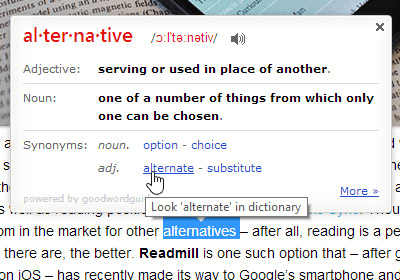
Contrary to the popular notion, your vocabulary isn't a function of your cognition or memory; it’s a function of your biceps: how many words you know is directly proportional to how heavy the dictionary is. And the dictionary, legend has it, has a way of doubling in weight a month before your GRE is due. Cry foul and surrender? Well, maybe not; you can use that ol’ brick of paper as a doorstopper while you hop online and go through your reading list accompanied by ProfessorWord. The free bookmarklet highlights all exam-worthy words and proffers helpful meanings while you surf the web. Who knew building your vocabulary could be this easy. Read More

Get Global Text Expansion & Autocorrect In Windows With WordExpander

The AutoCorrect feature in Word is probably the most used overlooked part of MS Office, with many people taking it for granted. The time it saves by automatically correcting those typos that we make in a hurry is priceless, and the absence of such a great feature across other apps or Windows' own text editors is lamentable. I wish almost all text editors included such a feature out of the box. The good news is, software like WordExpander can bring this functionality to almost every app you can think of, and that too without costing you a dime. The application appears to have been developed with Medical Transcription in mind, but can work perfectly for general purpose word expansion and auto-correct as well. No matter if it's a note-taking utility or a more powerful text editor, WordExpander supports almost every app out there. Read More

TheSage Is An Offline Dictionary With Wildcard & Anagram Search

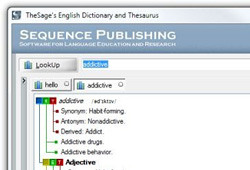
Before everyone got used to Googling everything, dictionaries were more or less the only source for checking correct spelling of words and their definitions. Now, the auto-correct feature can be found in every smartphone, and Google’s “Did you mean this” has allowed people to write correct spellings even without learning them. You can look up definitions directly by Googling a word, and read whole articles on it on websites such as Wikipedia. However, if you are dependent on Google to look up words, a bad internet connection at the wrong time might make you feel handicapped in this regard. In such a situation, you can either use a paper dictionary, or an offline digital dictionary. TheSage is an offline dictionary and thesaurus tool for Windows that allows you to look up meanings, definitions and synonyms/antonyms of thousands of words, view examples of word usage, look up the words online, maintain word lists, and much more. In addition to the look up tool, it offers a wildcard tool to select index entries that match a wildcard pattern, and anagram tool to find anagrams of a character string. Read More

Search For Definitions & Translations Anywhere In Android With AntTek’s Floating Dictionary

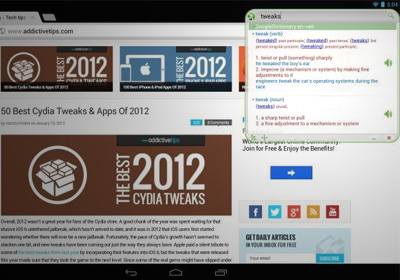
Floating apps are a great way to take advantage of both the bigger screen space and the faster processor that you get these days with tablet devices and large-screen smartphones. After the first floating app came out around 6 months ago, we are seeing a lot of them appearing in the Play Store. The best thing is that they are not restricted to a specific function and can be used to do anything intended by the developer, such as Floating Browser Flux! that lets you browser the internet using a floating interface, and Floating YouTube Popup Video, a floating player for YouTube that can work over any other app window. Today, we present to you probably one of the most useful tools that can be used as a floating app: a dictionary. AntTek Dictionary allows you to search for words against multiple online dictionaries and related services including Google Dictionary, Wikipedia, Google Translate, Bing Translate and more. The app also sports a floating GUI that allows you to search for words while you are using other apps such as a browser, allowing you to multitask without having to change the focus from the primary app. More on AntTek Dictionary after the jump. Read More

Smart Spellchecker Corrects Grammar & Adds A Handy Thesaurus To Chrome

There are two things you can find in abundance on the internet; bad grammar and grammar Nazis. English dominates when it comes to the internet and there is little tolerance for bad spelling and incorrect usage of words. Spell check in your browser has probably saved you tons of embarrassment when it comes to emails and social media updates but it has its limitations and the dictionary that browsers use isn’t really updated frequently leaving out many words that evolve to become part of everyday language. Smart Spellchecker is a Chrome extension that is a feature rich spelling, grammar and punctuation checker for your browser. At the backend, it relies on the Grammarly web service which has several additional features that help you write better including a plagiarism checker. As a browser extension it provides you definitions, synonyms, and live spelling and grammar check for multiple services like Gmail, Facebook, Twitter, Yahoo, Wordpress and Blogger. Read More

Quickly Search For Definitions With TheFreeDictionary For Windows 8

Just like all the other material published on paper, dictionaries too are losing their importance in our book shelfs. Nowadays, people use the internet to find out the meaning of new words. Gone are the days when you had to flip through pages to look for a particular word; just type the word and press Enter to quickly read its meaning and usage. If you use Google’s search to look up a word, you don’t even have to open a websites. The basic meaning , and a small definition of the word pops up directly on results page. However, dictionaries have not lost their importance completely. Instead, they have evolved with time to cater the needs of online users. There are lots of websites available that offer you a lot more than just the meaning of a word. Now, along with the meaning, you can view its synonyms, antonyms, related words, thesaurus, pronunciation in American and British accent, Translation etc. Whenever a new platform comes out, digital dictionary apps are one of the first ones to appear. Likewise, there are also a lot of dictionary apps available for Windows 8. Today, a third party app for TheFreeDictionary.com is available for Windows 8 users. Searches can be performed instantly and the meaning, usage, alterations (if available), thesaurus and translation into several languages can be viewed in the results. Read More

Tap-Dictionary For iPhone & iPad: View Definitions & Listen To Pronunciation Of Words Within Safari

The Define feature in iOS is a pretty decent option if you want to look for meanings of different words on the go. The definitions it offers are quite comprehensive - at times, a bit too comprehensive. Also, it is always nice to have some competition in any field, but presently, there aren’t many apps that integrate their dictionary with Safari, and offer offline use as icing on the cake. Tap-Dictionary might not work offline, but does let you look up any word without having to leave Safari. Not only that, the definitions offered by the app are very precise, and you can listen to the pronunciation from the definition box as well, If you want to look for apps related to the searched word, the app will take you to the App Store, and it is also possible to search Google for results matching the selected word. Read More

Linxy: Point Your iPhone At A Printed Word To Learn Its Definition

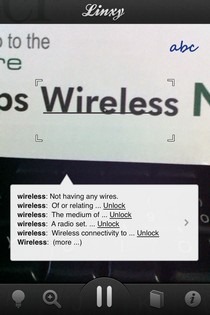
Most people who are into reading eBooks on their iOS devices are sure to appreciate the Define feature offered by Apple. It is impossible to have an infinite vocabulary, and every once in a while, we all need to refer to a dictionary. While iOS’s own dictionary has got you covered when it comes to words in the virtual world, you still need to manually type in everything if you come across an unfamiliar word in real life. Although paper books might not be as popular as they once were, a lot of people still read them, and even if you don’t, we live in a world where we are surrounded by text and alphabets. That’s what makes Linxy such a useful app. Thanks to the Linxy app, you can use your phone as an efficient dictionary for words you read anywhere in your surroundings. The app is based on augmented reality, and you don’t have to do anything other than pointing your iPhone to a word to view its definition and Wikipedia entry. Not only that, you can use Linxy even if you don’t have internet access! Read More

Search iOS Native Dictionary From Spotlight Using SpotDict [Cydia]

For some, Spotlight search, is one of the most useful and frequently used features in iOS. It lets you search almost every facet of your iPhone, providing real-time results; almost every facet. There are many tweaks in the Cydia store that focus on making additions to Spotlight search or changing its functionality altogether. While SpotDict does not do something as drastic as the latter, it does make an extremely hand addition to the things you can search from the Spotlight area. It allows you to search the iOS native dictionary from within the Spotlight area. It adds a button beside the search field that, when tapped, looks through the native dictionary for whatever text has been entered in the field. What makes this tweak handy is the fact that Spotlight is among the most easily accessible areas of iOS, and the native dictionary can only be accessed by selecting text from within apps. Read More

SilverDict: Collection Of Free Offline Encyclopaedias & Dictionaries For WP7

Android and iOS users have some pretty good options available when it comes to dictionaries, like the previously covered WordWeb and the official Merriam-Webster app. Windows Phone 7 might not be as lucky as the aforementioned platforms until now, but things might have taken a turn for the better with the release of the SilverDict app for Mango phones. Instead of having only one dictionary for offline use, this app will let you install any dictionary, encyclopaedia or acronym list of your choice, as long as you find it in the StarDict format. If you are not sure where to find such content, don’t worry, SilverDict has plenty of them available for free in its online repository. In addition to that, you can use the app to sync material from SkyDrive and Dropbox. Read More

Select/Highlight Words To View Definitions & Perform Search In Chrome

Wouldn’t it be great if we could search and lookup definitions of difficult words without navigating away from a page we are currently on? Inline Search & Lookup, a Chrome extension, works perfectly and allows you to perform searches or lookups without leaving the page. Once you’ve installed the extension, all you have to do is simply hold Alt (configurable) and double click a word. As you do this, a small inline box will pop up with the results of your search or lookup. Moreover, the search engine from where the definitions are retrieved can be changed. The extension works on almost any website, and allows you to easily specify your own sources. You can also specify default scrolling actions for each source, so when you perform a search, the pop-up will automatically scroll to the appropriate section of the page. Read More

Learn New Words & Improve Vocabulary While Browsing The Web [Chrome]

Language is something that evolves every day. Occasionally it might devolve to make room for things like YOLO or BRB but for the most part, a language is a collection of coherent words that have some meaning to convey. Once of the best ways to improve your vocabulary is to read a lot. For people who prefer to read online articles instead of grabbing a novel or even the latest edition of Reader’s Digest, increasing your vocabulary and learning new words might be slightly challenging since the language and writing is meant to be comprehendible for masses and not just people who have rich vocabularies. Online content tends to be informative or instructive such that people understand what is being said and it goes without saying that you can’t use big words and still hope to cater to a larger audience. PowerVocab, a handy Chrome extension, helps you learn new words and build an impressive vocabulary. After you've installed the extension, a button is added in the browser's toolbar that allows you to view words in a pop-up. Each word comes with pronunciation, definition and example uses. At the top of the pop-up, you will find a Get Next Word button. When you've read the definition and have learnt a word, simply click this and a new word will be displayed within the pop-up. Read More

Get Definition, Wiki & Other Data About Words With Define For iPhone

As common as dictionary apps might be in iOS, no one can deny their usefulness. Most people like to have at least one such app on their iPhone or iPad, and it all comes down to choice when you have to pick one dictionary app for your device. Define is one app which can be considered a personalized dictionary for iOS users. The app performs all the usual tasks of a dictionary app, but in addition to those, it can also be used to personalize the results and keep track of your past searches. You may also associate photos with words to preserve memories associated with a word. The app comes with a few additional features, like providing relevant Wikipedia entries for searched words and you might even come across a few IMDB entries as well. Read More

BetterDictionary: Bookmark Word Search In Stock Dictionary App [Mac]

Just about everyone relies on spellcheck; whether you’re looking something up on Google or writing an important email, spellcheck is probably the only thing that keeps others from finding out how good/bad your spellings really are. Similarly, we owe a lot to Wikipedia and online dictionaries for giving us a quick overview on short notice. If you use a Mac, you have the Dictionary app, which has a pretty good database in itself and comes in handy in case your internet is down. BetterDictionary is a small plug-in for Dictionary on your Mac that allows you to bookmark searches in Dictionary and view them again anytime. The plug-in can be extremely useful if you’re reading something, and continually have to look up words to understand it. The plug-in will allow you to recall them easily without having to type in the word or phrase again. Read More

Aard Dictionary: Multilingual Offline Database With Wikipedia Support

Before the era of “auto-correct” and Google’s “Did you mean this”, hard copy and soft copy dictionaries were the only source to check for the correct spellings of words and their meanings. These days, Google and Wikipedia have replaced the dictionaries for checking our the meaning of words, and thanks to auto-correct, people have stopped even bothering to learn the correct spellings of words. The problem, though, lies in the fact that to get the definition and meaning of words, you have to be connected to the internet all the times. Aard Dictionary is a multi-platform, multilingual open source application that provides you with a dictionary module which lets you search words in the dictionary, as well as the Wikipedia database even when you are offline. It just requires you to download the dictionary once and you are good to go. More on Aard Dictionary after the break. Read More

Official WordWeb Dictionary App Makes Its Way Into The Android Market

WordWeb Software is regarded highly among Windows, Mac and iOS users for the comprehensive English dictionary and thesaurus tool that it offers to each platform. While the official iOS client has been around in the iTunes App Store for quite some time, the Android variant has just been rolled out into the Android Market. The mobile client of WordWeb Dictionary lets users view definitions for both words and phrases, complete with examples of usage, pronunciation, synonyms, sentence structures, and related words online as well as offline. Other salient features of the dictionary include easy navigation between words in an alphabetical order, pattern-based search (exclusive feature), real-time search suggestions, help for frequently confused terms, bookmarking favorite words, random word meaning, integrated support for browsing Wikipedia, Wiktionary, Answers.com and Google for further references, advanced search filtering and lots more. Read More

Official Merriam-Webster Dictionary App Released On Android Market

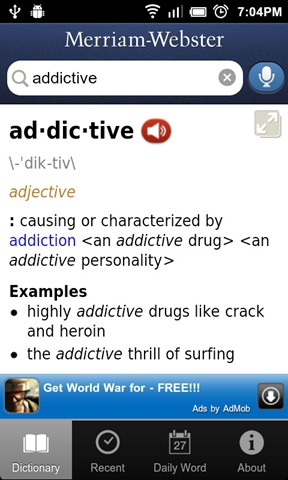
With advancement in web development, and the continuously rising popularity of web apps, most application developers have unveiled the web variants of their products, and the popular dictionary and thesaurus tool, Merriam-Webster is no different. The official Merriam-Webster Dictionary client, after enjoying a good run on the iTunes App Store, has finally landed on the Android Market. The interface of the Android variant, though equally efficient and easy to use, falls slightly behind that of the iOS version in looks (not a surprise). Everything else is roughly the same. With the help of the app, you can lookup the Merriam-Webster Dictionary for definitions, synonyms and antonyms for words both by typing them in or via voice search, view and delete recently searched words and learn a new word every day with the Daily Word feature. The app’s dictionary, as it seems, is downloaded at installation and automatically shifted to external storage. So you don’t need internet access to view definitions – only to listen to pronunciations, use voice search and for the Daily Word option. Read More

Lookup Meaning Of Words & Phrases With Language Help [Firefox Addon]

Remember previously covered Apture Highlights – an add-on for Firefox which lets you lookup word meanings, references, images, videos, and articles related with highlighted word/phrase with a single click. Apture Highlights has certainly proved to be an useful extension but a bit heavy on resources, as it loads all the related images, video links, Wikipedia articles excerpts on its on-screen window. Language Help is a lightweight addon for Firefox which offers what most users need while reading an article – meaning of selected word / phrase. It integrates with right-click menu, letting you instantly open dictionary.com to read complete article on highlighted word. Read More

Lingoes Is Powerful Multilingual Dictionary And Translation Tool For Your Desktop

Lingoes is an intuitive search engine which primarily focuses on finding words definitions, contextual meaning of word in sentence, abbreviations, etc., with a list of famous services to translate an inserted text, including Google Translate, Yahoo Translation, Yahoo BebelFish, Click2 Translate, etc. Additionally, it comes with multitude of dictionaries, such as, Google Dictionary, WordNet Online, Spelling Suggestion, Google Web Definitions, and so on, which you can choose on the fly while searching for the meaning or explanation of the word/phrase/idiom. A great deal of complementary features is also bundled in the package to give out one complete solution to daily life numerical and word related problems. You can lookup for irregular verbs, abbreviations, install a list of appendixes for International dialing codes, Weights & Measure converter, International Time Zone converter, and many more. Read More