NoClone Is A Duplicate File & Folder Finder With Content Comparison

A lot of files get accumulated on our computers as a result of downloads from the internet, copying files from our cameras, mobile devices and USB flash drives, and file transfers over the network. If left unnoticed for a while. we often end up with multiple copies of the same files in different locations, which can be pretty annoying as they consume a lot of valuable disk space without serving any purpose. Manually locating and deleting duplicate files is obviously a very lengthy and tedious process and by default, Windows does not provide you with any option to deal with duplicate files in separate folders. To avoid all this work, you can use any of the available third party tools that check selected folders for duplicate files according to different criteria such as file names, metadata, and file sizes, image dimensions etc. NoClone is one such application for Windows that lets you search for duplicate files and folders in your system in order to easily get rid of them. Read More

Remove Duplicate Words, Phrases & Sentences From Text Files With Text Deduplicator

Writing and editing large documents is a time-consuming process that requires a lot of concentration from both the author of the document and the editor. While spelling and grammatical mistakes can be located using different tools, one particular type of mistake i.e. duplication of sentences and phrases can be more difficult to locate. Since there is no technical fault with a duplicate sentence, the usual grammar checks do not highlight them and in order to locate them, you usually have to manually go through the whole document while retaining full concentration - a tiresome practice when you are dealing with a considerably large document or a large number of documents. Text Deduplicator Plus is a portable tool for Windows that makes it easy for you to located duplicate words, phrases and sentences in large text files. In addition, it can also sorts lines into alphabetical order, count the total instances of duplicate items in the file, and even remove them. Keep reading to find out more about Text Duplicator Plus and its features. Read More

Merge Duplicate Contacts & Backup iPhone Address Book With OneContact

If you are using a smartphone, chances are that you rely on a cloud service to keep your contacts permanently backed up. Gone are the days when you had to spend hours transferring your address book to a phone whenever you switched devices. These days, you just sign in to your Exchange or Gmail account to fill up the Contacts app in your new iPhone. While an extremely convenient method, this cloud syncing comes at a slight cost. If you are using more than one cloud service, you might end up with a lot of duplicate contacts when all your accounts have been added to the device. These duplicate contacts are a pet peeve of many users, forcing them to spend a considerable amount of time in making their address book neat and dupe-free. OneContact is a new iOS app that automates this process by scanning your complete contact list and highlighting all duplicates. The app is intelligent enough to sniff out multiple entries even if they are slightly different. Read More

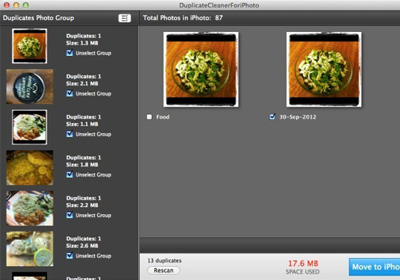
Find & Remove Duplicate Photos From Your iPhoto Library

iPhoto is one of the most sophisticated Mac apps available for managing your photo library. It lets you organize photos according to albums and events, and manage your Photostream as well as the pictures in your library. The application also helps you import pictures from external media devices, and keep them organized. When importing photos from different devices or streams, one often runs into the issue of duplicate photos; iPhoto warns you when you are about to save a duplicate to your library but in case you have already copied or created duplicate files in your library, iPhoto doesn't offer any feature to track them down for clean up your library later. DuplicateCleanerForiPhoto is a free Mac app available in the Mac App Store that aims to address that shortcoming of iPhoto, allowing you to scan your iPhoto library for duplicates and delete them. Read More

Find & Delete Duplicate Files Or Move Them To Another Folder

Over time, a lot of files get accumulated in our hard drives due to downloading content from the internet or copying files from our cameras and mobile devices. We often end up with multiple copies of the same files, which is pretty annoying as they take up valuable hard drive space without serving a purpose. It is extremely tedious to look for duplicate files manually by browsing every folder, and even then there is a chance of missing out on many. There are several tools available that allow you to locate and delete duplicate copies of files such as GDuplicateFinder and Fast Duplicate File Finder. Free Duplicate Finder is another application for Windows to help you locate duplicate files, and its lets you do so based on file type including photos, music, videos, documents, executable etc. When found, the duplicate files can be moved to a different folder, allowing you to decide if you want to delete or keep them. Read More

Image Comparator: Find & Remove Duplicate Images With Different Names & Sizes

People like to collect images. Even after so many online cloud storage services, image hosting websites and social networking services, a lot of people still like to keep their precious memories stored in shape of images in their own computers. Others, including myself, like to collect images of something or someone. However, at one point or the other, anyone collecting and saving images onto their hard drives is faced by one common problem – repetition. If you have hundreds of images on one topic, for instance, if you like to collect images of celebrities, it is almost impossible to not have multiple copies of the same image on your computer. Image Comparator is an open source software for Windows that allows you to easily find and delete duplicate images even if they have different names. Keep reading to find out more about Image Comparator. Read More

Gemini: Scan For Duplicate Files & Folders On Your Mac [Paid]

Do you often keep duplicate files on your system on purpose? Some people might do so to ensure they always have a copy of a file in its original format while they play around with the duplicate. Others might just accidently end up downloading the same file again and again and saving them to a different folder each time. Clutter creating habits aside, even the best of us end up with duplicate versions of the same files, and it is hard to track them down. Gemini is a Mac app worth $4.99 in the Mac App Store that is a superb duplicate finder. It doesn’t automatically remove files; rather, it allows you to decide which ones to remove. The app can detect duplicates based on the name, and even if a file name is appended with (1) to avoid overwriting an old version, the app treats it as a duplicate as such. Read More

Visual Search Pony: Detect And Delete Duplicate Videos By Resolution

Visual Search Pony is a duplicate file removal application for detecting and deleting duplicate videos according to space, duration, size, last modification time and resolution. What makes it unique from other duplicate file finders, is its ability to determine duplicate video files according to resolution and encoding differences. Visual Search Pony analyzes a file by running certain parts of the video (20 seconds or 5 minutes) to determine its attributes (such as duration, resolution, etc). Read More

WeeDuplicateDetective – Delete Duplicate Files By Size, Name & Content

Many duplicate finders search for files only by their name or size. This limits the potential of such applications as sometimes a file containing the same or similar content can have a different size or name. For this reason, it can be quite effective if a tool can locate duplicate files not only by size and name but also by content. WeeDuplicateDetective is duplicate file removing utility which provides the option to locate duplicate files from specified folder according to file name, size and content. All duplicate files are displayed in convenient sub-menus with the option to move (to a directory) or delete the selected files. Read More

AllDup Scans Every Data Byte-by-Byte To Find And Remove Duplicate Files

If you’ve found some duplicate files while visually scanning different folders, it’s an indication that all the drives must be checked for the duplicate files and folders. Before choosing a duplicate file cleaner, do check that to which extent it can search and apply filters using regular expressions and if it considers NTFS junctions as duplicate or not. AllDup offers a quick way of finding and removing duplicate files while supporting almost multiple types of filters to narrow down the search. It was developed to be light on system resources, so you can carry on with your work during the scanning process. An option to include or exclude NTFS junction points is also available to include or exclude folders from scanning which are referring to other (linked) folders. With AllDup, you can define search criteria according to your system current state. You can for instance choose to thoroughly scan the system for duplicate files by enabling file content byte-by-byte compare option or check most recently added folders and files only. Read More

Dupy Scan: Compare File Properties And Scan Files & Folders For Duplicates

Dupy Scan is a portable application to scan files and folders for duplicate items. Finding out duplicate files manually from different locations is a tedious task as one needs to navigate through different locations and need to check file's properties and other attributes. The application supports multiple options to check  duplicates by different properties, hash comparisons and other basic attributes. While showing complete comparison results and duplicate file list, it also lets user save the comparison list in CSV format. Read More

BitFinder – Duplicate File Remover

You may not realize how many duplicate files you have on your computer, and its not a wise decision to keep them as they are merely a waste of hard disk space. If you search your hard drive then you will surely find many extra copies of documents, MP3s, photos, video, etc waiting to be removed. But you can not perform the search operation manually in each and every folder of your hard disk as this will take ages, give BitFinder a try. It will help you reclaim your valuable disk space and improve your data efficiency. Read More