Gather & Play Music From Multiple Sources Under One Roof With Songdrop

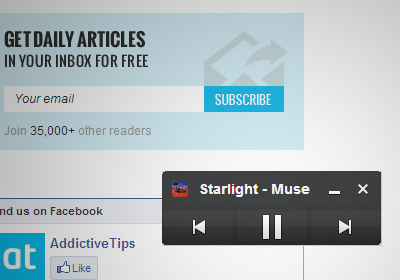
We listen to music from a lot of different sources; SoundCloud, Grooveshark, Pandora, YouTube, Last.fm, the list just goes on and one. At times, the services we use decide to play nice with each other and allow us to transfer our preferences from one to the other. At other times, we can use apps to help us connect these services and consolidate our listening experience in just one service. Songdrop is one such web service that acts as a song aggregator. It allows you to add songs to groups, which the service calls Mixes, from any website. There is a small catch though: you can drop a song (add it to the service) only from the song's own page. In addition to creating your own mixes, you can search other users’ mixes too and if you like the songs they have, you can drop them into your own collection. The service also has a dedicated Chrome extension, while users of other browsers can use the service’s bookmarklet to add songs. Read More

View Song Lyrics On YouTube & Grooveshark From Nine Sources

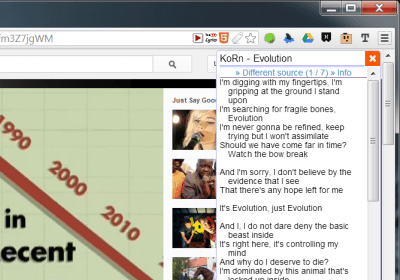
A lot of desktop music players support on-screen lyrics, but if you mostly listen to music on YouTube or Grooveshark, you might have little or no options for viewing song lyrics. On YouTube, channels add lyrics to within the song video's description or, at times, within the video itself, but it’s rare. YouTube Lyrics is an extension available for Chrome, Firefox, Safari, Opera, and Internet Explorer that displays lyrics for the current song playing in YouTube or Grooveshark in a small popup within the respective tab. The extension searches and loads lyrics from one of nine sources that you can manage from its options page. Read More

Use Hand Gestures To Control YouTube, Netflix, Pandora & Grooveshark In Chrome With Flutter

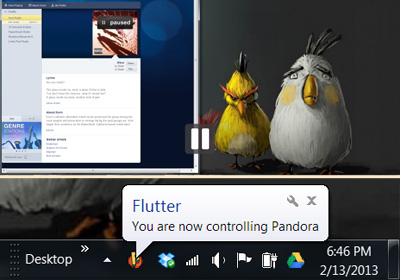
Flutter is an amazing app available for Mac and Windows that lets you control iTunes, Windows Media Player, Spotify, Powerpoint, Netflix and more by using your webcam and hand gestures. We have previously reviewed both Flutter for Mac and Flutter for Windows, and if you aren’t using this app, you’re missing out on a great ninja-like way to change whatever music you’re playing without even touching your computer. The Flutter desktop app controls desktop apps for the aforementioned services but for those of you who listen to music or watch videos in your browser, there is the Flutter Chrome extension. To use the extension, you must have the Flutter desktop app already installed. The extension allows the app to control YouTube, Grooveshark, Netflix, and Pandora regardless of which tab or window they are open in. Read More

MusicSmasher: Simultaneously Search GrooveShark, Spotify, SoundCloud, Rdio & More [Web]

The web has a massive collection of all types of music streaming services offering more than enough ways for listening to online tracks, but sometimes, this abundance can double as a problem, making it difficult to find what you're looking for in a hurry. While some people always use the same online music services, others switch between different ones to listen to their favorite music. MusicSmasher is a music discovery search engine that integrates some of the major online music streaming services, all in a single interface. Included engines include Grooveshark, SoundCloud, MOG, Spotify and more. MusicSmasher displays results in lists with different colors in a neat layout, so you can easily locate the track of your choice and navigate to the original source with minimum friction. Read More

Manage Grooveshark Playback In Chrome From Mac Menu Bar

You would've undoubtedly heard or read about the million or so apps that allow you to control iTunes from the Mac Menu Bar, and the hundreds of apps that exist for services like Pandora and Spotify. Grooveshark Control Center is a free Mac app that lets you control Grooveshark from the Menu Bar. The app is meant to let you control the online music service if Chrome is your default browser, and you use Growl. Seeing as how Chrome just surpassed Internet Explorer to become the No.1 browser worldwide, it might just be an excellent time to install this app if you regularly use Grooveshark. The app negates the need to have a similar extension installed in your browser, and makes more sense, since Chrome isn’t the only application you use when working. Read More

Control Music Playback For YouTube, Google Music, Rdio & Others From Chrome Toolbar

If you like listening to music from various popular services, such as YouTube, Google Music, Rdio, or Grooveshark, pausing or switching between songs can sometimes get difficult, specially when you’ve got a bunch of tabs open and are working on something else. Music Controller is an extension for Chrome that places a simple control panel on your toolbar that quickly allows you switch, pause/play songs or mute all background music at once, regardless of which tab the song is in. With it, you no longer have to be worried about whether you’re playing music in Pandora, Google Music, Grooveshark or any other service, as you may easily pause, skip or thumbs up for a song from the pop-up in your toolbar. The only requirement for the extension's working is that the music playing  tab should be in the same Chrome window. Read More

Control Grooveshark, Pandora & Other Music Playback From Chrome Toolbar

Unity Player is a Chrome extension that allows you to control music for various popular services, such as Pandora, Grooveshark , Google Music, SoundCloud and more. With it, you can control music from multiple sites from one handy pop-up. Now you no longer have to be worried about whether you're playing music in Pandora, Grooveshark or any other service, as you may easily pause, skip, rewind, thumbs up or check out the cover art from the pop-up in your toolbar. Another great feature of the service is that you can quickly focus the current site that is playing your song by clicking the album art cover photo, and if you start playing music from another source, the current one will pause itself as the new one starts. Read More

Grooveshark Player: Enjoy Full Web Interface On Your Mac Desktop

Grooveshark may be getting sued right and left, but that doesn’t mean anyone is going to stop using the service. Such is the popularity of this service, that many people keep it open all day long, use the radio feature, and search and listen to songs. While not quite as popular as Facebook or Gmail, for the true music fanatic and Grooveshark fan, a Grooveshark app can be extremely useful, and that is just what Grooveshark Player is. This Mac app literally puts the entire music site on your desktop; you can search for and listen to music, add it to your library, sign in to your account, turn on the radio, upload music and listen to songs from any one of the stations, all the while staying in control using simple keyboard shortcuts. Read More

GrooveDown Provides Quick Search And Download Of Grooveshark Music

GrooveDown is a simple downloader for the Grooveshark website, letting you easily search and download songs from within the main interface of this application, according to song, artist, album and playlists. All songs are saved in MP3 format. During testing, we found this application to be extremely quick in searching and downloading songs from Grooveshark. What makes GrooveDown even more useful is its simplified and quick song search and download mechanism, and reasonable memory stamp (64MB approximately). Read More

GrooveBud: Remotely Control Grooveshark From Your Phone [Chrome]

You may have come across a lot of extensions that let you control Grooveshark across different tabs in both Chrome and Firefox. Previous for Grooveshark & Google Music was a recently reviewed extension that let you control music playing on both Grooveshark and Google Music across tabs and windows but what beats all such similar extensions is being able to control Grooveshark from your phone. GrooveBud is a Chrome extension that allows you to remotely control Grooveshark; you can skip to the next or previous song, pause/play songs and control the volume all from your handset. Read More

Grooveshark Desktop For Mac OS X With Mini Controller & Theme Support

Do you hate to manually navigate to Grooveshark website to listen to your playlist, search new tracks and add them to existing playlists? Grooveshark Desktop is an app for Mac OS X which uses Grooveshark's web app elements to give you an unobtrusive environment of playing and managing your playlist items. In addition to playing and sifting through songs, it’s accompanied with Bowtie like mini controller with customizable themes to play and navigate through tracks without having to open the main window. Along with an on-screen mini controller, it comes packed with Last.fm, media keys and Growl notification support. Read More

Play Previous Song In Grooveshark & Google Music Playlist [Chrome]

For a true music junkie, no one site or one music collection is enough, there’s always the need to find more music, listen to the good old stuff and give something unusual a try. Grooveshark and Google Music (still available in the US only) are two different services for music fans. Grooveshark is a great place for streaming music and Google Music is a great way to take your music with you everywhere. A whole host of extensions for both these services are available but Previous for Grooveshark & Google Music is a Chrome extension that works across both. The extension is simple; whether you’re playing music on Grooveshark or Google Music, it will let you switch to the previous song. It works across tabs and across windows. Read More

Grooveshark Enhancement Suite – View Lyrics and Remove Duplicate Songs

For avid music fans there is a whole score of online services that allow you to stream songs for free, create playlists and music rooms. One popular online music streaming service is Grooveshark and it needs no description. There are different extensions available to either make your streaming experience on the site better or to perhaps to download a song or two from it. Grooveshark Enhancement Suite is a Chrome extension that adds three features to the Grooveshark interface; it allows you to view lyrics of the currently playing song, it removes duplicate songs from the current queue and allows you to control the site with keyboard shortcuts.

Read More

FindThatBand – Search Artists On Popular Sites From Right Click Menu

FindThatBand is yet another extension that will enhance the options in the right click context menu in Chrome. Similar to the FastTrack extension for Firefox in function, this extension offers more choice and customization. Once installed, you can select an artist name or song on any site and search for it on Grooveshark, iTunes, Pandora, YouTube and more. The extension was built not for finding songs but for information on artists or bands which is why the list of sites also includes Wikipedia. Read More

Search And Download Songs From Grooveshark With GrooveDown

SciLor’s Grooveshark Downloader was a desktop tool we covered a while back, which essentially lets you search for songs to download from Grooveshark. GrooveDown is a similar tool with one additional song information feature and a better interface. It lets you search and download multiple songs at once, you can define how and where the song(s) will be saved and check song information by right clicking a song from the list which SciLor’s Grooveshark Downloader didn’t. Read More

Add Grooveshark Playback And Playlist Controls In Firefox 4 Status Bar

Do you hate to bring up Grooveshark playlist every time just to change the track, search for your favorite  song or to shuffle the playlist items? GrooveControl is a newly developed extension for Firefox 4 which saves you a lot of time by bringing the Grooveshark basic controls in status bar. It was made to let users perform basic operations over currently opened Groveshark playlist whilst providing playback controls. You will also see details of the song, including, track name, artist name, and album art along with playback controls. Read More

GrooveWalrus – Music Player With Last.fm And Grooveshark Support

GrooveWalrus is a freshly-baked standalone music player which offers support for two widely used online music services -  Last.fm and Grooveshark. Since many users from around the world largely prefer listening and maintaining music profiles in either of these two services, it brings both in small package with all essential playback controls. The on-the-fly search for music tracks is also integrated to help users with populating their playlists quickly. While allowing direct last.fm scrobbling, you can bring all of your saved tracks and recommendations right into the application and manage your last.fm profile accordingly. Read More

keySharky Adds Keyboard Shortcuts (Hotkeys) To Grooveshark

If you are a Grooveshark addict, you will find that the keyboard functionality is missing. You cannot control the playback with hotkeys. keySharky is an extension for both Firefox and Chrome which adds this missing hotkey functionality to Grooveshark. The default hotkeys for Playback control are a bit unintuitive but they can always be changed from settings. Read More

Portable Grooveshark Desktop Application For Windows

From all the online music services out there, Grooveshark is the most favorite at AddictiveTips HQ. We, like all other users, hate to open a web browser just to listen to music. So what is the solution? Grooveshark has their own Adobe Air app but it is for VIPs only. If you not a VIP member and also hate Adobe Air, the third party Grooveshark Windows Application is for you. Read More