Selectively Add Or Remove Colors In An Image With Color Splash Pro

Almost a year ago, we reviewed a very famous app called Color Splash Smart that allowed you to selectively color parts of a photograph. It’s a great effect to add to your photos when you want to highlight a particular subject or region in it. Unfortunately, Color Splash Smart is no longer free and if you are looking for a free alternative for it, give Color Splash Pro a shot. It's a free Mac app that does pretty much the same thing as Color Splash Smart. While it has fewer features in terms of the extra stuff like crop and resize tools, you can easily find all those in several other free apps so that shouldn't be a problem. Let's find out more about Color Splash Pro after the jump. Read More

Remove Photobombers & Unwanted Items From Your Photos [Mac]

Before everyone started taking and sharing pictures from their smartphones and digital cameras, there used to be film based photography where your pictures were printed out on high quality 4x6 cards that made it impossible to cut out photo bombers or that one cousin no one really likes from the family picture. With digital photography, if you have the right software, the required skills and a few hours of time to kill, removing unwanted objects from a photograph is possible. For photographs with many subjects, you might need a very feature app to do the trick and considerable image editing skills on your part but for ordinary images (like ones you might have snapped on vacation), you can use a simple app like Intelligent Scissors to get the job done. Intelligent Scissors is a Mac app worth $3.99 in the Mac App Store that allows you to identify and remove unwanted items from a picture. The app is easy to use and gives you a live preview of the changes you make. Output is saved in JPG format. Read More

Evernote’s Image Editing & Annotation Tool Skitch Now Available For Windows 8

Skitch is a widely popular application, recently acquired by Evernote, that allows you to annotate, edit and share your images with others. It has been available for Mac, iOS and Android for quite some time and is considered one of the best applications for editing, annotating and uploading to Evernote accounts. Since the Windows 8 final, public release is scheduled for the 26th of October, a lot of apps by some major developers have released for upcoming version of Windows. Recently, we have covered apps for Windows 8, such as Dailymotion and Flux. Skitch has also hopped onto the Windows bandwagon. Currently available on Windows Store, it includes all the major features offered by the other variants of the app including webcam image capture, image editing and annotation. Read More

Open IT Online Integrates Popular Document & Image Viewers & Editors With Your Browser

Have you ever had one of those instances where you really needed to open a Word document, but didn’t want to fire up Microsoft Office and waste precious system resources? Or did you experience events when you wanted to edit an image but had no desire to install Photoshop or any specific software? Open IT Online, an extension/add-on for all major browsers, does it all for you! This utility enables you to open and edit your files in the browser window, as opposed to downloading the file and opening it via an external application. Open IT Online Lite integrates Google Docs Viewer, Zoho, View Docs Online and Vuzit for documents, and Pixlr, Sumo Paint, Picnik and Snipshot for images. You no longer need to have any software installed to view and edit documents, spreadsheets, presentations etc, or to edit any image. Read More

[Giveaway] SoftOrbits Photo Retoucher: Retouch Photos To Remove Unwanted Blemishes

Photo editing often involves too many tasks such as color correction, cropping, masking, layering, retouching and whatnot, in order to get the perfect image. Most of the high-end photo editors are stuffed with endless number of features (some that you don’t even need). However, if you are looking for a rather simple solution to quickly fine-tune your favorite photos, then go ahead and give SoftOrbits Photo Retoucher a try. This application provides you with a number of tools to quickly touch up your old photographs using tools like Spot Remover, Scratch Remover, Concealer Brush and Image Correction. Other noteworthy features include image cropping and a marker tool to remove unwanted objects in images. The application also lets you work with multiple images at a time. More details after the jump. Read More

Showcase: View And Share 3D Photo Presentations With Your Friends

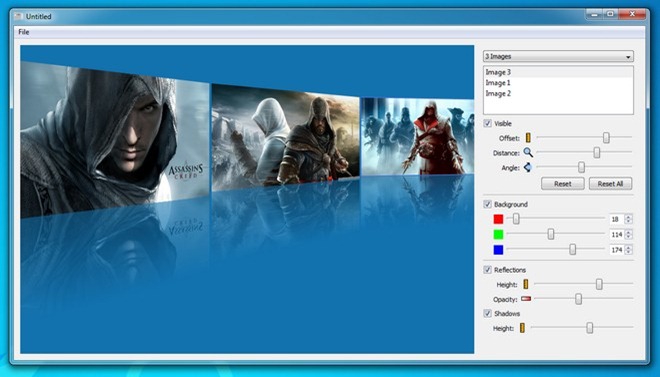
Bored of viewing your favorite photos as traditional slideshows? Looking for an exciting new way for showcasing the snaps you took last summer? Well, then try Showcase - an open source image viewing application that lets you view and save your images using different 3D visual effects. You can select and showcase up to five images, and then adjust them according to your preferences to create a 3D presentation. There are a number of different effects you can apply to your images like changing angle, zoom the images, flip and slide etc. There is also an option to change the background color of your album. The application is quite simple and easy to use, and you can quickly create fabulous image demonstrations to share them with your friends in a variety of ways.. Find out more after the jump with included screenshots. Read More

Seam Carving GUI: Content Aware Image Resizing With Removal Of Unwanted Areas

Seam Carving GUI is an open source image resizing utility that lets you resize your photos without affecting the focused subject. It does so by removing unwanted visual content in the image by employing a technique known as CAIR (Content Aware Image Resizing). CAIR was developed by Ariel Shamir and Shai Avidan, and the application functions on the basis of carving seams in an image. Now, that might sound like technical jargon to some, but seams can be called as non-wanted paths in an image, and we can increase and reduce the size of an image by increase or decreasing the seams. This is a great alternative for cropping and other conventional image resizing techniques. More after the jump. Read More

Picturenaut: Create HDR Images From Bracketed Exposures Using Filters

High dynamic Range Imaging, aka HDRI, or simply HDR, is a technique that allows bringing out the range of intensity levels (in images), which are found in real scenes, such as direct sunlight or faint moonlight. HDR techniques are geared towards the representation of contrast between photos of a single imagery. Non-HDR cameras, for example, take pictures at a single exposure level, and hence, have a limited contrast range. This often results in the loss of bright and dark areas of a picture, which can be corrected by using similar images and using HDR techniques. Picturenaut is a HDR imaging application that enables users to create High Dynamic Range (HDR) images from bracketed exposures. All you have to do is to select the input images, and Picturenaut will adjust the exposures in a single HDR image, with automatic exposure correction, picture alignment and color balancing. Additionally, you can tweak the image by managing the tone mapping for creating a desired image effect. Picturenaut provides 8-bit, 16-bit and 32-bit modes, gamma adjustment, support for RAW images and real-time preview. Furthermore, this application is fully capable of making use of multi-core processors. Read More

Artweaver Free: Stripped Down Version Of Photoshop With Macro Support

Artweaver Free is an image editing application that has full support for layers, sports a wide variety of brushes and has a lot of effect filters, enabling you to edit images with great detail. The application provides you with handy toolbars for choosing colors, layers and tools for applying changes to the image, settings for brushes and previewing the image. Brushes are highly configurable with options to change Brush Category, Brush Variant, Type, Method etc. It supports different formats such as Photoshop’s PSD, allowing you to generate impressive images and work with files created in other graphic editing applications. Read More

Easily Draw Perpendicular Lines In Image Editors With Squadra

Squadra is an open source and  portable application which acts as an overlying set-square on top of other applications for allowing you to easily draw perpendicular lines on any image editing program. Since it appears on top of any application, therefore, you can drag it over an image for creating lines and borders for an image. Although many image manipulation programs offer a large set of tools for drawing such lines, however, when editing or creating images, it can be sometimes difficult to obtain a precise direction for the drawn lines. Most image editors simple tilt and distort the drawn lines unless they meet a certain rotation criteria. Squadra enables you to position the set-square at any angle and size for manually drawing straight lines. Squadra is cross-platform and has versions available for both Windows and Linux. Read More

Edit Pictures With Layers And Effects Using RealWorld Paint.COM

A while back we reviewed, SunlitGreen PhotoEdit, which is an advanced image editing tool. RealWorld Paint.COM is a more easy to use image editing tool (also available as portable version) which provides editing functionality in layers, along with the utility to assign effects to each layer. Its drawing tools and image filters are able to perform gamma-aware blending and color gradient interpolation, which by default produces correct colors for the image. It is also compatible with a number of Photoshop plugins. RealWorld Paint.COM is not just for basic photo editing but can also be used to create raster images. Read More

F-Spot vs. gThumb Photo Manager And Viewer For Linux

F-Spot Photo Manager and gThumb are image management applications that allow users to find, organize, edit, print and share  images on Linux based OS. Both are top notch tools and in this post we will compare the features of these two applications and explain the pros and cons of using them. Read More

Inkscape Vector Graphics Editor Now Supports Multipath Node Editing, Airbrush, And Much More

Inkscape Vector Graphics Editor is a graphics editing tool with dynamic and intensive scalability options. It has many features similar to famous vector graphic editing software such as CorelDraw and Xara X, but is less CPU intensive than both. This freeware can be used with Windows, Mac and Linux based operating systems. It supports advanced SVG features including markers, clones, alpha blending, node editing, SVG to PNG export, and many other rich features. Version 0.48  of this application now includes, multipath node editing, new spray tool (Airbrush) , improved text tool (subscript, superscript, numerical inputs for text kerning), LaTeX export with PDF/PS/EPS, JessyInk extension for creating presentations which can be viewable in browsers and much more. Read More

Fotografix – Free Lightweight Photoshop Alternative

If you are looking for a lightweight tool for image enhancing, graphic designing, and image editing, then nothing beats Fotografix. It is a very lightweight portable tool(366KB when zipped and 713KB when extracted) which contains the very basic features of Photoshop. It is obviously not a Photoshop replacement but is quite an alternative for quick editing on the go. Read More