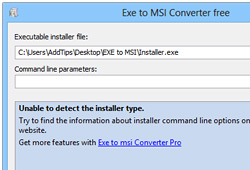
Convert EXE Installers To MSI With Optional Command Line Parameters

Windows application installers come in two file types; EXE and MSI. EXE is commonly used in all types of executable files including many app installers. MSI, on the other hand, is the standard format for installing Windows programs, based on the official Window Installer by Microsoft. They may look similar on the surface, and in fact, both work quite good for their purpose, deep down you will find quite a bit of differences between them. MSI performs a cleaner installation, which makes it easy to remove the program and all its traces from the appropriate locations. The EXE format often automatically checks if a computer is capable of running certain program or not and if it does, it automatically executes the included MSI file. If you have got some installation packages that you want to convert from EXE to MSI, give Exe To Msi Converter Free a shot. Boasting a decent and easily understandable interface, the program does the simple thing it's advertised for, and does it exactly as it should. It also allows users to add command-line arguments for the resulting MSI file prior to conversion. Read More

‘Get Mac Apps’ Allows Easy Batch-Download & Installation Of Popular OS X Programs

Installing apps on a Mac is not the same closed and fenced-in deal that installing apps on an iOS device is. True, you have to sidestep Gatekeeper if you're running Lion or Mountain Lion, but you can still download and install Mac apps from just about any source. Though, finding and then installing these apps - whether from the Mac App Store or the developer’s site - can be a bit tedious, which is something Get Mac Apps can help you out with. It’s a simple web service that allows users to select the apps they want to install, and gives them a single command to run in Terminal to get them all in one go. The apps are then downloaded without so much as asking you to enter your system’s password or sign in with your Apple ID. The best part is that Gatekeeper lets you run the apps without having to sidestep them, and any DMG files that are downloaded are automatically removed after installation. The result is one of the cleanest and most convenient ways to download and install Mac Apps. Read More

Download, Batch Install & Update Popular Windows Apps With Milouz Market

Dedicated app stores are a great way to install all your apps from the same place using the exact same process but when it comes to desktop platforms, things haven't been this way exactly. It can be quite time-consuming to download popular Windows apps from their own different sources and then individually running their installers. Furthermore, you have to keep a check on the installation process to make sure no needless bloatware makes its way to your computer unchecked. This is where Milouz Market comes to the rescue. This lightweight free app offers you quick, silent and bloatware-free installation of many popular apps without having to go through cumbersome installation procedures. Milouz Market houses a decent number of free apps in its repository, and also supports updating the ones that are already installed. Read More

Conloco: Batch-Download & Install Free Software And Check For Updates

How often do you have to reinstall your Windows OS? Being a reviewer, for me,  it’s one of those tasks that I frequently need to perform. If you're like me, who must have to go through the process of downloading and installing all your favorite applications and system utilities, from scratch, whenever Windows gets reinstalled - you must have an idea about this whole painstaking procedure. Wouldn’t it be more convenient, if you could download and install most of the frequently used applications at one go and all from a single place? Luckily Conloco is an answer. It's an open-source program, which is designed to keep an eye on latest (and most popular) free software, displaying a catalog from wherein you can download them in batch. In addition, it also keeps a check on latest software updates and notifies you if a newer version of the program is available – thus saving you the headache of manually updating each program. Details to follow after the jump. Read More

Install Essentials Packages Easily In Ubuntu With Eve Installer

Eve Installer is an Ubuntu tool which conveniently lets you install important applications in Ubuntu 11.04 and LinuxMint operating systems. With Eve Installer, you can install system tools, graphics, office, multimedia, internet and appearance related apps in a single click. It also allows adding useful repositories such as Medibuntu, getdeb and Playdeb. Although most (if not all) of these apps can be installed using the Ubuntu Software Center, however, what makes Eve Installer quite useful is its ability to provide easy installation of  repositories and update sources. Moreover, the most essential applications can be found within a single interface, which is not cluttered with outdated and disfunctional apps like in the case of Ubuntu Software Center. Read More

AllMyApps Is Feature Rich App Store For Windows

A while back, we talked about Windows OS being devoid of an App Store and advocated Npackd as one good choice for installing and managing Windows applications. Going over Npackd features, we couldn’t help but say that it lacks a lot of features in terms of organizing and searching applications by different categories, such as, Internet, Security, Video, Converter and so on. AllMyApps is a freshly baked utility which is, however, in beta phase yet seems promising in addressing the user needs when it comes to choosing a feature-rich App Store for Windows. Fortunately, it covers almost all the essential options which you might look for in an App Store. Be it application types, categories, runtime environments, download manager, or complete product description with ratings that you want to check before downloading, it brings all these necessary features of an OS App Store in a drop-dead UI. Since it’s going through testing phase, you might not be able to find plentiful of application software, desktop utilities but most celebrated applications, add-ons, browsers, IDEs, etc., are provided in respective categories, such as, Adobe Flash, Firefox, Google Chrome, VLC,  Notepad++, Skype, Live Messenger, Spybot, Paint.NET, and many more. Read More

Install Applications With Npackd Windows Package Manager

Unlike other OS platforms, which come with native App Stores, such as, App Store for Mac OS X and Synaptic for Ubuntu, Windows users have always been deprived of one App Store where they can easily find freshly baked applications, check latest updates, and, importantly, manage all of them under one hood. Npackd is an open source application which fills this void for Windows. It allows users to install applications, desktop utilities, compilers, etc., on Windows OS with ease. One major downside is that it doesn’t come with all sorts of applications which you might need on Windows, yet it can come handy for installing most prominent utilities, such as, 7zip, .Net framework, C++ Redistributables, Adobe Reader, VLC, Firefox, FileZilla, Audacity, CCleaner, Defragler, etc., with a long list of software designed for Windows power users. Read More

Keep Installer Packages Up-To-Date With Ketarin

There are plenty of freewares that get released daily and the same number of them get updated too. How will you keep track of all these updated applications? One way developers try to tackle this problem is to provide a build-in option for users to check for updates, but what if you have a lot of installer packages that needs updating too? Read More

Build An Installer With Complete Installation Wizard Using Inno Setup

Do you want to distribute your newly created app to the masses? But to distribute it, you will need to create a simple installer first. Many commercial installer builders are available, but before you pay for them, here is a quick tip for you, “Do NOT pay for something that is available for FREE”.

Note: Here at AddictiveTips, we are high advocates of using free software. Our computers are filled with 95% freeware apps and we are loving them.

Inno Setup is free installer builder for Windows that can quickly create a setup file. According to the developer, it rivals and even surpasses many commercial installers in feature set and stability. It can create a single EXE file, for easier distribution over the Internet. Apart from it’s basic functionalities, it supports disk spanning, can create Start Menu icons, INI entries, and registry entries, integrates file compression, and much more.

Read More

Keep Your Software Setup Packages Updated Automatically

Recently I came across a small handy tool called Ketarin which automatically downloads the latest version of the software setup packages for you. Suppose you have installed VLC Media player on your computer, now you can run Ketarin and track VLC Media Player by adding it to the list, if the new version is available it will automatically download it for you. In short, it does not keep your system up-to-date, it only downloads the latest setup packages, thus keeping your setup packages up-to-date. Read More