NC Enough Sets iPhone NC To Cover Only As Much Screen As Needed

The Notification Center of jailbroken iOS devices is often filled with interesting widgets and toggles that make our lives much easier. No matter how bloated your NC has become though, it is likely that whenever you invoke it, there will be a reasonable amount of empty space at the bottom of everything. With an iPad, on the other hand, things are completely different. The Notification Center is always just large enough to let everything fit inside it. As soon as you get rid of pending notifications, the NC shrinks back to its minimum size. If you like this feature, and want the NC to behave this way on your iPhone as well, NCEnough is the perfect tweak for you. Other features of the tweak include letting users change the color of the NC (a bit like Custom NC Background), and keeping the SpringBoard accessible even when the Notification Center is active. Read More

Overview Packs Mail, Reminders, Calendar Events Into One iOS NC Widget

iOS doesn’t have any widget APIs for developers to use to build their own widgets, but that isn’t much of a problem if your device is jailbroken, as there are dozens of capable widgets to choose from under alternative app store Cydia. Today, we came across a nifty new widget for iOS Notification Center called Overview that will make you slightly more productive. Check it out after the jump! Read More

Open Yahoo! Weather From Stock iOS Weather App Icon Or NC Widget

Whenever a Cydia tweak lets you replace a stock iOS app with a third-party one, it is usually a sign that the third-party app has got things right. We saw this happen after Google Chrome was released in the App Store, and now a similar option is available for the new Yahoo! Weather app as well. As we pointed out in our review of the new app a few days back, the Yahoo! app offers a lot more than the stock Weather app in iOS. It has beauty, shows you some amazing details regarding current weather conditions, and even lets you see the latest satellite maps to get an even better idea of the weather conditions for any region. Despite all this awesomeness, there are a few things that might have stopped some users from completely switching to Yahoo! Weather. The biggest problem is that the Notification Center widget still directs users to the stock iOS app, but if you have a jailbroken iDevice, this issue can now be resolved thanks to the Yahoo! Weather Is Better Cydia tweak. Read More

biteSMS For iPhone Updated With A New Quick Compose NC Widget & More

Whenever I jailbreak an iPhone, biteSMS is among the first Cydia apps I download. It offers so much in terms of convenience that once you get used to biteSMS, it becomes nearly impossible to go back to the stock Messages app in iOS. Having said that, some other tweaks in the jailbreak store have recently starting coming up with decent alternatives to the features available in biteSMS. Fortunately, the team behind biteSMS isn’t resting on its laurels, and are always looking to make the famous app even better than it already is. Quick Compose is the feature of biteSMS that has managed to attract most fans to the app, and with the app’s latest update, it has become even better! In addition to a plethora of performance improvements and bug fixes, the beta version of biteSMS 7.6 also comes with a brand new Notification Center widget. This widget provides shortcuts that can be used to quickly get in touch with your favorite contacts. Read More

BatteryDoctorPro Is The Ultimate Power Saving & Monitoring App For iOS

A lot of apps are often labeled as the most comprehensive in their genre, but rarely does one justify the tag more than BatteryDoctorPro. Battery Doctor has been around for Android and iOS for a long time, and BatteryDoctorPro comes from the same developer. There is one main distinction between the two apps though. Unlike Battery Doctor, BatteryDoctorPro has only been released for jailbroken devices. There are some pretty clear reasons for that, since the app incorporates widgets for both NC and SpringBoard. You also get a bunch of toggles to control system actions, just like SBSettings, and there are other similar features that you aren't likely to ever see in an Apple-approved app. Read More

Get iOS Status Bar, Notification Center & Banners On Android With Espier Notifications

Just a while back, we covered Espier Screen Locker, which replicates the iOS 6 lock screen on Android. The developers at Espier Studio are known for their efforts to bring the iOS look to Android devices and after Espier Launcher & Espier Screen Locker, they have released Espier Notifications. As you might have already guessed, the app brings you iOS-like notifications - both banners and prompts. There's more too - the app also adds an iOS 6-like status bar to your device, complete with an iOS 6-style Notification Center! There are plenty of options to configure such as changing status bar colors for specific apps, choosing the app for which notifications will be displayed in the Notification Center, and much more. Read on after the break to learn more about the app, as we take a closer look at it. Read More

View Bandwidth, Memory & Storage Usage In iPhone Notification Center

Users of SBSettings might know that the tweak's drop-down window isn't just a place to access system toggles; it also shows some basic system stats pertaining to your iPhone. N Stats is a Notification Center widget that isn't based on some truly novel idea, but it shows a few very important pieces of system data in graphical form, which is something not many apps or tweaks can accomplish without consuming a lot of screen space. This NC add-on shows just three system stats, but the developer has made sure that the displayed entities are the most important ones for most users. Thanks to N Stats, jailbreak users can get an idea of their device’s current RAM, storage and internet connection state at a glance. The tweak isn't customizable, but this only adds to its appeal since everything is ready to go as soon as you install it. Read More

Get A Gesture-Controlled Music Widget In iPhone Notification Center

With iOS 6, Apple proved that Notification Center widgets can come in handy for things other than just viewing information at a glance. The stock Share widget can let you post updates to your favorite social networks with ease, while users of jailbroken devices have access to a whole world of NC add-ons that can be used to do some truly useful stuff. NC widgets related to almost all areas of iOS have been released in the Cydia store, and music playback is no exception. Previously we covered Now Playing for NC - a Cydia tweak that can let users control their music using a couple of buttons placed inside a widget. NCMusicGestures does something similar, but uses gesture control for the purpose. You can scrobble your music to Twitter and Facebook, while changing a song takes merely a swipe. Read More

Add A Flip Clock Widget To The iPhone Notification Center

Flip clocks are pretty common on Android but for iOS devices (even jailbroken ones), these fancy time displays are still a bit of a novelty. The closest thing to an iPhone flip clock we have ever seen is iWidgets, which lets users add an HTML 5 time widget to their SpringBoard and lock screen. If you want a fully customizable flip clock widget though, your best bet is the newly released Flip Clock for Notification Center. The widget is capable of displaying time in the format of your choice as well as the the current date, and also lets you tinker with the color settings of the digits. The fact that you can use it with Dashboard X and other similar tweaks to place the flip clock on other areas of iOS makes the widget near-perfect. Read More

Create Notes, Reminders & Calendar Events From iOS NC & Lock Screen With Tap To Widgets

Notification Center widgets have been around on iDevices since iOS 5, and the next likely step would perhaps be the arrival of lock screen and SpringBoard widgets in iOS 7. Though as with many other features officially incorporated in iOS updates, Cydia users have had these for a long time now. Tweaks like AnyLock and Dashboard X let users place useful and cosmetic widgets in areas of iOS that are even more easily accessible than the NC. The tweaks themselves are great, but the problem has always been the availability of good widgets on these platforms. The ‘Tap to’ series of widgets has been around for some time now, letting users perform different functions within the Notification Center, and their developer has now decided to polish things a little more by combining five widgets into one package. Tap to Widgets lets you manages all of the offered widgets from one place, and lets you use them with Dashboard X as well. Read More

Get Email Alerts & Mac Menu Bar Shortcuts For Multiple Gmail Accounts

Mac users who aren’t happy using the default Mail app have the choice to use other desktop email clients like Thunderbird or Sparrow. Many are satisfied with just using their email service’s web interface. If you’re a Gmail user and like to stick to its web interface but at the same time receive notifications for all your emails, Mail Ping is an app worth $1.99 in the Mac App Store that might interest you. The app works with Notification Center in Mountain Lion to give you alerts every time you receive a new email. The app supports multiple accounts, just like Gmail’s web interface, and allows you to open your inbox or the compose message page for any of the configured accounts from the Menu Bar. Read More

Send SMS & Mail From iOS Notification Center With Compose Widget

While iOS 5 brought the most revolutionary changes to the platform, iOS 6 fine-tuned those changes and made them almost perfect. Notification Center widgets have been around for quite a while now, but it was iOS 6 that unleashed their full potential. Apart from the usual stocks and weather widgets, there is now a sharing widget in NC as well that lets you compose a new tweet or Facebook status update with great efficiency and ease. Based on a similar concept, the newly released Compose add-on lets its users create messages and emails from within the Notification Center. By just tapping the buttons added by this widget to the NC, you get a composing environment without having to actually launch the stock Messages or Mail apps. Read More

Sticky Icky Keeps iOS Notification Banners On Screen Till Dismissed

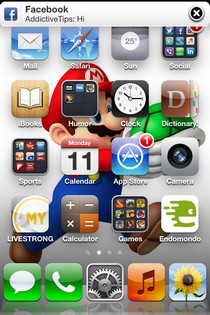
Almost all major iOS apps offer support for push notifications to some extent, and these real-time alerts are specially important for social networking, instant messaging, news and task management apps. As is the case with most areas of iOS though, users don’t get full control over these banner notifications; they appear for a predefined amount of time, forcing many people to repeatedly visit Notification Center even if they take their eyes off their iPhone for just a few minutes. Sticky Icky can change that, and do even more for your iPhone. This newly released Cydia tweak lets users control the duration for which notifications appear on the status bar; you can dismiss the banner as soon as it appears, or keep it pinned to the screen for hours. Read More

How To Change The Notification Center Alert Sound In OS X

The Notification Center is one of the highlights of Mountain Lion, and we've written about a few handy Notification Center tips to help you make the best of it, including one on changing the Notification Center background. It is still a relatively new feature of the OS, and some might go so far as to call it rough around the edges for the simple reason that customizing it is difficult. Even something as basic as changing the sound alert for the Notification Center isn't supported, at least not in the stock System Preferences. It is still possible to do so, and we've got the instructions for you. Read More

Schedule ‘Do Not Disturb’ In OS X Mountain Lion With Automator

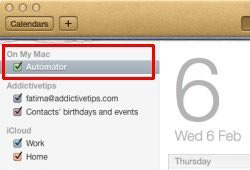
"Do Not Disturb" is a feature in Mountain Lion borrowed from iOS 6 to mute notifications from Notification Center. Unlike iOS, OS X does not allow you to schedule when the feature will be enabled or disabled. It needs to be toggled manually when required. It is programmed to enable itself at midnight each day, and there is no way to stop it from doing so. Though if you are interested in scheduling the Do Not Disturb feature by date and time of your choice, you can do so with the help of a simple AppleScript and Calendar. You will need to create Automator workflows for enabling and disabling Notification Center. The process is detailed below. Read More

Create Email Templates & Notification Center Reminders With Affix For iPhone

Affix is an iOS app that combines task management and Email templates under one roof, creating a tool that can add much convenience to the daily routine of professionals and students alike. The app is great if you don’t want to spend a lot of time trying to manage all your tasks by going through labyrinthine menus. You can edit and create new task lists and make entries in them with just a few taps. What’s even better is that Affix uses the Notification Center to list all the important tasks you have to complete. These persistent notifications will stay in the NC until you tap them, thus providing a good way of staying up to date with what needs to be done. Moreover, the app even lets you specify the recipient in mail templates. The interface is quite simple in looks, and a sprinkle of gesture control makes it simple to use as well. Read More

View Email Notification Alerts For Select Accounts In Mac OS X

The Notification Center in Mountain Lion is one of its best features but so far, it offers little customization at the app level. You can only choose which apps to receive notifications from and can’t select whether you want a notification for each event / action of the app, or just a few select ones. This limitation is most obvious if you've added more than once account to the Mail app. By default, you receive a notification for new emails received on all accounts. If one of those accounts is your personal account that you don’t want to be bothered with while you’re working, these alerts can be less than welcome. While there isn't an official way in Notification Center to customize notifications for each account, you can work around this one with the Mail app by making use of Smart Mailboxes. Read More

Ostium Adds An Awesome New Launch Animation & Gesture To iOS Notification Center

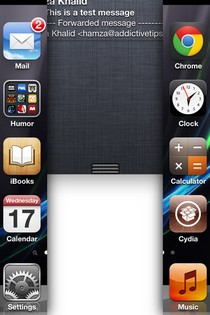
Ever since the release of iOS 5, the Notification Center has engaged the imagination of a lot of Cydia developers. There are several Notification Center widgets in the store, but that’s not all. A significant number of NC-related tweaks alter some basic features or cosmetic aspects of the grey notifications area. While cosmetic tweaks mostly do not offer any useful options, they are still adored by the jailbreak community. There are tweaks that let you change the whole appearance of the bland NC background, but one area that has so far been ignored is the drop-down animation that precedes the Notification Center’s appearance. New to the Cydia store, Ostium is a tweak that allows you to access notifications with a two-finger split gesture, and replaces the familiar drop-down animation with one that splits the screen vertically to reveal the Notification Center. Read More

View Facebook Account Activity In Mac OS X Notification Center With Glow for FB

Fall isn’t too far away now, and that means Facebook integration will be arriving soon to OS X Mountain Lion. For those who can’t wait or haven’t upgraded to Mountain Lion because an older version of OS X seems better, you might still be interested in having easy access to your Facebook notifications. Facebook integration, like Twitter counterpart, is something that you aren’t likely to realize the utility of unless you experience it the way it is in Mountain Lion. However, if you'd take our word for it, it’s pretty amazing. Glow for FB is a Mac app worth $0.99 in the Mac App Store that emulates what it would be like to have Notification Center alerts for your Facebook activity. While it doesn't offer the system wide integration that will be offered in Mountain Lion, it still lets you stay up to date with your Facebook notifications without having to open them in your browser. The benefit here is two fold; on one hand, you get your notifications easily, and on the other, you won’t end up wasting more time than you meant to by getting caught up with your feed. Read More

Get RSS Feed Alerts In Mountain Lion Notification Center With News Notifications

OS X Mountain Lion's Notification Center is largely dependent on other apps supporting it, and since not many do, we’ve seen an influx of apps that redirect Growl notifications to Notification Center. The Notification Center presents a lot of opportunity for app development and for users it is an excellent feature that they would likely want to put more creative uses. Since there is nothing wrong with Growl and a new version of the app for Mountain Lion has recently been submitted to the Mac App Store, you can rest assured it isn’t going anywhere. That leaves you with Notification Center and a world of possibilities. Demonstrating just one of the many uses you can put Notification Center to is News Notifications, a Mac app worth $0.99 in the Mac App Store that lets you put RSS feeds in the Notification Center. Read More