PDFNut For Mac Is A Great PDF Reader With Tabbed Viewing

Ever since I started using a web browser that supported tabs (something that didn’t happen for me until Chrome debuted), I’ve always felt that tabs were the right way to view any and all types of content. They make browsing and navigation easy and the lack of window clutter is an added advantage. This is one of the reasons why I find the lack of tabbed browsing in both Finder on Mac and File Explorer on Windows 8 to be perplexing. The good thing is, the tabbed browsing trend has caught on and spread to all sorts of applications over the years. PDFNut is a free Mac app available in the Mac App Store that applies this concept to PDF viewing. The app lets you open multiple PDF files in different tabs, features a bookshelf that you can add files to by dragging & dropping them onto the app, allows bookmarking and annotating pages, searching text within a PDF file and supports table of contents. Read More

Nitro PDF Reader 3.0 Update Adds Text Alignment & Auto-Save Support

We covered Nitro PDF Reader back in 2010. It was a PDF reader well ahead of many others at the time, even Adobe’s own software. The reader is more than what its name implies; it allows users to edit and create PDFs and that’s something that very few free PDF readers do, let alone doing it well. Nitro PDF Reader has just released a new version, version 3.0, that comes with four new features and a few enhancements to existing ones. The most significant features include the option to align text better when you’re creating a PDF file or insert text into an existing one, auto-recover a file you were working on when your system crashed, detect and indicate if a file is an image-based file or a scanned document, and lastly, for large enterprises, Nitro PDF Reader has implemented Autonomy WorkSite Integration. Enhancements for Japanese and Chinese text, detecting and opening links to PDF pages, reduced file sizes when text is added to a file and saved and better PDF rendering have been added. Read More

Foxit Mobile PDF For iPhone & iPad Goes Free For A Limited Time

Adobe Reader might be the most popular PDF reader on desktop, but there are a few other players in the market that give it some good competition. Foxit Reader is a name that is sure to be familiar to a lot of people. Not only does the service offer applications for PC and Mac, its iOS client has been around for quite a while, too. Foxit Mobile PDF is the perfect document reader for a vast majority of iPhone and iPad users. It isn’t too complicated, so you won’t get too lost in its functions, but the app still offers everything that makes it a comprehensive PDF reader. You can annotate your docs pretty thoroughly, make changes to them or just keep them stored in the app in a well-organized manner. A lot of people still prefer using Adobe Reader for iOS though, because that app is free, unlike Foxit Mobile PDF. Now, you don’t even have that excuse for not giving the Foxit app a try, as it has gone free for a limited time! Read More

Utopia Documents: A Specialized PDF Reader For Research & Academic Papers

While writing research papers, we often need such an integrated interface that can bridge the gap between online and offline content. There are various tools available that allow you to manipulate PDFs, explore an article’s content, or relate it to dynamic content, online. With Utopia Documents, you can benefit from all these features using a single interface. Working with documents has been made effective by incorporating a pager, figure browser, sidebar and search facility. Similarly, multiple viewing styles (structure, sequence or plot view) has been made friendly for analysis. Dynamic content enhancement aims to give life to the static content by filling in useful online tools wherever needed. With support for multiple data sources (like Altmetric, Mendeley, CrossRef, Sherpa), scientific sources (like BJ, Dryad, SciBite, RSC, AQknowledge) and annotators (like GPCRDB, NuclearDB, Reflect), Utopia Documents promises a truly unique learning experience. Read More

Qiqqa: PDF Management & Research Tool For Better Academic Progress

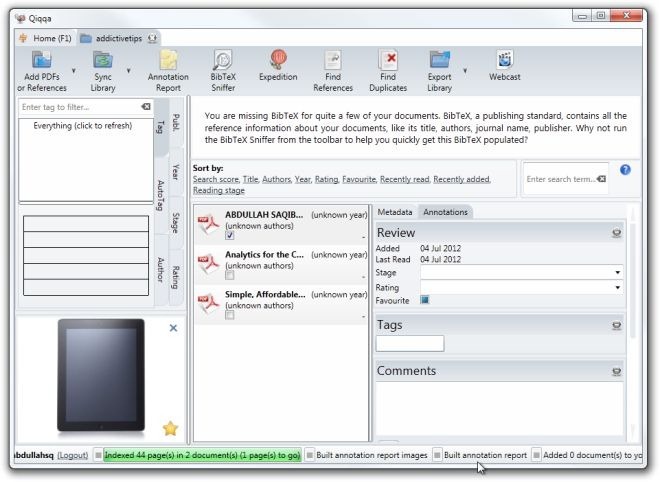
Managing PDFs have become an essential in creating, reviewing and collaborating academic work. Usually, PDFs are notorious for poor metadata (title, author, publication, etc.), which makes it difficult to to deal with hundreds of documents. In such large virtual libraries, the importance of tags, keywords and annotations comes to light. Qiqqa is a powerful tool made to address the needs of academicians (students, faculty and researchers to name a few), worldwide. Equipped with powerful OCR (Optical Character Recognition) feature, it adds value to PDFs by making them susceptible to comprehensive searches as well as abstract and keyword extraction. It allows easy integration with your computer as well as popular programs like Zotero, Endnote and Mendeley via the BibTeX format for import/export. Furthermore, it syncs your libraries and documents with the Android app for access, on the go. Read More

Mantano Reader: Feature-Rich Android ePub & PDF Reader With Support For Cloud Sync & Annotation

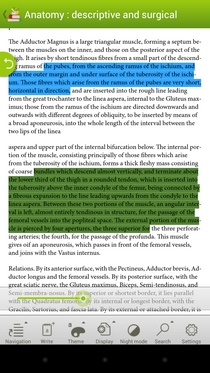
Whether you’re a dedicated bookworm or occasionally find yourself in need to fetch some helpful material from various ePub and PDF documents, you’re likely to have, at least, one e-Reader installed on your mobile device. While the Google Play Store offers some pretty comprehensive options in this regard, there is still room for a product to impress readers with its own unique features. One such immensely useful eBook reader that brings several ePub and PDF-reading features to the table is Mantano Reader. Laced with plenty of conventional and relatively fresh eBook/PDF reading and annotating tools, Mantano Reader vows to enhance your reading experience on your Android device. The app sports a neatly-designed library that caters for your local and online eBook management needs. In addition, it features its own Open Publication Distribution System (OPDS) catalogs explorer, supports opening files protected by Adobe DRM, lets you sync data and preferences with the Mantano Cloud, and last, but not the least, brings arguably one of the most intuitive and well-crafted eBook reader interfaces to Android. Read More

Downloader Elite: Perhaps The Best, Most Feature-Rich Download Manager For iPhone & iPad

Downloader Elite is the sort of app you can’t really consign to just a single category. Most people will call it a simple download manager or a web browser for iPhone and iPad, but it is actually much more than that. The app includes a decent audio player, can handle a vast variety of video formats (including FLV and HTML5), has a PDF reader, and comes complete with a nice text editor. With support for so many file formats, the app makes everything convenient for users by providing them with a neat download manager. The app is Downloader Elite has AirPlay support, lets you play videos in the background and can be used to open ZIP or Office files. The list of offered features goes on and on, past the break. Read More

PDF Reader Pro Is One Of The Most Comprehensive Document Viewers For iPhone & iPad

An iOS app that handles PDF files might not sound like something too exciting, but PDF Reader Pro has so much more to offer. The app lets you view PDF files on your iPhone or iPad, but that’s not all it does. It rises above the crowd owing to the staggeringly large number of additional features it has on offer and is undoubtedly one of the best if its kind out there. PDF Reader can handle images, videos, HTML, iWorks files, common document formats and, of course, PDFs. Most of the formats compatible with the app can be converted to PDF with a single tap, regardless of the file’s size. In addition to all this, PDF Reader Pro comes with some amazing sharing options, and you can get files in and out of the app over WiFi, via email, iCloud or just about any other cloud service you can possibly think of. The app’s reader is sleek, and comes with a lot of options to improve your reading experience. Read More

Adobe Reader For Android & iOS Updated With Digital Signing & Support For EchoSign

Adobe Reader for Android, iPhone, iPad & iPod touch has just been updated (to v10.2.0) with quite a few significant additions and improved features; two of the most noticeable of which are the new Ink Signature tool, which lets you sign your PDF documents, and the option to fill out PDF forms right from within the app. Not just that, the app now also supports Adobe EchoSign, which can be used to send documents to other users for e-signing purposes. You no longer need to rely on other electronic document signature tools to get your digital documents signed on the fly. Other than that, the update also brings several other useful features, such as the option to supplement PDF files with sticky notes, link URLs and/or any part of a document to another PDF file for easier navigation, improved annotation, in-app search, text highlighting, underlining and strikethrough options, and plenty more. Read More

PDF+PDF Lite: Read & Annotate Two PDF Documents Side By Side [iPad]

There are quite a few PDF readers on the App Store, but this is the first time we've come across an app for iOS that lets you read and annotate multiple PDF documents simultaneously. The app is called PDF+PDF Lite and it is designed specifically for the iPad. The app is designed to relieve you of the headache of consulting and annotating books, journals and documents when the time is scarce and you have ample studying to do. With PDF+PDF Lite, you can crop pages in a PDF doc, change background color, annotate important sections and copy text from one PDF document to the other all within the app. Read More

ReadCube: Search Google Scholar For PDFs & Organize Local PDF Files

PDF is a format you can’t escape if you frequently download and read eBooks, journals, or even boring office reports in this format. While PDF readers are a dime a dozen, something with a little more kick can never hurt. ReadCube is a PDF reader and research tool for Windows and Mac. This Adobe Air-based application integrates Google Scholar and PubMed, allowing you to search them directly from within the app. The application is primarily geared towards students and researchers, allowing them to use their university accounts and access journals that the university provides. However, that isn't a requirement, and you can use just about any kind of email address to sign up and use it. ReadCube also lets you open and switch between different files that are open, import your PDF library from hard drive, create lists, add notes and search and download PDFs. Read More

Adobe Reader For iPhone & iPad: The Best Way To Read PDF Files On iOS

PDF files are by far the most used medium for reading e-books on desktop computers as well as on mobile devices. Adobe is the name that is sure to spring to your mind as soon as your hear the word PDF mentioned. Adobe Reader is, arguably, the most widely used PDF reader for desktop computers, and has had an Android client for quite some time now. It took Adobe a lot of time to release a variant for iOS, maybe because of the Flash-point between Adobe and Apple (pun intended), but better late than never. The app does make up for being late by offering a variety of really cool features, and you can use it to manage every aspect of your PDF files rather than using it as a simple PDF reading app. Read More

Aldiko Sync For Android Uses Dropbox To Sync Aldiko eBooks Across Devices

Aldiko Book Reader - a free eBook reader for Android - is already quite popular among users due to its simplicity and multi-format eBook reading capabilities. If you, like XDA-Developers member GameGod72, are a fan of the app, then the developer’s debut venture Aldiko Sync might have something very special in store for you. Designed for Aldiko Book Reader (v2.0.2),  Aldiko Sync is an Android app that syncs all your eBooks (with their last state preserved) from Aldiko to your Dropbox account so that you can easily continue reading the same books across multiple devices - a concept based very much on the renowned 'Whispersync' feature of Amazon Kindle. Read More

Modern Reader Is Metro Based PDF Reader Built Into Windows 8

The developer’s preview of Windows 8 was released to the world yesterday and it is available for anyone looking to give Windows 8 an early try. Even if you aren’t a developer, the many features showcased at the keynote conference are enough to tempt you to take it for a quick spin. The build of course isn’t what the final version will look like and lacks some features like the app store showcased at the conference, and the native PDF reader. Although not previewed at the Build Windows keynotes conference, a native PDF reader had been confirmed to be part of Windows 8. The native PDF reader; named Modern Reader, effectively negates the need to download bloated  Acrobat’s Acrobat reader (or any other third party reader). Read More

Flipping Book Reader – View And Flip PDF Pages Like A Book

Flipping PDF Reader as the name suggests is a PDF Reader which can be used as an alternative to your default PDF Reader. It has an interactive interface where you can flip pages like in a real book. It provides a number of stylish and unique features such as the option to switch to a two page view, book shelf for all accessed documents, a thumbnail view of the table of contents, a customizable interface and the utility to scroll page up/down using the mouse pointer. Read More

Alternative PDF Viewer – Fast Font Rendering & Multiple Color Modes [Android]

PDF is easily the most commonly used file format for viewing and sharing documents. Whether it is the user’s manual of your newly bought gadget or a tutorial of some training course, PDF file format is the preferred choice for documentation of all. Although there are many PDF readers available in the Android Market, most of them are somewhat restricted in their ability to display PDF documents according to user convenience. Whatever quality alternatives are present are either laden with all sorts of features, or tied with hefty price tags. In an attempt to make PDF file viewing easier on Android, XDA Developers member arpruss has come up with Alternative PDF Viewer. Alternative PDF Viewer supports some handy and interactive PDF reading features that are not present in other alternatives. Read More

How To Unlock Hidden Features In Windows 8 Initial Builds

There’s been a lot of discussions on the web about new and interesting features of Windows 8, including, Windows 8 Aero, Ribbon-based Windows Explorer UI, Revamped Task Manager, PDF Reader, and Web Cam, but initial leaked releases of Windows 8 lack all these said features, giving Windows 7 like user experience. Recently, some Windows OS enthusiasts have managed to unlock these features by writing small registry tweaks to bring ribbon based Windows Explorer UI, Revamped Task Manager, PDF Reader, and Webcam in initial releases of Windows 8. We have already covered Aura that brings Windows 8 Aero features to Windows 7. This time around we have Windows 8 features unlocker for you called Windows 8 BluePoison. It was developed to unlock hidden Windows Explorer and Task Manager improvements along with two Windows 8 native tools PDF reader and Webcam. Read More

MartView: Slick Eye-Candy PDF Viewer & Downloader

Sumatra and Foxit are two popular free PDF Readers, the latest feature-packed Nitro PDF Reader is also getting rave reviews all around the blogosphere. The developers behind these apps have always focused on simplicity, functionality, and speed. MartView however is different, the core aim behind this PDF viewer is to give user a slick eye-candy and book-reading experience, while keeping most of the functionalities intact. Read More

PDF Reader Plugin For Chrome

Google Chrome was developed keeping web apps in mind. Want a PDF Reader for Google Chrome? Why not add Google Docs integration with Google Chrome so that every PDF link can be viewed online before downloading it?

Read More