Popular Twitter & Tumblr Mashup Pheed Comes To Android

If you’re keeping a tab on the social media sides of things, you might already be aware of Pheed. It’s a social network service launched back in October last year as a web app, followed by an iOS client in November. Since then, has become quite popular, attracting users' attention from around the globe – specifically teens and youngsters. The service is primarily designed for sharing a variety of creative content such as photos, videos, audio and text with other Pheed users . In addition, it allows you to subscribe to a multitude of channels that suit your taste in order to discover content created by other users of the service. Although it was released on iPhone, iPod touch and iPad only, Pheed has now landed on Android as well. Lets take a closer look at the Android app of the service. Read More

Flayvr Is An Auto Gallery Organizer For Android With Online Sharing Of Interactive Albums

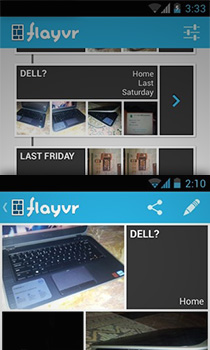
Android’s native Gallery app has never been disappointing and suffices for most users, but it does leave much to be desired, especially by power users and media enthusiasts. If you want to organize or edit your albums, you have to resort to a third-party app, since the native app offers no such features, being entirely driven by the folders on your device’s storage. Enter Flayvr - an album organizer with dynamic previews for both pictures and videos. Released earlier for iOS, the app has been available on the App Store for quite some time, and has just made its way to Google Play Store as well. Let's take a closer look at how it performs on Android, and the features it brings to the platform. Read More

Easily Share Images & Screenshots To Imgur Via Drag & Drop With MyImgur

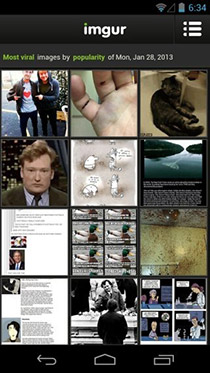
Imgur needs no introduction when it comes to sharing photos and pictures over the web. If you have ever used Reddit, you'd probably be as much familiar with this acclaimed service as you like viewing those cat pictures over at Reddit. MyImgur is a Windows application that lets you upload images or screenshots to Imgur right from your desktop. You don’t need to fire up your favorite browser, open Imgur’s website and then upload the images. MyImgur consolidates all these steps into one. You simply drag and drop your image over the application window and it will swiftly move to Imgur server. The application also lets you sign in to your Imgur account in order to upload images straight to your profile. Read More

Share Self-Destructing Media Or Text Messages Anywhere With ReadOnce

There seems to be quite a market for self-destructing messages; popular apps like Snapchat and Facebook’s Poke are proof that people would like to say something and leave behind no trace that they ever said it. Jokes aside, if you’re using a smartphone, it is  likely that there is an app available for sending these self destructing messages. However, there are few options for doing the same from your PC, and the few that do exist support only plain text messages and have an unappealing interface. ReadOnce is a web service that lets you send self destructing messages. These messages can be plain text, images, audio clips, or videos. You can select how long the messages will be visible up to a maximum time limit of 59 seconds. The time can be customized down to the millisecond. The great thing about ReadOnce - apart from the different message formats - is that the message is only deleted from the recipient's side; you still get to keep it for 5 days, and can share it again with anyone. ReadOnce also lets you mask the URL you share using Bit.ly. Read More

AltaPixShare Is A Photo Resizer, Styler & Sharing App For Windows With A Great UI

They say sharing is caring. Sharing photos with your folks is probably the best way to rekindle old and good memories. Due to the advancements in technologies such the high availability of home and mobile broadband internet access, along with various image sharing websites and services, the process of sharing photos with others has become much more easier than it was a few years ago. Though at places where you don't have access to high speed internet, for instance a trip to the countryside, it can be a bit hard to instantly share your high resolution photos, especially if they are fairly large in size. The best way would be to resize the images to a smaller size before you send them to others. If you require to instantly do that, AltaPixShare has an answer. This lightweight Windows app streamlines and unifies the processes of photo resizing and sharing, and even lets you apply a few filters to them in the process. Read More

mosaic.io Combines Multiple iPhones To Create One Big Display For Viewing Photos & Sharing Files

People always love apps that are capable of performing mundane tasks in novel ways. If an app can also add convenience to the mix, even better. Bump and Chirp both are basically designed for file sharing, but one uses sound to transfer files between iDevices, while the other requires touching two devices together to share photos quickly. mosaic.io for iPhone, iPad and iPod touch does something similar, but in a way more fun and unique way. This universal iOS app lets its users place multiple iDevices side by side, and then stretches a single photo across all their displays. In simple words, if you own more than one iDevice, mosaic.io lets you create one big real-life photo mosaic out of their screens! The app is also capable of transferring Dropbox files between two or more devices (that are located in close proximity) via a simple gesture. Read More

Add Stylized Weather Info To Photos With CamWeather For Android

We have seen countless weather apps with several different approaches, but CamWeather delivers on what has crossed my mind quite a few times, and I’m sure there would be others out there too who have wanted something like this. The app works on a simple yet novel idea - it fuses local weather and social elements together, enabling users to share not just the weather for their location with others, but also add a picture to it for their friends to see. In short, let's say you're out on a vacation and want to share with others how it is there; you run CamWeather, take a photo, overlay your location and weather information on it, and share away via Instagram, Facebook and more. With several weather layout presets and an interface that even a child can easily understand and use, the app gives a whole new dimension to weather info sharing. Read More

Send Digital & Printed Copies Of Your Photos From Windows 8 & RT With Kicksend

Kicksend is a service that has made its reputation for letting users share high resolution photos with anyone. What sets Kicksend apart from other similar solutions or alternative methods like email and social media is that it doesn't compress images in the transfer process, thus the original quality of the photos remain intact. After earning its fair share of success on desktopAndroid and iOS, the app has now landed on Windows Store. Even though it looks quite simple on the surface, the app still gets the job done the way it's been doing on other supported platforms. Read More

Instametrogram Is A Windows 8 Instagram App With Geotagged Map View

Instametrogram may seem like just another Instagram app at first sight, but deep down it’s packed with some really great features, set in a pretty decent interface. This Windows Store app lets Windows 8 and RT users browse and save their Instagram photos with ease. In addition, you can gaze at popular images shared by other Instagramers around the globe without having to sign up for an account with the service. Just click the Read More button for our full review. Read More

Spred Consolidates Photos From Instagram, Pinterest, Tumblr & More

Instagram gained immense popularity by offering an easy way of sharing photos with your social circle and friends. Most profiles on Instagram are public, and anyone can discover your photos quite easily. If you are among the people who admire good photography, Instagram and Tumblr can be good sources for browsing all types of photos. Spred is an app that can help you in your quest to find the best images around the web. This new iOS release combines photo feeds from Instagram, Tumblr, Foursquare and Pintrest, based on topics. You can then maintain your own photo collections within Spred, and share any images over other social networks in bulk. Read More

Send Photos & Videos Directly From iOS Keyboard With QuickPhoto

When it comes to  jailbreak tweaks, there are ones like FullForce, FolderEnhancer, Winterboard themes et al that significantly alter or enhance your user experience, and then there are one-trick pony tweaks that subtly change one very specific part of your operating system to get one thing done right. Developed by CocoaNuts - the folks who developed the RageBoard keyboard add-on - QuickPhoto is a recently launched jailbreak tweak that's a good example of the latter. It allows you to add photos and videos from local albums to your message compose box directly, much like the Emoji keyboard that you can enable from Settings > General > Keyboard. Check out our hands-on look at it after the jump. Read More

Sync Facebook Photo Albums With Your PC The Dropbox Way Using Drop N Sync

Facebook has become a one stop shop for all kind of social networking, media sharing, and promoting your business/venture without costing a dime, but it’s apparently the internet giant’s photo sharing feature that is used the most. Previously, we've covered various desktop tools and browser extensions/add-ons that let you upload images to your Facebook account, and today, we've got yet another one at your disposal called Drop N Sync. It’s an intuitive desktop application that makes uploading your photos to Facebook a breeze. It lets you synchronize your existing Facebook albums with your PC, which makes the process of downloading and uploading new photos to Facebook completely hassle-free, in a Dropbox-like manner. Lets dig deeper into it and see how it works after the break. Read More

Pixplit Is A Collaborative, Social Photo Collage App For Android & iOS

Initially released in iTunes App Store and just recently made available to Android users, Pixplit is among the few cross-platform social photo sharing apps that actually justify their purpose of being truly ‘social’ and ‘interactive’. The app is built around the simple concept of social photo collage making, where a user starts a collage with a photo of their choice and then anyone from anywhere can contribute to the collage by adding images of their own. A typical Pixplit collage is referred to as a ‘split’, and comprises 2-4 empty slots that can be filled by that many different users. Like any quality photo editing app, Pixplit offers a wide array of filters and borders that you can apply to your images prior to sharing. In addition, the app boasts an extensive set of featured content shared by worldwide users who you can socialize with using various conventional socializing tools. Read More

Transfer Instagram Photos To Tumblr & Flickr, ZIP & Save Them With Recygram For iPhone

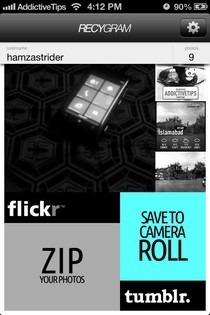
In addition to all the fancy photo effects and social sharing options offered by Instagram, the world's most popular mobile photo app is also a huge repository of images. Everyone who has been using the service for a while is sure to have a decent collection of photos in their Instagram account. Most of the times, a picture that has been shared from Instagram remains there and we don’t give much thought to re-sharing it on other services. Recygram is an iOS app with the potential to change all that, by letting its users share photos from Instagram to Tumblr and Flickr in bulk. It is also possible to download these images to your device, or compress them into a ZIP file and send the archive to others via email. Read More

Minus Releases iPhone And Android Apps With Chat Feature [Review]

Popular image sharing service Minus has released an app for both iOS and Android platforms. While Minus’ web interface encourages you to share files, the mobile apps encourage you to make friends with other users of the service who are nearby, making it more of a proximity-based people discovery service in addition to merely being a photo sharing app. Minus for iOS and Android allows you to take pictures, add filters and edit pictures via the Aviary image editor that’s integrated in the app, and lets you find pictures taken near you by other users. ‘Pictures nearby’ is how you are encouraged to find friends to connect with, though you can search for users by name as well. A chat feature allows you to share messages, images and your current location with any user.  Interface wise, the app has a lot going on and it will probably take you a little time learning where everything is. Read More

SKYE For iPhone Combines Weather Forecasts With Photos From Your Area

A weather app can rarely be labeled exciting and unique these days, since there are so many of them available in the iOS App Store, with most of them differing from their competitors only in terms of interface. While SKYE Weather+Photo offers a decent interface too, the app’s real uniqueness lies in the fact that it mixes a bit of photo sharing with weather. You get to provide your own feedback related to weather and can also view weather conditions of the cities most of your friends live in. SKYE lets you overlay the current weather information on any photo, and post it to the app’s network. These photos also act as part of the background for the weather page of your current location. Read More

AutoSnap For iOS Instantly Shoots & Uploads Photos To Cloud On Launch

While Photo Stream can be quite useful for backing up all the photos you take from your iOS devices on iCloud and keeping them synced across all your devices, many people snap photos with the intention of later uploading them to Instagram, Facebook or some other online service, and Photo Stream offers no such auto-sharing option. AutoSnap allows you to do just that, and more! In fact, you don’t even have to shoot the photo manually, as the app can take a picture after a few seconds’ delay whenever you launch it, which can come real handy to quickly capture those precious moments that you would otherwise miss. Though you can also stop the shooting and uploading processes any time you want. Read More

Photo Aggregating & Sharing Service OpenPhoto Launches Android App

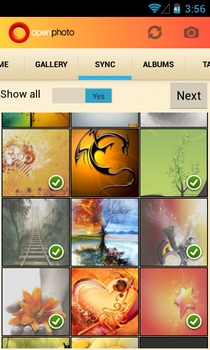
Created by a former Yahoo engineer, OpenPhoto is an open-source photo hosting, sharing and aggregation service that supports photo backups both locally and on various renowned cloud storage services like Dropbox, Box, CX and Amazon S3, etc. When we reviewed it earlier in April, OpenPhoto was only available as a web and iOS app. However, the company recently decided to expand its user base by releasing a companion app for Android in the Play Store. Sporting a clean UI, the official Android app is capable of displaying your OpenPhoto images aggregated from various affiliated services in an elegantly laid out gallery. Using the app, you can filter your uploaded images by albums and tags, sync images between your OpenPhoto cloud and device, share public photos with your social or mail contacts, and upload fresh or existing photos to your OpenPhoto account after applying custom tags and effects. In addition, the Android app supports Facebook, Google+ and Dropbox-style instant, automatic photo uploads, as well as the option to limit uploading to Wi-Fi only. Read More

Use Copy & Paste Hotkeys To Upload Images To The Web With Snaggy

Copying and pasting images works best on your desktop computer between apps and from one folder to another, but you won’t find too many web apps that allow you to paste images directly to their interface. Most, if not all image hosting services will have you manually upload or drag & drop an image from your desktop. Very few of them would allow you to paste images view the Ctrl+V shortcut that you’re used to, and fewer still extend that functionality to images you might have copied online rather than from your computer. Snaggy is like an image clipboard for the internet that also supports your desktop. It lets you copy and paste images from any website or your computer, and paste it in the app via the Ctrl+V shortcut. Snaggy has a built in editor that will let you crop images, annotate them with text, and draw on them. It uploads the images online to its own server, from where you can then share it using a direct link or one of the many social network buttons. Read More

memoloo Is A Free, Location-Based Social Photo Sharing Android App

Whether you want to get a collection of the best landscape-centric images out of your favorite photo sharing apps, or simply want to feast your eyes on some of the most awe-inspiring photos from different locations the world over, we've got a great solution for you. Available exclusively for Android devices, memoloo is a social photo & video sharing app that allows you to explore, track and share some of the most scenic locations of the world. Each image and video shared via memoloo is a short story in itself, describing its significance to the user and the specific category under which it appropriately falls. Also, memoloo automatically geotags each shared image and presents it on a map via its individual placemarker to help users learn about the exact location where it was captured. Moreover, the app supports several customary socializing tools to rate an image/video, comment on posts, follow a user, explore trending locations, share your own memoloos, and keep a close tab on your activities on the memoloo network. Read More