Silence For Android Gets Holo UI, Calendar Events, Power Toggles & More

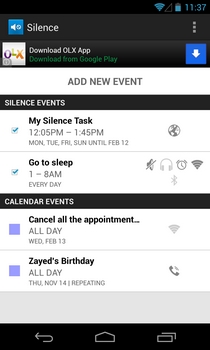
Silence the handy event-based sound profile automation app for Android – has received a pretty impressive update in the Play Store today. Besides sporting a shiny new Holo UI, the app now allows you to play around with several other volume and power toggles, so that you can use it to completely automate your Android device’s behavior as per your requirements. Already capable of automatically switching back and forth between user-selected sound levels during and after certain events, Silence can now toggle Wi-Fi, Bluetooth and mobile data as well. The app’s integration with Google Calendar now allows you to import events from your personal calendar, so that you can easily define your device’s volume and power settings during your events. That’s not all – there is also support for recurring events till a particular date, and you can now set a specific volume level for each sound toggle instead of silencing it completely. Details to follow. Read More

Manage & Automate Android Sound Profiles With Smart Volume Control

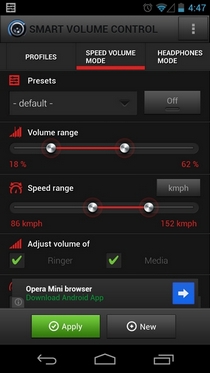
Smart Volume Control is a powerful multilingual sound profile management app for Android that vows to be the ultimate solution for your device’s volume adjustment, automation and tweaking needs. Besides supporting hyper-customizable sound profiles, the app brings to the table several features that are hard to find in most similar solutions. For instance, it offers multiple profile presets under a accelerometer-controlled Speed Volume Mode that can be availed to activate personalized sound settings for when you’re out on the road, cycling, or crossing a subway. The app lets you schedule activation of profiles according to desired time, or as per your Google and/or Microsoft Exchange calendar events. Want your device to automatically silence, or redirect incoming calls to Bluetooth when at your workplace? Smart Volume Control’s location-based profile automation has your back. Then there is a fully customizable profile for when your headphones are plugged in to your device. The app’s many thoroughly customizable widgets allow you to play around with the desired sound profiles and settings directly from the home screen itself. Read More

FenrirFS: File Manager With Profiles, Evernote Sync & Data Labels For Quick Access

Downloading and transferring files from the internet and physical storage mediums respectively, and saving them at different locations makes it quite hard to manage disk space. Most third-party file managers provide a helping hand in fighting such issues by letting users organize files and folders from a single place. FenrirFS is a brilliant file manager that organizes your data by implementing the concept of Profiles and Labels for data identification. The Labels feature lets you tag the files from different locations, so that you can quickly access them by just clicking the required label. The application also allows you to upload images to social networking sites like Facebook and Twitter, synchronize important notes with Evernote, preview files like video, image, audio and text in an integrated quick-preview window and more. Read More

GooPatient: Effectively Manage & Backup Your Personal Health Records

It is a frequent incidence where patients are often found searching for their medical records and prescription before going to the doctor. Amidst the blame-game that follows, quite often you may wish for a safe, organized, private and effective way of managing health records for the entire family. GooPatient allows you to create health profiles with your own medical card (ready for printing), health journal (organized using hash tags like in Twitter), conditions and treatment tracking, webcam shots for a closer insight to the symptoms, and contacts management for an efficient way for taking care of yourself for good. You can easily attach files and set health levels with each record for a complete picture of the relevant data at one place. Lost your reports? Log in to GooPatient online and get in control! Read More

Phone Schedule: Schedule Sound Profiles, WiFi, BT & More On Android

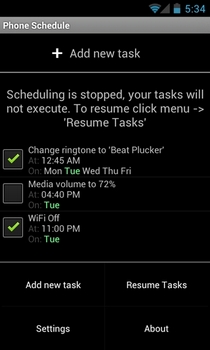
Phone Schedule is a simple, yet extremely effective Android app that lets you create scheduled tasks regarding various actions that you wish could be performed on your device automatically. For instance, using the app’s predefined list of actions, you can opt to create scheduled tasks pertaining to, well, almost anything, such as sound and alert profiles, Wi-Fi, Bluetooth, Airplane mode, device volumes (ringtone, alarm, notification, media) and plenty more. Can’t stick with the same ringtone for an eternity? No worries! With this app, you can also create a scheduled task for changing your device’s default ringtone to a selected one after a specific time duration. The same applies to your device’s default notification tone, too. All you need to do is create a new task with personalized scheduled settings, and forget about tinkering with the relevant actions manually. Instead, the app will serve the favor for you by continuously running in the background, and taking care of all the scheduled tasks. Want to temporarily pause a scheduled task without removing it from the list permanently? There is option within the app for that as well. You can select any task that you wish to put on hold for a brief period of time. Once the specified time period expires, the task is restored with the default settings. Read More

Audio Control: Define & Switch Between Multiple Sound & Alert Profiles [Android]

We’ve seen some very effective ways of instantly switching to a user-defined volume present on Android with sound profile management apps, such as, Volume RockerFine Volume Control and Volume Sync. Adding to the long list of apps from said genre is Audio Control, a free tool that lets you define volume profiles as per requirement. There is no restriction on the number of profiles that can be created, and for each profile, you can specify individual volume levels for your calls, ringer, notifications, media, alarms, speaker phone and the operating system itself. In addition, the app provides you with an option to specify a custom ringer mode (silent, vibrate or normal) and separate vibration settings for your calls and notifications. With Audio Control, not only can you set the required vibration intensity level, but also view all volume levels within the currently active sound profile on your homescreen using the app's customizable widgets. Read More

Connection Planner: Schedule Profiles For WiFi, GPS & More [Android]

Connection Planner is a simple yet very useful Android app that lets users schedule and lock status of various connections or profiles for Wi-Fi, mobile data, Bluetooth, GPS as well as airplane and silent mode. By automatically disabling/locking Bluetooth and GPS as per scheduled timings, not only can the app save you quite a few minutes (or even hours) of battery life, but also prevents any apps from using these connections without your permission. Similarly, by automatically activating silent/airplane mode on your device, Connection Planner saves you from the hassle of toggling these profiles manually while you’re at work or travelling. Read More

Switchy: Easily Create And Switch Between Profiles On Firefox

Firefox saves your information about bookmarks, passwords, and user preferences in your user profile; nothing but a set of files which saves all this information. While this makes perfect sense for a single-user scenario, having two different people share a computer will become a nightmare because of continuous conflicts with each other’s preferences. Firefox allows you to create multiple profiles but switching between them isn’t very easy. While Firefox allows you to create profiles, creating or switching between them is no way near as easy as it is in Chrome. Switchy is a Firefox add-on that fixes this; it allows you to create new profiles, assign different URLs to open at default and keep add-ons, preferences and bookmarks separate from the default profile. Read More

Chrome 13 – Tile Tabs To Side, Multiple Profile Support & Tab Grouping

Chrome 13 is now stable and many users must have upgraded or are in the process of upgrading. The features that everyone is looking forward will probably be the ones announced on the official Chrome blog but there are three other tweaks to the browser apart from Instant Pages, Print Preview and the previously covered hide Omnibar option that we reviewed in Chrome Canary. Chrome 13 now lets you sign in and sync multiple profiles. Each Chrome window can now associate itself with a separate profile. You can now list all open tabs in a vertical panel on the left as opposed to the top and finally, you can select and separate tabs from the same domain or tabs opened  from the same page, to another window by grouping them together and dragging them out. All options must be enabled from about:flags. Read More

How To Manage Multiple Network Connection Settings In Windows

Do you have multiple networks and would like to manage them all in one place? NetSetMan is a free tool for Windows that lets you manage up to 6 different network profiles. Want to change the IP of a network or maybe you want to change the DNS server? Instead of following the extra-long steps in Windows XP and Vista, you can now manage all network settings from one simple window.

Read More

How To Backup, Restore, Create, And Manage Your Google Chrome Profile(s) Instantly

Are you still using Google Chrome and looking for a way to backup, restore, or simply manage the profiles? Your Google Chrome profile contains all information about you, i.e your history, user data, passwords, etc. Google Chrome Backup is a free little tool that helps in creating, restoring, and backing up all your Google Chrome profiles for free. It is a portable app, therefore no installation is required and can be carried anywhere in a USB flash drive.

Read More