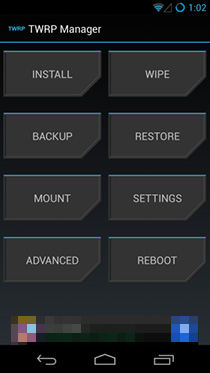
What Is TWRP Recovery & How To Install & Use It On Android Devices [Guide]

Till just over a year back, ClockworkMod (aka CWM) was the go-to custom recovery for pretty much every mainstream Android device. Things have changed a lot since, with a newer player entering the game and gaining a lot of critical acclaim, as well as a huge user base. TeamWin Recovery Project – or TWRP for short – is a fully touch-based custom recovery that was initially developed for Nexus devices, but has since been made available for countless other smartphones and tablets as well, in form of both official and third-party builds. Just like we took you through a very detailed tour of ClockworkMod recovery and its features, we’re going to guide you through all the features of TWRP right after the jump. Read More

HTC One M7 Toolkit: Unlock Bootloader, Install Recovery, Root & More

The HTC One is becoming HTC’s biggest hit to date, and rightly so since the phone is not only amazingly beautiful to look at, but also packs quite a punch when it comes to specs and features. The device was rooted soon after getting released, and we brought you our rooting guide for the device as always, though it required you to do everything manually. If you are looking for an easier way to unlock your HTC One’s bootloader, flash ClockworkMod, TWRP or any custom recovery to it, root the device or any combination of the above, there’s now an all-in-one toolkit available to help you with the process. Read More

How To Root HTC One M7 Using Custom Recovery

HTC One rooted! The device that currently sits on the throne of the Android world has gained root access while the hype from its announcement is still fresh. With its off-the-charts specs and prowess, root access is only going to add to the already-popular device’s appeal. If you are one of those lucky few who somehow managed to grab this device, or are planning on getting one soon, you are in luck. The rooting procedure is fairly easy, though the recoveries needed are not fully functional yet and there have been complaints regarding users failing to boot into a certain recovery. The idea is to flash a recovery, boot into it and install the SuperUser package from within. Not sure whether you should root? Our guide on the top 10 reasons to root an Android device might help you out with your decision. Read More

Make Nandroid Backups On Android Without Booting Into Recovery

Want to back up your Android phone or tablet without having to reboot it into recovery? Better yet, want to do it without even having a custom recovery installed (as long as your phone is rooted)? You can do exactly that now, thanks to a tool that makes them for you right from Android itself, eliminating the step of rebooting into recovery. For more details and the complete method, read on. Read More

All-In-One Toolkit For Samsung Galaxy S3 GSM

The Galaxy S III seems to be making some really fast progress in terms of third party support for software development for this device. Earlier, we had covered quite a few ways of rooting the device, including installation of ClockworkMod recovery as well. For those who fear flashing files via ODIN, XDA-Developers forum member mskip has just released a Samsung Galaxy S3 Toolkit, making life for inexperienced rooters who just got their hands on a brand new S3, very easy. If you thought the functionality is limited to just rooting, installing recoveries and kernels, the toolkit offers a plethora of functions ranging from installing APK files to pulling or pushing files onto the device. Read on for more information on this invaluable toolkit and how you can use it for your SGS III. Read More

Install CWM Touch Recovery Or TWRP On T-Mobile Galaxy S II & Skyrocket

The official Team Win Recovery, ClockworkMod Touch Recovery, and the ClockworkMod recovery (non-touch) can now be flashed on the AT&T Galaxy S II Skyrocket and the T-Mobile in a single click or tap. Installing a custom recovery on your Android device is a vital and important step for those with rooted devices. The installation method is not always the same and varies from device to device, such as installing via ODIN (for Samsung devices), flashing via bootloader (HTC devices mostly), or flashing the file via an update.zip in the the original recovery. That said, one device often ends up supporting more than just one recovery, and these can adopt different installation methods as well. Given all this, it would be nice to have one app or tool that would flash the recovery of your choice straight away from one place. Easy Recovery Switcher, developed by XDA-Developers forum member starskyrob for the T-Mobile Galaxy S II, and the AT&T Galaxy S II Skyrocket is available as an App for Android, and as a desktop application as well. We take a look at how it works, after the break. Read More

AROMA File Manager: Touch-Enabled Android File Explorer That Runs Within Recovery

We at AddictiveTips always love to bring to you apps that provide the users with instant and convenient solutions to their routine technology-related issues. When it comes to Android, things are no different at all. As can be seen in our compilation of 10 best Android file browsers, we have already come across quite a few feature-packed file management apps for the Android platform. Managing your Android’s internal and external storage content from within the OS through a nifty file explorer is one thing, but what if you wanted to avail these tools right from within your device’s recovery? If you often flash custom ROMs or mod ZIP files onto your device, you might have, at least once or twice, forgotten to move the flashable ZIP file to local storage before rebooting into recovery. You can always use your custom recovery's mount USB storage option to remedy such situations, but now, there's a better way to go about it.  Fresh to the arena, AROMA File Manager by XDA member, amarullz, is among one of the very first successful attempts at providing Android users with a fully-functional root-level file explorer that can be operated from within system recovery; a custom recovery such as ClockworkMod Recovery. Read More

All-In-One Hack ToolKit For HTC One X, One S, Vivid, Rezound, myTouch 4G Slide & Amaze 4G

Tool kits for Android devices are a blessing literally. With the abilities to perform multiple functions from one app and mostly via a convenient one click method. XDA-Developers recognized member hasoon2000 has been hard at work developing a toolkit for the latest HTC devices out there, but best of all, he has released versions of the toolkit that are particular to the device at hand. The tool kit covers the recent HTC One X, One S, Vivid, Rezound and the likes of myTouch 4G Slide and the Amaze 4G as well. The tool kit lets you not only root the device, install a custom recovery, flash a custom kernel, but brings with a few very useful extra commands as well. We talk more about it, and how you can use this tool, in detail after the break. Read More

DoomRecovery Brings Touch Based Custom Recovery For Sony Xperia S

The Xperia S gets a touch based custom recovery, called DoomRecovery, based on the famous ClockworkMod Touch recovery, thanks to the efforts of renowned XDA-Developers forum member and developer DooMLoRD. Credit also goes to Napstar from Team UtterChaos for adding in the touch capabilities to the recovery, Frosty666 for the vibration triggers, FreeXperia Team (Bin4ry & jerpelea) and of course, Koush.The recovery is based on the sources from the CWM 5.0.2.x but quite a few changes have been made to bring you the DoomRecovery including some really cool aesthetics. Read on after the break for a preview of the recovery running on the Xperia S and a tutorial on how to get this recovery running on your Xperia S. Read More

Flash ClockworkMod Touch Or Stock Recovery With One Click On Optimus 3D

Custom recovery for a rooted Android device should not be an option, but at times, the procedure involved puts off most users who try and do without a recovery installed. The Optimus 3D is not exactly a new phone on the market, but certainly one of the most popular Android devices out there. For that said device, recovery installation never really came easy, or if it did, you never got the option of 3 recoveries in one package. Yup, thanks to the efforts of XDA-Developers forum member Paki0402 the device gets a recovery toolkit containing the option to flash ClockworkMod recovery, ClockworkdMod Touch recovery and if things get really out of control, the stock LG recovery. Read on for more on how you can use this app for your Optimus 3D. Read More

Root And Install Custom Recovery On Motorola Droid 4 With One Click

Aptly named Droid 4 Utility Pre-Release for Windows, the tool has been developed for the Motorola Droid 4 and released by XDA-Developers forum member mattlgroff which, as the title suggests, includes more than just your one click root. Earlier we covered a guide on rooting the Droid 4, a solution that was out just as soon as the device was released, leaving Motorola wondering where the lacked in locking down their devices bootloader. While we leave Motorola to worry about that, we’re glad they let their guard down, or for that matter, kudos to Dan Rosenberg for his motofail exploit that rooted the device. Coming back to the multipurpose tool, it also brings along a one click root for the Droid 4 on ICS 4.0.3 even though an update is not here as yet. More on the functions and how you can use this tool, after the break!

Read More

Install ClockworkMod Recovery On MOTOACTV Android Watch [How To]

The MOTOACTV (F100) Android watch gets ClockworkMod recovery 5! The tiny 1.6” screen sized Android device is trying to compete with the big guns here, where it was rooted almost as soon as it came out, and a few weeks later, it gets an Alpha version of ClockworMod recovery 5. Does this spell future custom kernels and ROMs for this device? We wait and see, but for now, if you have the Actv rooted, here’s ClockworkMod recovery for you, courtesy of RootzWiki forum member utkanos. Read More

ClockworkMod Recovery Touch For Nexus S & Galaxy Nexus [Install]

If you haven’t been living under a rock, you would know that Koush has been working on a touch based ClockworkMod recovery for our Android devices. Touch based recoveries are becoming more and more demanded since a few have already been launched in the Android world. However, to this date, a lot of users remain committed to the ClockworkMod recovery. So after teasing us with what the Touch based rcovery will be like, Koush has now released the recovery for the Galaxy Nexus (CDMA & GSM) and the Nexus S (GSM), but it’s a beta for now and remains largely untested. So if you own one of these devices, you can flash the recovery to your device quite easily. Read More

Touch Based Amon Ra Recovery For Acer Iconia A500 Tablet [Download & Install]

Touch based custom recoveries are all the hype these days. The Acer Iconia A500, just made the list of a handful of Android devices that had the privelege of getting a touch based recovery. This comes in from XDA-Developers forum member drellisidee who has built this from the Amon Ra recovery source. Yup, this is not your ClockworkMod recovery, but the equally popular Amon Ra. Further credits also go to kjy2010 for releasing a flashable zip file for those already running a custom recovery on their device. However, those without any recovery installed, would have to go through a handful of ADB commands and it’s not exactly the method of choice for many users. Read More

How To Flash Custom Recovery On LG Optimus Me P350

Budget phones, can turn into some really impressive pieces of hardware if the device is running Android. Root the device and users have access to system level files allowing them to make changes to kernels, and even flash custom built firmware's. Of course to do all that you further require a custom recovery. If you own a LG Optimus Me P350 device and have recently rooted it, you can now install the AmonRA custom recovery on the device in no time thanks to XDA-Developers forum member drapalyuk, Read More

ClockworkMod Recovery Ported To Lenovo ThinkPad Tablet [Install]

Just a while back, the Lenovo ThinkPad tablet was rooted, and now ClockworkMod recovery has been ported onto the Honeycomb device powered by the Tegra 2 chipset. The porting of the ClockworkMod recovery comes from jcase over at XDA-Developers and should open the gateway for future custom kernels and ROMs. However, the recovery remains largely untested for now. Credit also goes to  More on the recovery and how – if you wish to – you can install it. Read More

How To Root Samsung Galaxy R & Install ClockworkMod Recovery

Rooting and custom recoveries go hand in hand for all Android devices. If you own a Galaxy R I9003 and still haven’t rooted the device, you can now do so thanks to the instructions by legion1911 over at XDA-Developers. The process is neither a one click one, nor a complicated and lengthy one. You will be flashing the recovery via ODIN and moving on to rooting via flashing Superuser from the recovery. Read More

Flash Recovery & Kernel Images On Android While Booted

A few select HTC and Samsung Android phones have just received an app that lets you flash kernel and recovery images straight from within the Android OS (while booted). The app, called Flash Image GUI, comes to us from XDA-Developers forum member joeykrim, and is basically a GUI interface for the Linux binary. The app can flash kernels, logos, and recoveries on the Samsung Moment, Intercept and Acclaim. Devices like the Samsung Epic however can only flash the kernels (zImage). The HTC Amaze 4G, EVO 3D CDMA & GSM, EVO, EVO Shift, Nexus S / Nexus S 4G and the LG Optimus get to flash kernels (anykernel & boot.img) and recoveries (zip or image files). Read More

How To Install ClockworkMod Recovery 5 On LG Nitro HD

The Nitro HD gets CWM 5! Soon after the device was rooted, users had their hopes pinned on a custom recovery so that custom ROMs and kernels and more could follow. That day is here, thanks to XDA-Developers forum member bytecode64 who has released the CWM v5.0.2.7 for the Nitro HD. Installation is easy, and quick, so if you have a rooted Nitro HD – yes you need root access – let’s take a quick look at what this recovery has to offer. Read More

Install Touch Based ClockworkMod Recovery On Galaxy Nexus [How To]

Galaxy Nexus gets a touch based ClockworkMod recovery. This comes in from RootzWiki forum member unstableapps along with Chris Ennis. The recovery is an Alpha build right now, and is only meant for advanced users at this point. The recovery while sporting touch functions via the on-screen navigation controls (Up, Down, Back and Enter), retains navigation controls via the hardware keys as well. Read More