Install Linux Mint Mate Desktop In Ubuntu 11.10
Due to frequent Unity issues and UI preferences, many Ubuntu users have installed the Gnome 3 and the classic Gnome (Gnome Fallback) sessions. Although Gnome Fallback session brings many of the Gnome 2 user interface features, it is greatly deprived of the eye candy. If you are an Ubuntu 11.10 user who wishes to obtain a Gnome 2 style desktop with a stylish interface, then try Linux Mint 12. In this post, we will provide you with the procedure to install Linux Mint 12.
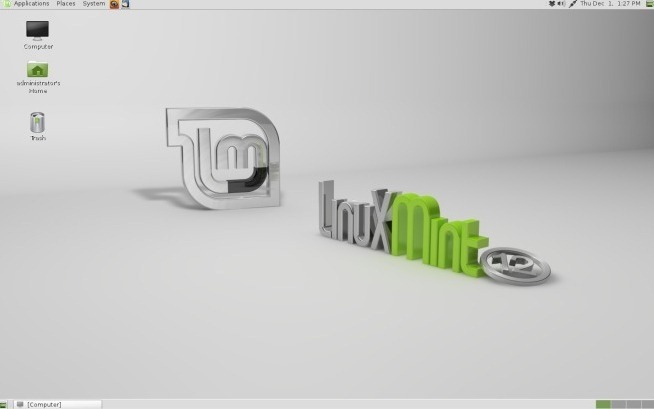
First of all, install MGSE (Mint Gnome Shell Extension) in Ubuntu 11.10 by entering this command in Terminal.
sudo gedit /etc/apt/sources.list
This will pop-up a gedit window, where you will require adding the following line at the end (as exactly shown).
deb https://packages.linuxmint.com/ lisa main upstream import
Once done, enter these commands in Terminal.
sudo apt-get update
sudo apt-get install linuxmint-keyring
sudo apt-get update
After following the procedure described above, MGSE and MATE will become available in Ubuntu Software Center. Now, search and install Mint Gnome Shell Extension, followed by Mint Meta Mate from the Ubuntu Software Center.
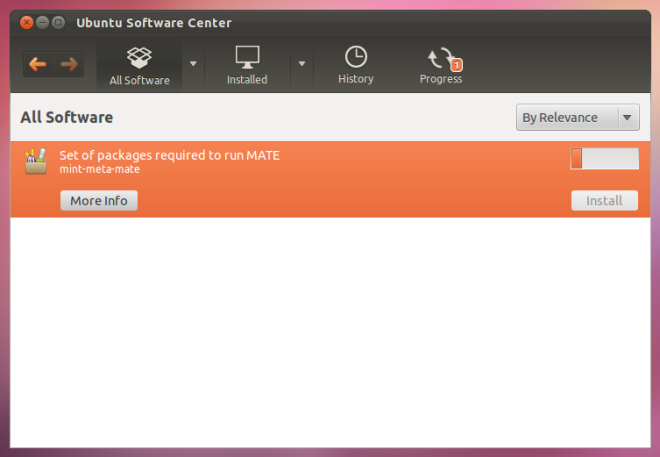
If installation fails, you can fix broken packages using Synaptic Package Manager, and locating broken packages under Custom Filters. Mark and remove broken packages to fix installation issues. It must be noted that Synaptic Package Manager does not come pre-installed with Ubuntu 11.10, and will have to be installed via the Ubuntu Software Center. If you get an error while running sudo add-apt-repository, and are unable to launch Ubuntu Software Center (after installing MGSE and MATE), then run this Terminal command.
sudo gedit /etc/lsb-release
In the gedit window, replace the existing text with the following and hit save.
DISTRIB_ID=Ubuntu
DISTRIB_RELEASE=11.10
DISTRIB_CODENAME=oneiric
DISTRIB_DESCRIPTION=”Ubuntu oneiric”
[via Ubuntu Sharing]

Warning! Installing this tutorial will cause a lot of problems under precise. The kernel and system will be changed into a mint system. The software center and myunit won’t work anymore. Also, you will get a lot of error messages from both Ubuntu and Mint. Crossing Mint and Ubuntu is a bad idea.
The look and feel from the mate-gnome desktop is not the same as we know & like it from former Ubuntu versions. I have tried this tutorial, didn’t like the mate desktop so much. I recommend to try the Gnome classic login, even if it’s sometimes hard to configure. Some settings you can only make with unity, for example activating the display of the day next to the time. The biggest problem I had was deleting applets from the panel. It works either with ALT+Rightclick or ALT+WIN Rightclick. The gnome-tweak-tool and MyUnit can also be helpfull.
To remove the changes described in this tutorial, find all packages that start with “mate” or with “mint” and remove them permanently. Change your /etc/lsb-release back to something like
DISTRIB_ID=UbuntuDISTRIB_RELEASE=12.04DISTRIB_CODENAME=preciseDISTRIB_DESCRIPTION=”Ubuntu 12.04 LTS”
-Regards,
beauman
wow…i don’t know if i could switch over again!!!
You forgot to add one command in the end:
(Perhaps because you’ve written the Software Center approach)
sudo apt-get install mint-meta-mate
Software Center approach didn’t work for me.
This command did!
i tried this several times but still no results for mint when searching in software centre ….?
where can I find this so-called “terminal” in linux. I’ve been trying to install applications into linux to no avail. Please help!
you will find it under accessories menu
I followed the above and now i get “problem with the configuration server (/usr/lib/MateConf/mateconf-sanity-check-2 exited with status 256). so now i’m not reaching the Ubuntu logon screen! wtf??? i think it has something to do with permissions, but i can’t figure it out. i can work in recovery mode, but that’s it! HELP!!!
Frustrated with Gnome 3, would like to remove and install Mint 12. I’m running Ubuntu 11.10 Server so Mint 12 would be my GUI.
End state: setting up home media server in a mixed environment (win, Mac and Linux).
Should I opt for 100% clean install or is there better way?
There should be a huge warning on these tutorials, I cannot now add any repositories, all i get is
Traceback (most recent call last):
File “/usr/bin/add-apt-repository”, line 98, in
sp = SoftwareProperties(options=options)
File “/usr/lib/python2.7/dist-packages/softwareproperties/SoftwareProperties.py”, line 96, in __init__
self.reload_sourceslist()
File “/usr/lib/python2.7/dist-packages/softwareproperties/SoftwareProperties.py”, line 580, in reload_sourceslist
self.distro.get_sources(self.sourceslist)
File “/usr/lib/python2.7/dist-packages/aptsources/distro.py”, line 91, in get_sources
raise NoDistroTemplateException(“Error: could not find a ”
aptsources.distro.NoDistroTemplateException: Error: could not find a distribution template
I am also not able to add new repositories after installing mint by following above steps. Did you find any workaround?
There should be a huge warning on these tutorials, I cannot now add any repositories, all i get is
Traceback (most recent call last):
File “/usr/bin/add-apt-repository”, line 98, in
sp = SoftwareProperties(options=options)
File “/usr/lib/python2.7/dist-packages/softwareproperties/SoftwareProperties.py”, line 96, in __init__
self.reload_sourceslist()
File “/usr/lib/python2.7/dist-packages/softwareproperties/SoftwareProperties.py”, line 580, in reload_sourceslist
self.distro.get_sources(self.sourceslist)
File “/usr/lib/python2.7/dist-packages/aptsources/distro.py”, line 91, in get_sources
raise NoDistroTemplateException(“Error: could not find a ”
aptsources.distro.NoDistroTemplateException: Error: could not find a distribution template
I have to replace the setting in /etc/lsb-release every time I reboot the PC to get the software center to work. How can I fix it permanently?
Yeah, now it’s not letting me load the Ubuntu software manager at all.
I’m considering Ray’s advice and just going to Mint.
I found that if I reset /etc/lsb-release, apparently after every reboot, ‘sudo software-center’ will allow Ubuntu software manager to run.
no solution?!
Remove (full remove, with all files and dependencies)
mint-info-fluxbox
Where is the warning? You will get errors on update-grub after doing this. He is correct that this will further remove the linux mint tentacles, but something is now missing that Ubuntu needs to replace
Yes you now have Linux Mint 12 sort of and a lot better than Ubuntu I might add.
I have laid Ubuntu to rest. RIP Ubuntu.
In fact my advice is do a fresh install of Linux Mint 12…..
You’l be hooked for life.:-)
You are joking right? Mint sucks. It freezes all the time here, plus there are some annoyances like having “duck duck go” instead of google as the default firefox search engine
Is this like transforming Ubuntu into Linux-Mint ???
just be aware, that if you later decide to remove the linux mint repos and keyring that the software center will no longer work and you will have to reinstall ubuntu, as happened to me recently
yes you are right same with me i also removed repos
usc wont work
I fixed it.