Write Single Image File To Multiple USB Flash Drives With ImageUSB
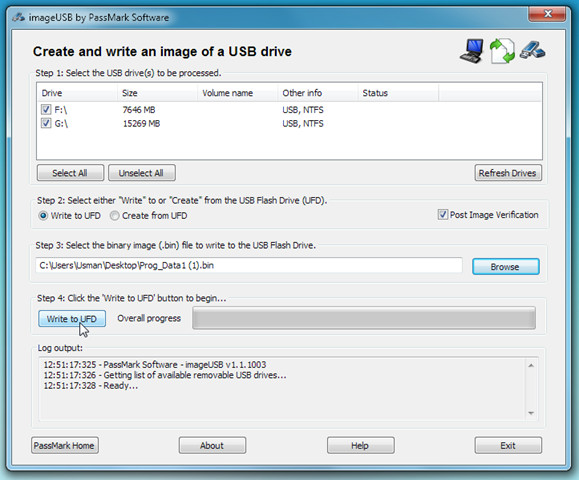
Just a few days back we reviewed multi-boot USB/ISO image creator called XBoot, which allows anyone to create a package of multiple ISO files and then write it to USB in one go. Today we came across ImageUSB, which will be utterly useful for users who write images to USBs on regular basis. ImageUSB is developed on a different concept than XBoot but keeping the very same users in mind. It enables you to write an image file to multiple USB flash drives simultaneously, so you wont need to wait until writing process on one USB gets completed, just plug-in USBs to write data on all of them at once.
Additionally, it allows you to not only write data to flash drive but image can be created from USB onto multiple flash drives as well. These modes can be selected prior to starting the writing process. As of now, it is only capable to write and create BIN files. According to the developer, support for other eminent image formats will be added in forthcoming releases.
Application usage is simple, first you need to plug-in USB drives which are to be written, it is recommended to use pre-formatted disc because it will cleanup all the existing data without any prompt. Once flash drives are listed, specify the mode – Write to UFD (USB Flash Drive) or Create from UFD followed by the location where BIN file is residing. Now Click Write to UDF button to begin the process.
Since writing data manually on more than one USB drives is a tedious job to go by, having an application like ImageUSB will prove to be one real time-saver. It supports Windows XP, Windows Vista, and Windows 7. Testing was done on Window 7 x64 system.
