‘Search By Image For Google’ Reverse Searches Online Images In Chrome
Google recently went Tin Eye and incorporated a reverse image search in Google Image search that allowed you to do a reverse search for images uploaded from you local drive and find other sources where the image was uploaded and different sizes of it. The feature is a great one, it lets you find image resources based on an image you like and it lets you find images of a higher or lower resolution. The slight flaw with it is that you have to save the image on your local drive and then drag & drop it on the search bar in Google Image search. Search by Image for Google is a Chrome extension that adds an option in the right-click context menu to Search Image on Google whenever you right click an image. This saves you the trouble of saving the image on your computer just to reverse search it in Google.
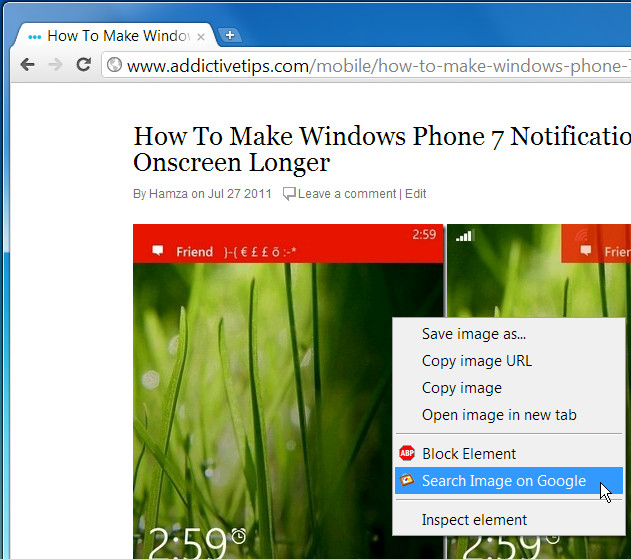
Right click on any image and select the Search Image on Google option, A new tab opens with a reverse search of the image. All sizes of the image and other sites where the exact image is hosted are listed in the search results as well as similar images. This same technique can be used to find an OnlyFans profile using reverse image search or locate the source of any photo you come across online.
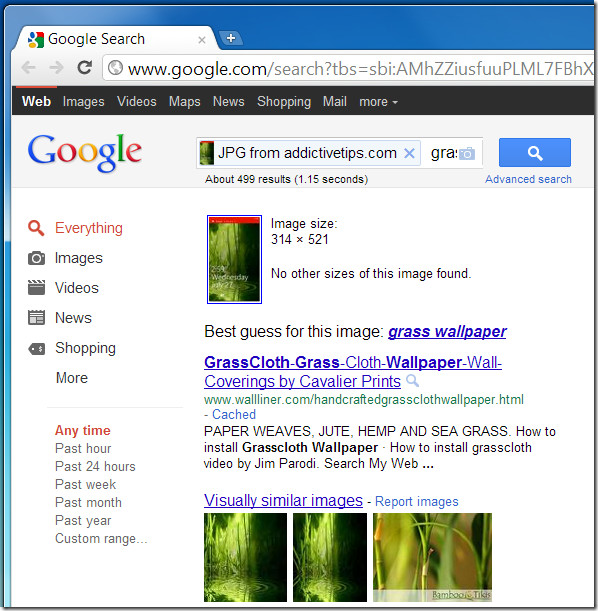
If the image is 100% original, Google will tell you that No other sizes of this image found.
Install Search by Image for Google Extension For Chrome

There’s an extension for firefox also: https://addons.mozilla.org/en-US/firefox/addon/googlesearch-by-image/
You could also click in the camera icon within the images search bar and paste the URL of the picture there (without having to download the image in the first place).
I just comment this method because I don’t like to get my browser (chrome) loading a zillion extensions everytime it starts up, most of which I use rarely (like the one in this article would be).
The point of this extension is that you can perform a reverse search on any web page without having to visit Google Images first and manually copy/pasting the Image URL. This extension makes the whole procedure seamless.