Use NumPad Keys to Position App Windows With WinNumpad Positioner
We have previously reviewed TicClick – a Windows AeroSnap supported application which lets user easily adjust active application windows to different sides of the screen, it offers 9 positions in total with a small on-screen position adjuster to select the position of the window. Nonetheless, the only downside of TicClick is that it doesn’t offer hotkey combinations for adjusting windows, therefore users have to bring up its adjuster and then select the position. WinNumpad Positioner offers what TicClick doesn’t – simple hotkey combinations to adjust windows quickly. As it name implies, it enables user to dock window at any side through Numpad keys combinations. All the Numpad keys are mapped with the screen positions. You can for instance press Win + 5 to bring active window to center of the screen, using 7 instead 5 will dock the window at upper-left corner.
The application offers absolutely no interface and no configurations to tweak with. After the application is launched, you will see it lying in system tray, indicating that it’s now up and running. Now all you have to do is to start using the hotkey combinations for adjusting windows.
- Win + 6 to move active window at right-side.
- Win + 4 to move active window at left-side.
- Win + 2 to dock down the active window.
- Win + 8 to dock up the active window.
- Win + 9 to move active window at upper-right corner.
- Win + 1 to move active window at bottom-left corner.
- Win + 7 to move active window at upper-left corner.
- Win + 3 to move active window at bottom-right corner.
It’s must be noted here that these combinations only work with Numpad keys. In the screenshot below, you can view application windows adjusted through WinNumpad Positioner.
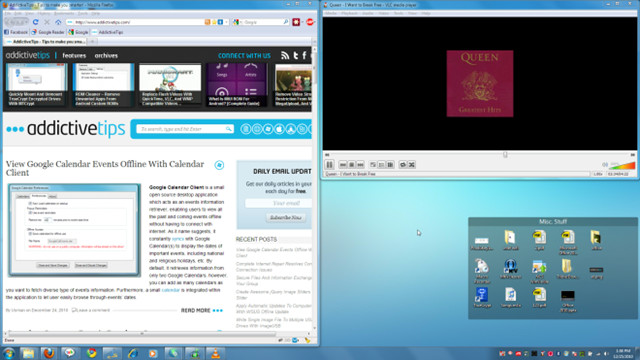
The application works on Windows XP, Windows Vista and Windows 7. We successfully tested it on Windows 7 x64 system.

I like WinNumpad Position
but the same site offers something even better, and unique
http://pbrs.weebly.com/winsorter.html
I am the author of TicClick. I appreciate the earlier review btw. 🙂 For setting positions using the number pad I have written TicTac and TicTacLite. TicTacLite is the same as TicClick, using the number pad keys with the Winkey to correspond to screen positions in the work area, but it is written in C++ and uses no tray icon. The exe is smaller(only 11 kb) and uses fewer resources.
I prefer mouse hotkeys most of the time. That’s the reason I broke TicClick out as a separate utility.
Another good positioning program I’ve found is an AutoHotKey app called WinSize2. You hit a hotkey and it remembers the active window size and position. Nice for apps you always want to park in the same spot.
btw, I have nothing to do with WinSize2 other than I like to use it. This is the page for it:
http://sourceforge.net/projects/winsize2/
My hotkey utilities may be downloaded from this page:
http://www.favessoft.com/hotkeys.html
It hasn’t been updated in quite a while, but I like reSizer (http://sites.google.com/site/zestant2/resizer) for using the NumPad to resize and reposition windows.