YouTurn Brings Auto-Repeat Track Feature To YouTube Videos [Chrome]
Every once in a while you find a YouTube video that’s so addicting you can’t stop watching it, literally. It can be anything from a song cover to a cat video that you just need to watch repeatedly until you get bored or just can’t laugh any more. A lot of people have hit the play button on a YouTube video repeatedly but just having to click the button over and over is annoying especially if you the tab isn’t active and you have to revisit it. YouTurn, a Chrome extension, allows you to auto replay YouTube videos. All you need to do is, click the grey colored circle in the URL bar while watching a video, and the circle will turn green, indicating Automatic Repeat is on. You can toggle auto replay on and off by clicking the button. The extension has limited functionality, but can be of great help for users who use YouTube to listen to music, and miss the repeat function.
Once you’ve installed the extension, click the grey circle located in the URL bar to enable Auto replay. As you do this, the circle will turn green, indicating Automatic replay is on. You can replay all videos automatically; however, when enabled on videos from playlists with the Autoplay option enabled, the extension will not work. In order to replay videos from playlists, first click the Turn autoplay off option displayed at the bottom of the video, and then enable the extension to automatically replay videos.
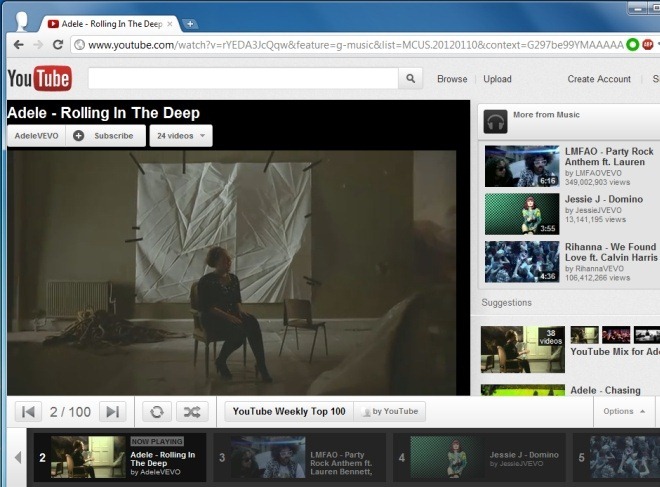
The extension doesn’t just let you loop a video, it also adds a share button that connects with the YouTurn Facebook app and allows your friends to see which videos you’ve been watching in loop. It’s something of an extra wheel since you can share the video directly from YouTube’s share options and there really isn’t much sense in sharing that you’ve watched a video on loop. Should you decide to use the option, you will have to permit the app to connect with your Facebook account and to post on your behalf.
For best replay results, it’s best to hit the replay circle in the URL bar as soon as your video loads. While it will work just as well if you click it after the video has started playing, there may be a slight delay between when the video ends and then plays again.
If you really hate walking up to the system to click the replay button every time the song/video ends, then you definitely need to check out YouTurn. Grab the extension from the link below and let us know what you think.
Install YouTurn For Google Chrome
