A Challenge For Developers : Disabling Advertisement In Office 2010 Starter
Microsoft will be putting Office 2010 Starter for free in the newly purchased computers. But Starter is only the stripped-down version of the Office 2010. With Starter you can write, add charts, and edit documents, etc, but the most bothering thing you will notice is the right pane of the starter, which will contain adverts and keep the window stretched, to adjust advertisement pane.
Many user from around the world have already started using Office 2010 Beta which will be expired down the wire, but it give users a thorough look of what sort of new features Microsoft would be integrating in the final version. Microsoft Office Starter 2010 includes basic functionality so users can view, edit, and create documents. Microsoft claims they are “designed for casual Office users” who apparently will be perfectly fine with reduced-functionality and ad-supported software. But we all know that, Microsoft is looking forward to get a hold of market with giving-away free products to incite more customers.
For short period of time you will be able to use Microsoft Office Beta and Starter on your machine, Microsoft Office 2010 Starter will be containing less features than the original Office 2010. On the positive side Starter will be free for all users, featuring only Excel & Word.
In the past, as we have seen that whenever there is a very useful application launched in the market, which is not free to use, or bound customers with trial periods, licensing, or advertisements, it actually flare up the curiosity in developers to come up with some patch or any sort of script to get over the annoyances.
But it seems that, this time Microsoft is driving on the other side of road where it will not encounter too many crackers to get over the ads pane included in the Starter edition. It should be noticed that whenever a huge product hits the market, the developers also start to show up and start making rhetorical claims about unblocking or cracking, as it happened with Microsoft Windows 7, which is now taking more share of the market than any Windows version has taken up in this small interval of time. It is also not free, and RC has already expired, but you can observe that, many developers came up with patches and cracks for activating Windows, and amazingly some of the cracks are dealing with Microsoft activation process very tactfully.
Coming back to this version of Office, for novice users it will be astonishing that Starter folder will be residing in a very strange location that is in Virtualization Handler folder. Microsoft built an app launcher which actually invoke Word & Excel starter version. So it would be difficult for cracker to go about it as Microsoft embed the app in labyrinth of other apps. The developers who will be looking forward to disable advertisements, would caught in maze of files and facing a great challenge as core apps are embedded in other app, which apparently do nothing, besides invoking Word or Excel(and also updating them).
In retrospect, if we jump in to the details that, whenever users encountered any problem which was deliberately incorporated into the app, developers come up with an idea to get it over with, by building different scripts and patches, that eventually abets user to get rid of the problem, But the dev-team which Microsoft have been working with, must have built this version of office in a way, which would be difficult to hamper and elevate hindrance for crackers, preventing them to enter in to the Office Starter application code structure to start modifying code or changing its structure for adding more features. Whenever it comes to the acme of cracker’s desperation, they have proved that ‘nothing is impossible’. So when Microsoft Starter would hit the market, developers will start to look up for a way to make adverts disappear from the app window. As we have seen many applications have been modified for providing easier use, far reach access, enhancing interactivity, and embedding plug-ins to make the app more productive.
So if you are a placid user who doesn’t care much about the annoyances, then it would be easier for you to get along, but down the line it is possible that Microsoft starts adding more advertisements in Starter version, as it will be used by millions of users around the world. So big corporations would never let this chance to slip through their hands, and eventually start compelling Microsoft to include their product’s advert, slogans etc, in the Office Starter version by shelling out a lot of bucks.
On installing Office 2010 Starter, you will notice that it need consistent upgrading, and it immediately connects with internet whenever you establish internet connection. The backtracking of the whole updating process is difficult. There are absolutely no options available for the user to stop any kind of update process, the fact of the matter is, this version of Office would covertly start updating and adding more advertisement from the back-end. This would lead to set-up a hidden kindle between the Microsoft and developers who will try their best to pry in to the application code/structure to place a script or lines of code that would eventually make the advertisement disappear permanently.
After a thorough research we came to realize that, it will not be an easy task for developers to add a script or to embed any code because of the location where Office 2010 Starter is residing.
C:\Program Files\Common Files\microsoft shared\Virtualization Handler
Inferring from the location, we could assume that it would be consistently sharing data with it’s main server, that’s mean whenever you will go online, it would start making changes.
This is the target file location of Word 2010 Starter, this seems really tough to even find out where it is actually residing.
“C:\Program Files\Common Files\microsoft shared\Virtualization Handler\CVH.EXE” “Microsoft Word Starter 2010 2014006604090000”
CVH.EXE is the app launcher for both Word and Excel 2010, when you will launch Word Starter 2010, it would refer to this executable file, and then CVH.EXE will invoke the app you needed to run, but on running it exclusively, this dialog box appears.
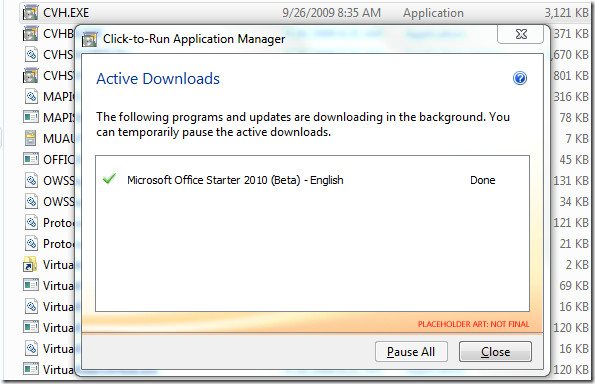
Nothing works on this window except Close button, which we bet, wouldn’t be helpful for anyone, the Help button can be seen, but there is absolutely no help associated with this executable file, as this dialog states “You can temporarily pause the active downloads”, actually it is a charade too, you will not be able to cease the updating process. On running Starter first time on your computer, it will consistently update the files and start disrupting you work as it becomes impassive and starting to show erratic response.
As shown in the screenshot below, Office 2010 Starter includes limited features, as you might have noticed that there are only few tabs, and the most bugging thing would be the advertisements at the right side of the window, which you will going to despise when you start using Starter version.
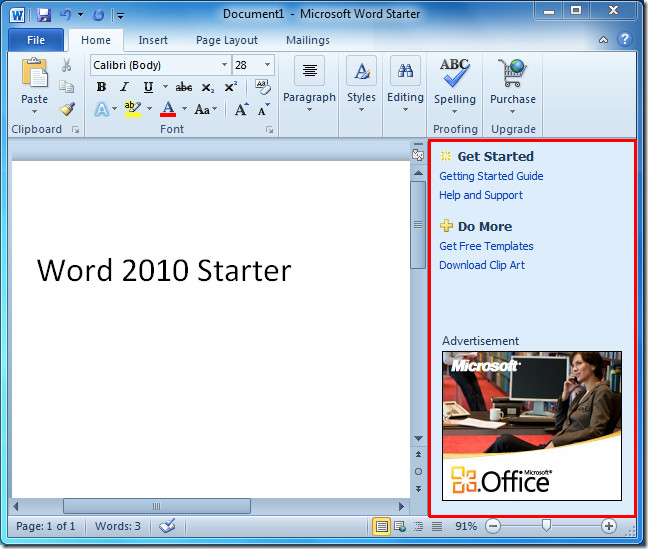
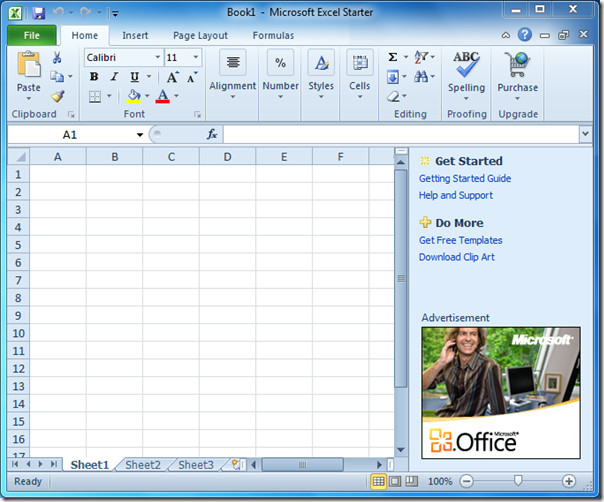
Excel 2010 Starter version contains way less feature than the Excel that will be included in the final version of Office 2010.
Now users around the world are hoping for any developer to show up, providing them with the panacea of the problems, they will be facing with Office Starter 2010, and most importantly make the advertisement pane disappear from the window. We all are counting on the one who will be the first to break into Starter application code.

Hi Sir,
how to use excel sheet Advertisement .example all news Chanel scroll others news.
To say you have to accept the panel as the word program is free is stupid. What use is a car without an engine? The engine is ‘free’ when you buy the car, it does not come with an unmovable billboard in the passenger seat. What use is a word pad that comes with a 1/3 of the screen flashing add that gives you a headache?
stupid huh? your analogy attempt is not describing the situation.
ignore/deinstall the thing if you consider it crapware and don’t want to use it
I have it and note in 2013 (amazing how it was out-dated even in 2010!) it’s still the same! Microsoft should hope to all that is holy that Sony doesn’t make they’re own versions of Excel and Word!
Yeah, the Excel starter ad panel is a cheesy nag to buy the full version. My previous windows had Microsoft works. I have a couple of dozen xlr files. To get them to open excel starter when i clicked on the files I had to change the extension from .xlr to .xls (no biggie, took about 10 seconds per file). But that excel starter ad panel taking up the right side of the window was a non-starter. So I installed free Apache Open Office. During the installation it asked me if I wanted Open Office to be the default for opening excel and word files … Yes I did. Now when I click on an xls file the Open Office Calc program opens up. No adds. Same functionality. No brainer.
HOW DO I GET RID OF THE STARTER WINDOW THAT USES 1/3 OF DISPLAY??
I really would like to use the full screen width in Starter. So how can I delete the advertisements that appear on 25% of thescree.
i cant remove advertisements from my excel some body help[ me?
thank god — before I pull my hair out — the TRUTH. Starter “free” on your pc is nothing short of a lie to suck you in, get a few files or config pref then BOOM, you’re sucked off to cyberspace to “update” by a Q drive that doesn’t exist and on and on. Either the average person needs to buy smart phones (whose competition has caused this volcanic eruption of GREED, even in my oldest admired company GOOGLE, now the worst of the worst of invasive entities), then add an ipad or other brand, and voila, we No Longer Need a machine that would support the Space Station in the hands of the Unknowledgable victim who doesn’t know anything except to go along to get rid of the annoyances.
But the big guys always forget the small brilliant entrepreneures like google USED to be.)
I’ve done my time changing config sys, writing dos utilites, I have another life.
And if all else fails, there the Old Way of writing novels — under a tree with pen and pad, and of course you can pay someone else to sit for hours typing.
We’ve just got to stand up and say NO. The public doesn’t know enough to do it, so for those of you out there to whom CODE is drug of preference, get after it. There’ll be a great big hole opening up soon for you. Mind you, I don’t mind paying for software I used to get free…as long as it’s actually MINE. I told my sister yesterday, who loves gadgets and downloads and kindle and the whole silly mess, You don’t own any of those things. She looked at me strangely and asked the obvious. I said, “Bill Gates owns your computer. He says when it will run and eventually the UPDATES will get you like the boogyman if you don’t obey.
CASE IN POINT: About the third time I didn’t allow cookies from google, I was suddenly locked out of my YAHOO email and spend hrs trying to turn stuff back on just to use my own comp and my OWN inet connect $69 a month. So YAHOO/GOOGLE/YOUTUBE are toast with me. Buying and installing private email client like outlook used to be, going to run MSWorks frm CD if I have to, BUY IPHONE 5, buy some old 40gig pc and load it with win98disk from yrs ago (yes I may have to write some script or heck maybe it’ll just install — nevermind I can buy it for DIRT.
REMEMBER: YOU’RE BEING PREPPED FOR RISE IN GAS PRICES B’CAZ OF EASTER/SPRING BREAK. BUT PRICE GOES UP, PUBLIC STARTS CUTTING USUAGE, AND WOW, PRICES GO DOWN. NOTE: I WAS NOT ALWAYS SO CYNICAL. I WAS JUST PAYING ATTENTION WITH THE PASSAGE OF TIME. Oh. Daytraded a bit saw the manipulation of the market.
Sorry, so long but I NEVER spend precious hours posting and blogging, so now it’s out of my system, thanks for the space to do it. The sun is shining outside!!
damn………….its not going out………give some clues, if any one come across with the solution.
Simple solution!
Click 2nd button in at top right-hand corner.
Drag all 4 sides to fit the screen.
Drag whole window to the right to hide the annoying advert.
Drag small COPY’ window to the left to fill in the empty space
(or a calculator window etc.)
This can be saved as a new BLANK1.
and can be recalled for future use.
I don’t mind the program with limited function but on my netbook the stupid ad panel takes up a third of the screen making the program virtually useless for word processing. Bravo Microsoft you have managed to destroy one of the best programs you had going for you.
When you get free software, what do you expect… go on a market place on your smartphone. pretty much any free app you download have apps as a part of them, do you moan about these too?
Some people really can’t just accept something which is being GIVEN too them…
redneck ad blocker…
“it twas a dark and — iCheezos iNew iImproved! — iStormy iNight…”
I just don’t want to be subliminally infuenced by the ads while working on a word job, and I bought this computer for word jobs only–no internet–so thanks but no thanks.
this is radiculous! with this starter 2010! I promise, my next software will be linux Mac. So stiupid is putting the adverts in the corner. you cannot focus on the word job you have to do. really lack of imagination, especially that this software is design for possibly the youngstes and not advanced users of pc – this definatelly will not incourage them to work, just anoied. And for goodnes sake – microsoft forgot that is producing only a tool – which constantly is not up to perfection. very sad.
Not sure if this will definitely work yet,but I tried right clicking and then zooming in on the advert, zoom in about 20 times and all you’ll see is a blank pane.
Stop complaining about the ads, atleast its free and it has not stopped most of us from using it. Yes, all ms products could be cheaper (they are too expensive) but its amazing how no other developer has developed anything better. Open office.org is ok, but word is still the most accepted world wide.
I also have a netbook, but dont find the ads that annoying, making the ad a bit smaller would be great but their is still planty of room. I create pc tutorial notes with images etc and have no hasseles.
I’m a writer. Having a yellow ad flash every three minutes is VERY distracting. I don’t care if they put an advertisement in my program, but:
1) I did not ask for my computer to have Word. I hate Word. I preferred Works Word Processor.
2) It wasn’t free. It came with my computer. I paid for it by proxy, since I paid for the software on the computer.
3) Don’t make it a flashy piece of crap that makes sure you can’t pay attention to your work.
I installed avira antivirus.Whenever I start office word, avira will pop up message that it has blocked the word to access advertisement via internet.Thats a bit cool..no more flashing add.But that area is still blocked by the add space.
Download Wordweb (a free dictionary programme) set it to “stay on top” in the preferences, and then resize it so that it covers the ads.
Worldweb is a VERY good idea. If you’re someone who uses thesauruses/dictionaries while writing all the time, then this would be the perfect thing to cover up the ads with. It’s something useful and does the initial job. 🙂 Love it, works fine.
All I have to say is OfficeLibre!!!
now stop crying, you should have know about it already!!!
That’s it Microsoft! My next computer will be a MAC!
yep, I stay with my mac, the ads are driving anyone insane.
its the time to users to search for other OS… and for sure i choose MAC…….
PLZZZZZZZZZZZZZZZ BUY MAC..OS…..
These are the steps hide the ads
Click the File tab.Under Help, click Options.Click Trust Center, and then click Trust Center Settings.Click Privacy Options, and then clear the Allow personalization of ads in Microsoft Office Starter check box.
better u can buy office..not MAC 🙂
Try C++, just insert a random line of text and see what happens! (make sure it has the words microsoft office starter in it). randdfsgdfsg4213423=423….qwreijfpeoih1234324twg 658748%^e$r&i^%e*.
this is so horrible, since I have a netbook with a 10 inch display that panel takes up like a third of my screen and i see nothing
At the bottom of the page there are 4 options on viewing the page: print layout, web layout, outline & draft. Switch to web layout and it will let you see the document without scrolling left or right. Its all squished, but at least no more scrolling back and forth.
I wrote a simple utility to hide the panel, for my personal use. Wasn’t too difficult.
I’m sure there will be others too.
Mind sharing this simple utility with us?
try a post-it note!
Pretty please.. 😉
Anyone got rid of the stupid right panel yet? Thanks!
Yes, I installed Openoffice.org
lol.