Android 2.3 Gingerbread Keyboard For EVO 4G & Droid Incredible In Red, Green and Blue
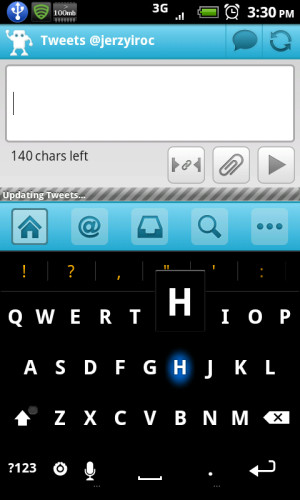
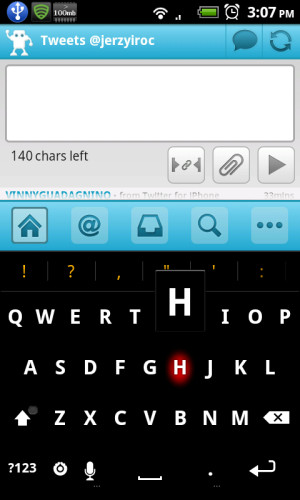
Although the latest Android 2.3 Gingerbread keyboard with its revamped looks has become quite popular in the past few days and has been ported to several Android devices, the XDA-Developers community sees no reason to stop at the default. Thanks to them, you can now install the Gingerbread keyboard on your HTC EVO 4G and HTC Droid Incredible in three different colors – red, green and blue.
Earlier today, developer UserName- released versions of the Gingerbread keyboard in red and blue in addition to the default green for HTC EVO 4G, and member todd3835 has discovered that it also works on HTC Droid Incredible. All versions are based on the latest Gingerbread keyboard, include auto-correct and predictive text input, and have a black background theme with a colored glow on key press.
To install, just download the color of your choice from the links given below, flash it to your device in recovery mode and you’re done! Tired of using red? Just grab the blue or green version. To view more screenshots, report bugs or request versions for other devices, contact the developer at the HTC-Developers forum thread.
These keyboards have been tested to work on HTC EVO 4G and HTC Droid Incredible, but may also work on other Android devices with the same screen resolution.
(https://www.addictivetips.com/app/uploads/2010/12/Gingerbread-keyboard-Red.zip) Download Android 2.3 Gingerbread Keyboard (Red)
(https://www.addictivetips.com/app/uploads/2010/12/Gingerbread-keyboard-Green.zip) Download Android 2.3 Gingerbread Keyboard (Green)
(https://www.addictivetips.com/app/uploads/2010/12/Gingerbread-keyboard-Blue.zip) Download Android 2.3 Gingerbread Keyboard (Blue)

Flashed this to my EVO and the original keyboard is still there.
No idea on what might cause this. Perhaps the original developers of these keyboards can help. Just visit the forum thread from the link given in the post and join the discussion there.
It replaces your keyboard. You can restore a backup if you took one prior to flashing this one. It is always advisable to take backups before flashing anything from recovery in case you think you would want to revert back to the previous version again.
What you can do is look for the stock keyboard for your phone in flashable zip format and just flash it from recovery to replace this one with that one.
how do I uninstall it