Clear And Disable The Recent Documents List In Ubuntu Linux
Ubuntu lists the recently accessed documents in the Places > Recent Documents option. You should make sure this option is cleared and disabled if you don’t want others to see your activities. We will address the following two points in this post:
- How To Clear the Recent Documents List in Ubuntu
- How To Disable The Recent Documents List in Ubuntu
How To clear the Recent Documents List in Ubuntu
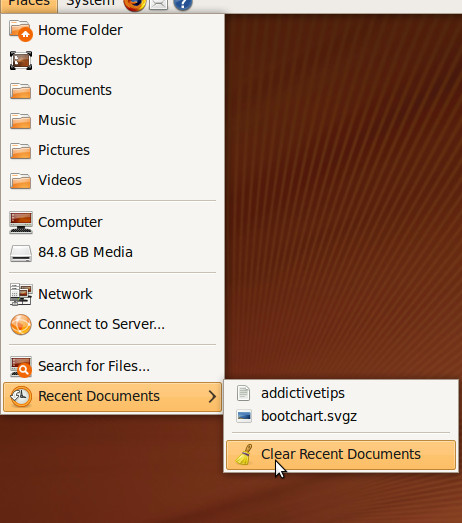
Its pretty straightforward to clear the recent documents list. Go to the Places > Recent Documents option, here you will see the Clear Recent Documents option, click it to clear the list.
How To Disable The Recent Documents List in Ubuntu
If you don’t want your activity to be saved, then go through the following steps to disable it. First of all open the .gtkrc-2.0 file by running the following command in the command prompt.
sudo gedit ~/.gtkrc-2.0
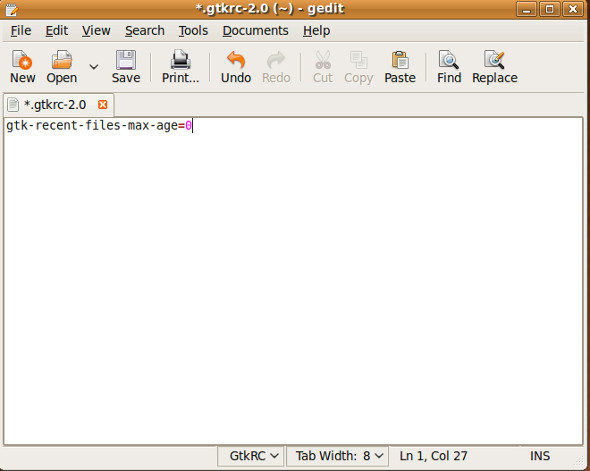
Now this file will be opened in the Gedit text editor, add the following line of code in it and that’s it.
gtk-recent-file-max-age=0
The following screenshot illustrates it.
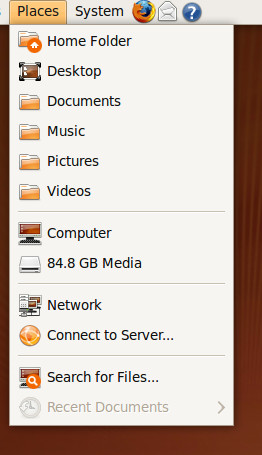
Now the Recent Documents option will disabled.
Enjoy!

thanks a lot! it works with the gnome session fallback in Ubuntu 12.04LTS, but i had to create the file cause it did not exist
For 12.04 LTS
all settings -> Privacy -> Record Activity = Off
AAFCIT you\’ve covered all the bases with this answer!
thanks dude, really appreciated
the right is
gtk-recent-files-max-age=0