Batch Copy Or Move Files At Scheduled Time Intervals
If you want to copy or move files from one destination to another, it is quite an easy task. But to copy or move files on a specific time of the day seems impossible. You must be wondering what is the use of moving the files on a specific time of the day? Well it is sometimes useful where one has to move files for backup purpose on a specific time or move some files to the server on specific intervals.
Sadly this most demanded corporate feature is not included in any version of Windows. FileMove Lite is a useful little application that can come handy in such situations. It checks for free disk automatically, and overwrites any existing file that is present in the folder where you are moving or copying the file.
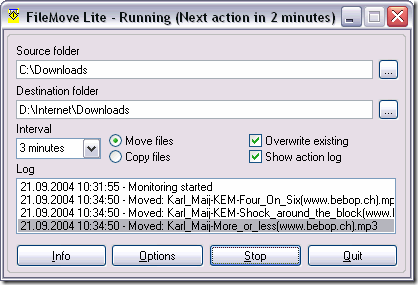
Simply enter the Source folder, the Destination folder and the Time Interval. Once you have done this, you can choose weather you would like to Move or Copy the files, if you want all files to be overwritten in the destination folder, remember to keep the Overwrite existing checkbox ticked. Now click Start, and leave the rest to this software, it will start copying or moving the file instantly.
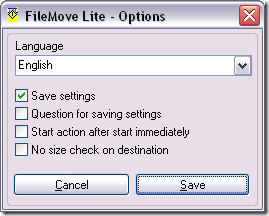
If you don’t want to check the size on the destination where you are copying/moving the file, you can click on Options and then check the No size check on destination checkbox. That’s all. It is a very useful tool that can come handy if you want to make frequent backups, and specially if you are a network administrator. Enjoy!
