Cannot Find Windows 7 Documents & Settings?
I have been reading various complains in almost every forum regarding Windows 7’s Document and Settings. Most complains are that they cannot access this folder. These users are those who migrated from Windows XP to Windows 7, thus skipping Windows Vista.
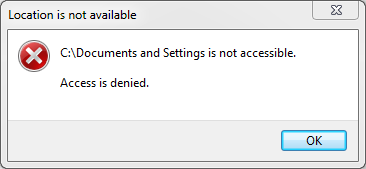
What they should know is that Documents and Settings does not exist, when you try to open it you will be shown an “Access Denied” error. Even changing the permission won’t help.
Microsoft replaced ‘Documents and Settings’ folder with ‘Users’ folder in Vista(thus same is the case in Windows 7). So if you want to access the Documents & Settings, you are actually looking for Users folder. 😉
Update: Reader Guillaume points out that there is a junction link. It is true but remember that not everyone gets redirected. For e.g, see screenshot below:
Want to ask any other question? Don’t hesitate to contact me. Enjoy!

I’m trying to set up email (not working yet). Before my rebuild (just got back yesterday), my mail files lived several layers under Documents and Settings. Now, that does not show anywhere. I already changed the folder views and did the UAC thing, but I can’t do the step with D & S. There is no Security Tab listed when I right click. Although the computer shop retrieved most old data, not the stuff under D&S, where my mail files lived. Unless I can at least put some of the older address book files in the right mail file, I will have to rebuild 26 years of addresses one at a time. I’d like to follow Nicholas’ steps anyway, but there is no security setting.
I don’t know exactly what you mean by “rebuild”, but if the files you’re looking for aren’t in C:Users anymore, then they aren’t in that folder when accessed via “Documents And Settings” anymore either. So just search for your files in C:Users.
Please help me…..!
The last set of directions did not work for me. Properties shows c:\documentsandsettings as a short cut. New win7 64bit user
I found a solution to show the Documents and Settings
yesterday i open it
look!
1. go to Organize
2. folder and search option
3.choose show all hidden files,folder and ….
4.open my computer and choose c:
5. right click on Documents and Settings then properties
6. choose security then advanced
7. on Permission choose change permission
8. for example if your account name is “windows” select it and choose Edit …
9. give yourself full access and check the check box to apply it to all the folder
Documents and Settings contain .
note : if not do this issue for any folder do you want to open it
10 . enjoy !! windows 7
I’m realy stuck. I believe I have done everything correctly, but when I go to C:
Organize
folder and search, show hidden files,
I STILL do not visually see documents and settings anywhere.
I have Windows 7 Professional edition
Help!!!
okay,
you should choos hide protected system… after the step 2. of upstairs solution.
I’m a chinese boy.O(∩_∩)O
Ah, my bad, I [i]can[/i] directly use the junction dir from within Total Commander, but indeed not from within Explorer (now I remember). No user has the rights to access it, not even admins, judging from the Security tab, which makes me wonder how the redirection then goes (for some legacy applications that might have 'Documents and Settings' hardcoded). Somehow I can take ownership of the link (takeown /f) but it still prohibits me from changing the permissions. Stuff like C:Documents and Settings%username% [i]does[/i] work on the other hand. Strange behavior.
Check my reply above. I have added an update to clarify my point. 🙂
Huh? What are you talking about? There's a perfectly valid junction link to Users for compatibility reasons, so it you go to C:Documents and Settings, then you'll end up in C:Users, not problem at all! Same thing with C:Documents and SettingsAll Users, which points to C:ProgramData…
Ah, my bad, I [i]can[/i] directly use the junction dir from within Total Commander, but indeed not from within Explorer (now I remember). No user has the rights to access it, not even admins, judging from the Security tab, which makes me wonder how the redirection then goes (for some legacy applications that might have 'Documents and Settings' hardcoded). Somehow I can take ownership of the link (takeown /f) but it still prohibits me from changing the permissions. Stuff like C:Documents and Settings%username% [i]does[/i] work on the other hand. Strange behavior.
Check my reply above. I have added an update to clarify my point. 🙂
Huh? What are you talking about? There's a perfectly valid junction link to Users for compatibility reasons, so it you go to C:Documents and Settings, then you'll end up in C:Users, not problem at all! Same thing with C:Documents and SettingsAll Users, which points to C:ProgramData…
Huh? What are you talking about? There's a perfectly valid junction link to Users for compatibility reasons, so it you go to C:Documents and Settings, then you'll end up in C:Users, not problem at all! Same thing with C:Documents and SettingsAll Users, which points to C:ProgramData…
Check my reply above. I have added an update to clarify my point. 🙂
Ah, my bad, I [i]can[/i] directly use the junction dir from within Total Commander, but indeed not from within Explorer (now I remember). No user has the rights to access it, not even admins, judging from the Security tab, which makes me wonder how the redirection then goes (for some legacy applications that might have 'Documents and Settings' hardcoded). Somehow I can take ownership of the link (takeown /f) but it still prohibits me from changing the permissions. Stuff like C:Documents and Settings%username% [i]does[/i] work on the other hand. Strange behavior.
1) Go to control panel
2) Open folder options (while looking at classic view)
3) Make hidden folders and protected operating systems files visible
4) Go to C drive
5) Right-click on Documents And Settings
6) Go to security tab
7) Click “advanced”
8) Change the bit where it says permission is ‘system’ to your username
9) Apply – It will pop-up something
10) Close the properties
11) Right-click again
12) Go to security tab again and make sure all ticks indicate full access to folder
13) You can now go into App Data etc, listed in subfolders for each program (it’s a view of the re-direct to “c:users” that has all the normall hidden system stuff in there too)
Enjoy. (The effort i had to go to in order to manually fix winmediaplayer.
Genius! A spot-on reply! You cut through the cr*p and went straight to the essentials. Thanks for the advice, it’s solved the nightmare of trying to delete the tens of thousands of images that MP had indexed on my NAS drive. Removing them manually in MP was taking literally hours.
Cheers
Pete