How to Fix MSVCP71.dll Missing Errors in Windows
Do you get Msvcp71.dll and Msvcr71.dll missing error when running a program in Windows 7? Both are Microsoft C Runtime Library files and it seems as if Microsoft forgot to add them to Windows 7. Some programs require you to have both files for it to work successfully.
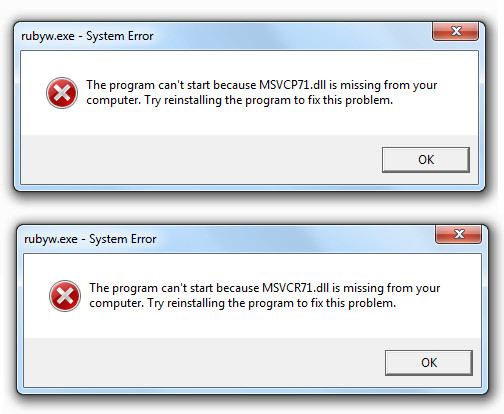
We have uploaded both dll files for you (grab them from the bottom of this page), but the bigger question is how to install them? Before we begin, have a look at the errors in the screenshot below.
Installation In Windows 7 32-bit OS
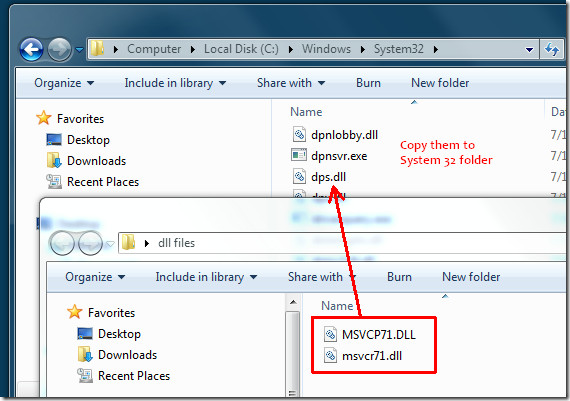
If you are using Windows 7 32-bit then you need to put both dll files inside Windows/System32 folder as shown in the screenshot below.
Installation In Windows 7 64-bit OS
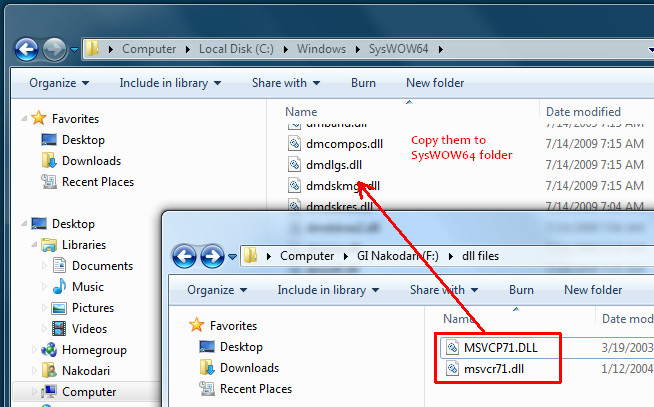
If you are using Windows 7 64-bit then you need to put both dll files inside the Windows/SysWOW64 folder as shown in the screenshot below.
We have put both dll files inside one zip archive, simply extract them and follow the above guidelines to install them.
Download Msvcp71.dll and Msvcr71.dll files.
Enjoy!

You saved my day, thank you
Tahinks you bast
Teşekkürler windows xp 32 bit ve windows 10 64 bit te işe yaradı.
Saved my life thank you!
Worked like a charm. Thanks!
i downloaded both the files….but can’t copy those dll file to system32 folder….what should i do???
Great help! Thank you!
Thanks Alot!
i can’t open the dmdlgs.dll !!
Wow… its very simple and thanks a lot
Wow it worked for me thank you guys so much!!
Microsoft not genuine copy of windows OS errors show, When you run cracked or not genuine windows. You can fix not genuine windows error by registration your OS, For which You need to enter Microsoft 25 digits product license activation key getting from ODosta Store. You can buy retail product key from Microsoft, but its very costly, So I recommend you to buy cheap key code from ODosta Store, as I recently bought it, activated it and my issue has been fixed.
https://uploads.disquscdn.com/images/1e4b05fef1cb98056c22364c61e5b6168c2418a8041002fdb8438d0fdee4854e.png
i installed the dll files to my system32 but a program still doesn’t want to function, how can i fix this?
Many tnx!
I’ve solved problem with Siemens NX10 CAM component.
THANKS
THANKS SO MUCH BRO!
Thank you ever so much!! This is just what I needed. I uninstalled a RealPlayer application and it took these .dll files with it. So glad to have these little files back. Audible Manager won’t launch without them.
Windows 8 too?
yahooooooooooooooooooooooooooooooooooooo i got it by adding in SYSWOW
Great !!!!!!!! ,,,,,,,,,,,,,,,,,,,,,,,,, love you 🙂
it’s working thanx a lot
it works .. thanks
Awesome software.
Thank you
not working.
thanks a lot !! really worked for me…..i kept searching Microsoft forum and other sites….but none of em worked….
yeah thanks bru
Thanks! You save my day! =)
your information was very to the point & most useful! thanks a lot.
wow! thank you sooo much for this. More power! 🙂
Thanks a lot
I am running Win 7 ultimate 32 bit VM and DLLs were not in system32 folder, thanks for files.
Thanks sir… Its working perfectly..
But now i cant hear the speach sound..
Will you plz help me.
Thanks again.
The problem still exists in Win 8. Your solution worked. Thanks!
thk u so much, it works 🙂
i have Windows.dll is missing what can i do ?
Your solution works! Issue solved, thx!
Thankyou so miuch! it worked 🙂
I can’t find the place where I have to copy msvcr71.dll..
Thank you:)
is there one for windows 8?
yes …got..thx very2 much
thank you
thank u so much …. 🙂
Thanks the 64 bit solution worked for my Win7
Worked perfectly, Thank you!
Thanks… works fine for me…
Great fix thanks Nakodari.
thanks it solved my problem
Thanks so much! Couldn’t get Twine to run all of a sudden. Tried a few things but nothing worked until I found this. Thanks again!
Thanks! It’s solved my problem!
Nice thanks! Fix my problem with XRay SDK 0.4 🙂
Thank you very much… it is working.
This worked fine yesterday, but the file msvcr71 went missing today. I tried pasting the file again today but still nothing??? (using DAW software Ableton live and cant find VST plugin)
thanks so much
Your tip worked great for me in Windows 7… Thanks!!!!!
Thanks so much!
Good! Thanks! =)
Thank you very much, you helped me a lot.
Its working. . .thanks a lot. .!!
Thanks for the tip. My Windows XP Mode Virtual Machine (on Windows 7) was missing this file. It caused AccelDSP to complain with error -107374515 and compilation error E-C-0010 codes when running Generate fixed point or Generate system generator. Copying the file over to the VM’s system32 from an old XP machine worked great. Cheers!!
Thanks for the file. It fixed my issue.
Shoeb
Thanks. Your post saved my day.
thanks ! its working in windows7 64bit 🙂
Just copy on that location and restart Toad (C:WindowsSysWOW64)
Thanks
Works fine, thanks.
Excellent, I had this error on my Windows 8 Pro 64bit OS when running an old 32bit version of Photoshop and adding your files to the SysWOW64 folder really did fix it!
Thanks, Worked for Windows 8 32-bit!
Fixed my issues, thanks a lot bud.
thanks man !…simple and quick (also risky…are these files clean ?..lol… the salt and pepper of life)
Thanks!:) Sure you can’t rust all downloads, but you can be observant
Excellent it worked….!!!!
Microsoft Visual C++ Redistributable doesnt help.
thank you so much!!! you cant even imagine how !!))
foobarbaz you are moron
thank you very much .it worked
thank you sooooooooo much,,,,,
thank you very much that has helped me a lot i can finally finish what i needed to
Thanks again
doesn’t work, site reported to google
Brilliant, thanks.
Wow. Thank you.
thank u very much
THANKS SO MUCH. I’m a computer technician/ network engineer and the error had me stumped!! This fixed it first time for me.
i found required dll SQL developer JDK. pasted inside sys folder, it worked.. thanks
Oh Thanks Dear,,, It Works…. And It’s Really Very Helpful For Me…
Thanks I got it…. 🙂
thanxxxxxxxxx
thanks a lot for the tips. it works 🙂
THANK YOU very much !!!!!!! well solved my problem !!!
Awesome fix. You’re a lifesaver.
Lifesaver! Thank you! I’ve been struggling with this issue for some time.
You guys saved my life! Thanks
Thank you very much for your help worked perfect.
am getting this error Can’t find setupUi.dll! how to clear. can any body help
Thanks. worked
Very vary thank you
Finally..It works! Thank u very much…!
Thank “U”
thank you
Thanks a lot……….
THANK YOU VERY MUCH!!!
Thank you verymuch.. My long standing issue is resolved. Additional tip: Peoples who doesnt have access to System32 folder may paste the downloaded dll files into their own setup file folder(prefereably bin folder if any) which they are trying to access. It works for me.
IT sCREWS UP YOUR COMPUTER
thanks alot ,work 100%
Thanks a lot….Dude
thanks very much
this is exact answer for this problem. hope this will helps.
thank u very much…..
I might also add that on the Microsoft site is says to NOT install the .dll into the windows directory.
Someone else mentioned it is a Net 1.1 file, i have read that is well but i have also read it is part of the Windows 7.1,so idk this should be explained simpler i guess..Net framework 1.1 is very old ,i am not sure if it can even run under the new Win7 infrastructure but maybe it can and is a part of both files. 1.1 and 7.1.
I have yet to see the answer to this problem,there has to be a definite reason why it just all of a sudden happens to some peoples system.
First of all ,in the RUN field type in any of those files and most likely MOST will see they are already there.
It seems i actually have 3 of the same file,go figure.]
This could be a tricky way of malware disguising itself as a legit file.I see no reason why i would have 3 identical files.
I have run Adware which for years many know is a VERY shotty company,run by former scammers.Many think they are on the up n up now,but we will never really know.Another thing that all of us might be doing is running an anti virus,then allow the program to fix the problems.Often Malware will attach itself to legit files therefor when the anti virus cleans it out it also removes the needed file,especially .dll’s.
What we need to really get a better answer so all can realize the problem,is WHY do our machines say the file does not exist when it does?
How did I lose these modules? !!!
Anyway awesome solution !
Amazing, thxs a lot…
Thanks alot
tigan should think before speaking (writing). Msvcr71.dll is part of .net 1.1 not c++ redistributions. The files in the link above are digitally signed so check the signatures before installing these files. Thanks for the post here. You can also pull the same files from C:WindowsMicrosoft.NETFrameworkv1.1.4322 directory if .NET 1.1 is not already installed.
Thx a bunch! 🙂
thanxx
hey thanks a bunch worked out perfectly.
thank you so much………………………….
THANK YOU SO MUCH
Thanks!
THANKS!!!!!
thanks !!!!!!! It works 120%
Thanx..works good!
It Works!Thanks Alot!Appreciated!
Thank you for the post! Microsoft’s command line “SFC /SCANNOW ” did not work for me, but this one did.
Thank you, for some reason it didn’t install the ddl files using the official installer.
thank you
thanks for your share man.. it helps me alot 🙂
thanx alot….
that really worked for me,,,, thanks you very much admin. i been trying to install and uninstall the program several time but didnt worke. but your two files worked for me. thanks again
if i make any mistake can it harm my compjuter?
Thanks…
Solved!! 🙂 🙂
OMG THANKS!!!
thank u very very much it works
I DID THE SAME THING BUT STILL THE SAME PROBLEM. BY THE WAY MY WINDOWS IS NOT GENUINE. IS THAT THE MAIN PROBLEM WHY MY PROGRAM IS NOT RUNNING ? !
thank you so much
thank you so much
Thanks so much.. I was looking for this information and your fix worked perfectly.
thank’s a lot… its really help!
thanks
thanks you you are best
Thanks a tonne
Thanks
THANK YOU! I have searched for hours to fix this problem.
Hallo, ich have no rights for windows. So i am not able to copy the file. Please help me. Sorry for my english.
woowww thanks!
Worked for me too. Thanks!
You made my Day 😀
Thank you very very much!!
very easy and very fast!!
Thumbs up xD
Thank you
I was having this problem with Altium Designer Camstatic document opening. The file replacement solved the problem. Thanks a bunch 🙂
thanks …buddy it helped me
Thank you so much! My problem is sorted! 🙂
I have problem in installing one software, that is in window/system 32/msvcrt.40.dll……. help to troubleshoot plzzzz
Thanx you very much, really fixed my problem …
Thanx. Good site. Clear concise instructions. Up and running again in under a minute!
Awesome! totally works . thank you
Thanks a lot! it really works!
hi
there is a similar error in my windows 7
i get the error hcnfs.dll is missing
please help me
hi
there is a similar error in my windows 7
i get the error
please help me
tanx ….
thnx for help ^^
totally worked! Thanks so much for providing these!
it’s working !! thanks !!
Worked perfectly! Thank you!!
Thanks so much. I spent most of my day trying to figure this out and how I was to fix the problem and this has fixed the problem. Thanks so much.
Folks like you brighten my day.
Thanks!
According to an MS KB article (http://support.microsoft.com/kb/326922). Although these files are very very commonly required they are not actually part of the base OS and therefore should *not* be installed in system32/SysWOW64 but instead in the same directory as your application. The trouble is because they are ubiquitous they are often taken for granted and not bundled with the app.
yay..
it’s working !! thanks !!
Thank you so much for your help, it works like a charm 🙂
Your tips are really addictive it works flawlessly … Thanks for sharing your experience with us buddy!! Keep going and make us more addictive.. 😉
Thank you for your helping
Thank you for sharing the solution. c”,)
thank u so much :-*
Thank you got My Corell Painter to work again. I put it in windows 32 bit and 64 bit, because I didnt know which one since I had both I hope I don’t have any problems because of it. Thanks again for the files and the steps.
Thanks!
Thanks very much for this quick and simple help.
Oh my goodness thank you so much…that silly message was driving me crazy…
didnt work
Thank’s bro…. alot…
Thanks!
Just what my application wanted…..
Quick and easy!
Thanks! easy
thx you very much.
it works for my qvod.
worked.
ty
thank you very very much ……..I got so many problems …….from this issue……………thanks again…
Thanks, its works great! Problem solved!
Thanks very very much
I resolved my problem
you gays are great
Thanks again and again
Thanks so much really I am very happy I found it usefull
thank you so much, it saved me, no doubt.
Thx a Ton man. May GOD bless u. U bring me out from frustration.
Thx once again.
!!!Long Live!!!
Muito obrigado, foi fácil e rápido, resolvido.
Thanks.
THANK YOU SO MUCH!!!!!
thank u so much its work thax a lots
thanks for those files………..
OMG IT WORKED! Thank you so much! I really appreciate it! ^^
thank guys..helped!
thank you so much
bien ahi funciono perfecto, thanks you save the day!
Thanks, this has worked perfectly
dude u a geniuse shot for them help man apreciate it what would dummies like us do without people like you 🙂
Thanks a lot man. i appreciate it! 🙂
thanks i hope this works !!!!!!!!!!!!!!!!
Thank you sooooo much. Couldn’t run the video on my DVD. You’re the BEST!Works GREAT!
THANKS ALOT BUDDY!!!!!!!!! MY BACK UP FILES WHERE NOT WORKING BCZ OF THIS ERROR.
Thank a lot! Its my first time to use Windows 7 and I’m not familiar to it! ^-^
I installed both .dll files for a program to run which required it but when I tried to run the program, it gave me this error message:
The procedure entry point ???1?$RCPtr@UStringValue@LM_UniString@devtech@@@devtech@@QAE@XZ could not be located in the dynamic link library AdobeLinguistic.dll
what does this mean and what are the steps to rectify this problem? thanks in advance for your help or anyone reading this who has a solution and would like to share it. 🙂
It means that the version of AdobeLinguistic.dll that the program found is not the one it expects (the DLL file didn’t understand the call by the program, so to say). The solution is to reinstall the software that provides the required version of the file.
that was helpful , thanks.
I am still getting the error message (Windows 7 64 Bit). I tried the System32 folder, I tried the SysWOW64 folder, I even tried the normal system folder. Same result: error message, when I try to install Skype (which by the way has been running well so far on my Win 7 until the last update two days ago….)
Any suggestions?!
Reall…y Tanks you very much…. !!!!
Pasting in the Msvcp71.dll And Msvcr71.dll files directly into the System32 folder resulted in the successful installation of previous game programs which earlier flagged the missing files as being necessary to run the programs.
Thanks very much for everyones input
Thanx a lot..worked great!!!
trying to download /Msvcp71.dll and put in system 32 it dosnt work help help help help help plzz
thankz it is working very well
Thank you very much.. thank thank you very very much muchhhhhhhhhhhhhhhhhhhhh
worked; great thanks
Yes , it’s working for me 100%
Thanks =]]
TQVM…..(^_^)
You shouldn’t download dlls and executables off of random web pages and manually install them. You should get the normal installer from Microsoft’s download page. Look for Microsoft Visual C++ Redistributable.
If an application doesn’t find it then they haven’t packaged the installer properly with the redistributable.
Doesnt everyone love the smartarse who replies with a pedantically correct but utterly pointless reply. Sure the files should be there, but they aren’t – isn’t that exactly why we are here??? Knob!
You’re the kind of moron, who does stupid things like download DLLs from random web sites and copy them to Windows’ system directories, and then a year later starts dozens of threads on the forum of some random game or app whining about how it doesn’t work on his system. If the official installer doesn’t work, why don’t you try and figure out why, instead of meddling with hacky solutions like this?
How is providing the correct way to install these files a pointless reply? The only pointless reply I see here is yours.
Thank you, Tigen. I believe that took care of it, and from the Microsoft web site.
Have done that, still had the problem. Now the problem’s fixed. MS Install couldn’t do that!
Which one do you need? im having this same issue and i to dont want to download from some random site, but which distributed pack has it? is there a link?
Mirror 1 (If the above link doesn’t work, try this mirror. Please note that it is compressed in .7z format which will require 7zip to extract)
thank you so much !!!!!!
thank you very mauch, its nice job
thank you soo mucch..=)
i cant open da file it says its invalid??wat do i do next??gosh its frustrating
Thank you so much! You rock!
Great job guys !
Thanks a lot !!!
i agree with dude right fuckin above me same happened here
Thanks for letting us know. It is fixed now. Please try the mirror.
I can't open the .zip file after downloading it to my desktop. When I try, I get the following message: Windows cannot open the foldr. The Compressed (zipped) folder 'c<filenam.zip>' is invalid.I run Win7 64bit Ultimate as administrator
It is fixed now. Try the mirror.
Thank you so much for this. I was pulling my hair out. I kept adding msvcr71 to my “system32” folder, and it wouldn't fix the problem. I didn't know I also needed to add it to the “sysWOW64”. You've saved the day.
thank you bro.
you saved my day
i didnt know that i need to add to syswow64 file too.
thanks a lot
I'm running Windows 7 Ultimate, 32-bitI download the zip and tried to unzip to the System32 folder, and it told me that both files already existed.
Wow! My system must be messed up then. I am using Ultimate 64-bit. Thanks for letting me know…
No, these files are not there by default, but may be installed with other programs that depend on them. Unfortunately, not all programs check for the presence of these DLLs, hence the error messages like the one above.
Mine said they were already there and i selected copy but keep both files and it worked.:)
On x64 systems you can also put the files in the WindowsSysWOW64 folder (Windows-On-Windows 64-bit). This is the folder with 32-bit DLL's etc.
It wasn't working the first time, but second time it worked fine. I have updated the post now.
installed the files system working now u thank you so much
now i can get back to my music bless you all
Works now Thanks!
thanks a lot
We have uploaded both dll files for you(grab them from the bottom of this page), but the bigger question is how to install them? Before we begin, have a look at the errors in the screenshot below.
If you are using Windows 7 32-bit then you need to put both dll files inside Windows/System32 folder as shown in the screenshot below.
thanks man !