Add Bluetooth Devices in Windows 8 Without Extra Software
Among other things that might need exploring in Windows 8, there are the Bluetooth settings. Gone are the days when you needed to install 3rd party Bluetooth drivers or software to connect your Bluetooth device with your PC. Windows 8, by default, includes built-in Bluetooth software, but unlike Windows 7, it allows you to manage all devices easily from PC Settings. This is a simple step-by-step guide to adding and managing your Bluetooth devices and sending files from your system via a Bluetooth connection. We touched briefly on this topic in our comprehensive post on Windows 8 PC Settings, but here is the complete drill down for you.
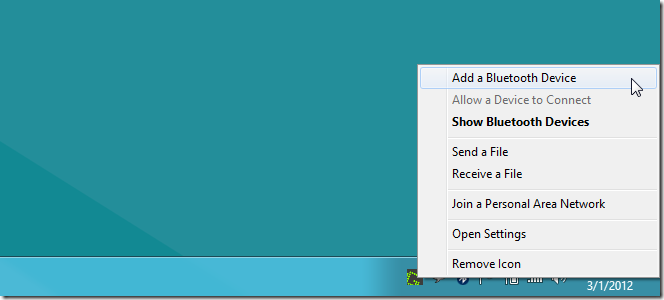
If your Bluetooth is switched on, and you are on the Desktop view in Windows 8, you will likely see the Bluetooth icon in the system tray. You can right-click the icon and select Add Bluetooth Device to add new files.
Alternatively, you can use the Charms bar (move your mouse pointer to the top or bottom right corner of the screen and hover until the bar appears, or hit Win+C hotkey). Click Settings (the very last button on the bar) and select More PC settings.

Regardless of whether you’re on the Desktop view or the Metro view, the settings will open in Metro. You will see a list of all items that you can manage on the left. Select Devices and all connected or recently added devices will be listed on the right. While you may not have added them yourself, some devices such a Bluetooth mouse or keyboard might already have been added and will appear in this list. Click Add New Device at the top of the list and Windows will search for all available Bluetooth devices in the vicinity.
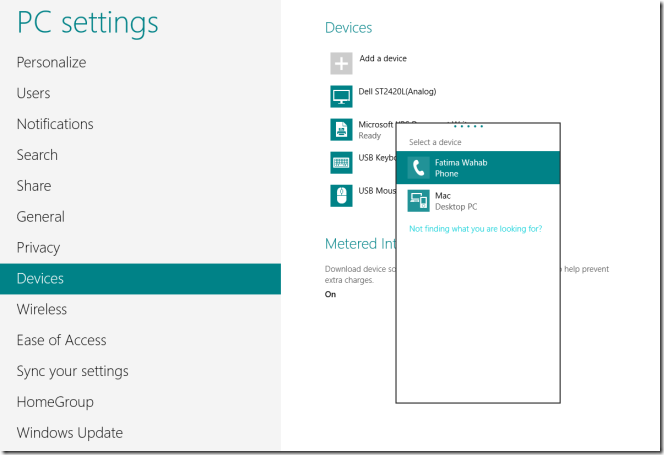
Double click the device you want to connect to and wait while a connection is established. You will be presented with a passcode that you must either verify as being the same on the other device (most likely if you are connecting to another computer), or enter the code on the device you are connecting to (most likely in case you are connecting to a phone).
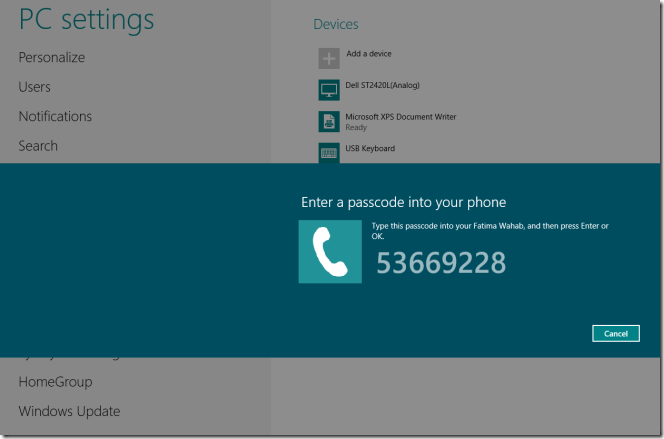
Once the code has been entered or verified, your device will appear in the list of added devices and the connection will be active between the two. So long as a device is in this list, your system will connect to it whenever it is in Bluetooth range. You will no longer be prompted to enter codes or allow a connection to be established.
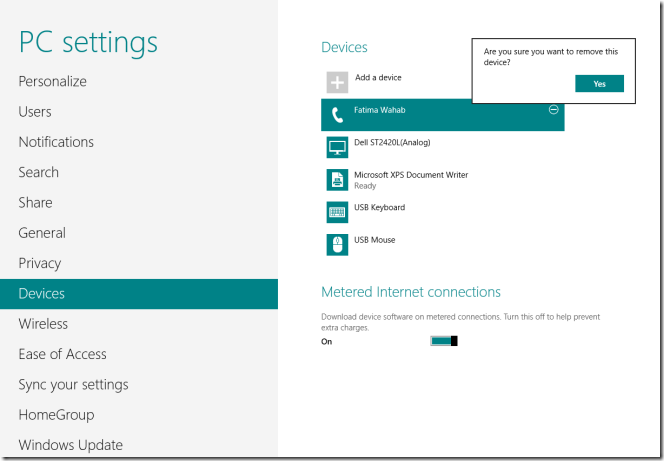
To remove a device, simply select it from the list and click the little minus button that appears on the top right of the device name and click Yes in the notification that pops up.
If you’ve connected a mouse, headset or a keyboard, you’re all done here. If you’ve connected a phone, you can now send files to it. To send files, right-click the Bluetooth icon in the system tray and select Send a File. Select which device you want to send a file to from the window that opens. Only devices that you can exchange files with will be listed in the window. Select a device and click Next.
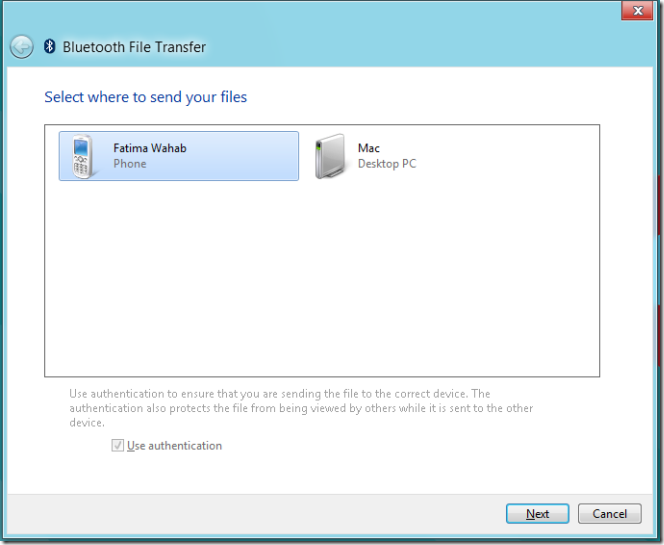
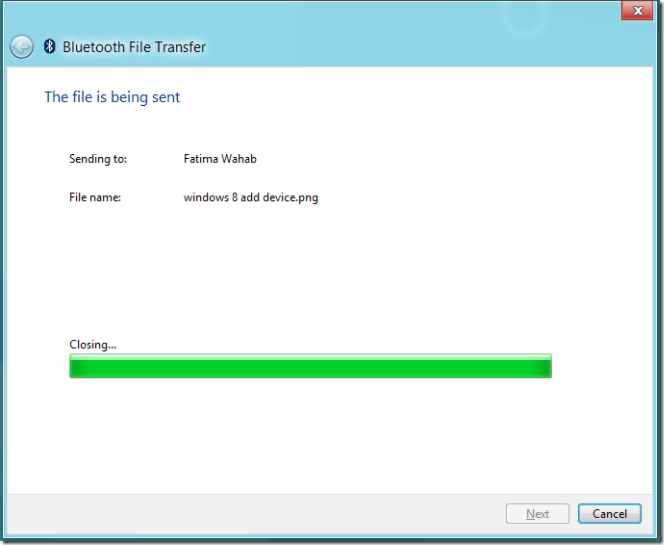
Browse and select the file(s) you want to send and click Next and wait for transfer to complete. Transfer progress will be shown on a progress bar, as seen below.
That’s all there is to Bluetooth on Windows 8. You can now easily set up phones, keyboards, headset, mouse, track pads and more. Enjoy!

Help! I clicked on IGNORE this device … as I thought that would be easily re-set when I do want to find and pair with the device again. No such luck!! Anyone know how to UNDO the Ignore a Bluetooth device?
I love Xdream Bluetooth Technology(Power Bank), best match to my new iPhones. Incredible smooth to the touch and better heat dissipation performance than normal plastic case.
I agree with Hater, there’s a “remove device” button but no “Connect to” button, WTF Microsoft, this is the worst OS next to Vista that you ever produced. The Apps Screen is blah, boring, and the Bluetooth module sucks, Windows 7 is better, why do you always have to screw with something that already works well. I read a Windows article earlier that said that you don’t need a third party Bluetooth driver or software, because yours is so easy to use. NOT! I had to install a software to receive and send files otherwise it was a pain in the Ass.! With Windows 7 sending or receiving files was a breeze from the task bar. You need to get your head out of your own Ass and fix this Bluetooth module, and all the other useless items in this OS. Get it right and when you do leave it alone.
I’ve been trying, AGAIN, to connect my Samsung TV to my Samsung laptop. I have done thins several times now as it keeps deciding to forget the connection! This time, it just will not work! Never had 1 single problem with my old Vaio, this is a pain in the arse! I have been through the correct procedure time and time again and NOTHING will make it connect this time!
I HATE HATE HATE HATE The windows 8.1 Bluetooth charm bar. It allows for nothing to get done, it gives you no options for wiggle-room in case your PC has difficulty connection to a device for instance. We need the windows 7 solution.
I have set up my studio to run on bluetooth using Windows 7 & 8.
None of these systems connect to my bluetooth receiver.
NONE of them!
Android & iPad work fine (so I can’t even get reimbursed for the BT receiver!)
That is several 1000 € DOWN THE DRAIN Mr Gates!
Are you going to pay me back?
I envy those people who do manage to get on successfully with windows 8. I have a slightly different problem with bluetooth; it keeps turning itself off, this is easy to rectify as I simply turn it back on in the settings. But this time, it won’t comply. I click it on, but it won’t stay on for more than 2 secs.
My Philips SHB7000 headphones won’t show up in the Add Devices list (Bluetooth).. Windows 8.1 on Asus K68C
New ENVY window 8 computer touch screen, new Bluetooth mouse. Why can’t the blue tooth mouse stay connected to the computer? I just spend 2 hours turning the computer off and back on and trying to find the blue tooth computer connection. Miscrosoft REALLY how can you screw this up so badly. Don’t you have tech’s that develop this technology for you. Well who ever was responsible for the Bluetooth system in this computer should be fired. Shame on you. This is the 21 first century. I have a Samsung Note 3 phone, A car with a Bluetooth radio, and shame on me that I once again fell for a HP computer and mouse and thought by now Microsoft had it all figured out. I should of brought and IMac.
thanks :D!!!
Seems Windows 8 is the only operating system unable to find my Bose Soundlink speaker which is sitting right next to it. Everything else can find it in less than a second from across the room.
I want to send a file from my mobile to my PCwindows 8
and the mobile can’t scan for my pc device
I mean these pictures is to how send file from pcwindows8
but what about receiving ??
I can’t figure out how to Manually Connect and Disconnect a Bluetooth Device. I DO NOT always want my bluetooth headset connected to my laptop since it should be connected to my phone… but I do not want to have to PAIR and UNPAIR it to disconnect it. STUPID INTERFACE MICROSOFT.
what you have written here is all about sending and receiving files by adding devices through BT,and i dont think BT is default in windows 8 because i cant access bluetooth in my windows 8 pc after i refreshed my pc and the bluetooth icon is not even there in the system tray.i have tried installing the bluetooth suite from pc manufacturer site and the installation process fails everytime and its working anymore.and if you know how to fix this failure of installation then pliz let me know.
how do you find the address of your COMPUTERS bluetooth device? i see ways to find it with windows 7 but cant find anything about windows 8
My Monster Clarity Speaker worked great with my Lenovo w/Vista. Now my Samsung with Windows 8 shows the speaker but shows “offline”…very frustrating.
Windows 8 doesn’t discover my android phone….tried all the advice given
My Nokia connects during 3 secs and it disconnects, I cant send a picture from my phone to my laptop. I so regret the upgrade to windows 8. Totally not user friendly, basic stuff doesnt work. 4 clicks to turn off the pc, lost 5 h on how to and to install a simple card game like solitaire , it continuesly ask to login online with a windows account for even watching your own pictures. Win 98 was even more user friendly. They should make an uninstall version to get 7 again.
yeah, doesn’t f^&%ing work, headphone is in device list, won’t connect, won’t remove so I can reconnect, Microsoft you suck.
I just purchased a BTA-10 bluetooth adapter. I have a full surround sound system plugged into it, but the Windows 8 driver is only a Stereo Bluetooth driver. How can I use my full 7.1 channel sound system over the Bluetooth adapter using Windows 8?
Thanks!
I believe Bluetooth audio is limited to stereo only. (A2DP Peofile?) Please correct me if I am wrong.
Sounds easy, but does not work there is no SEND A FILE anywhere on my Widows! Oh how I wish for Vista or XP!
yeah this is nice but…. this is useless if you use a dongle, which requires a driver.
If you have a Broadcom dongle they have some new drivers for Windows 8 that add a connection window like there was in Windows 7 also adds a lot of features I can now make calls, share my contacts and play audio files from my phone all nice features that I have been missing since updates in Windows 7 took them away. I don’t use them that frequently but always nice option. I use a tablet running Windows 8 in my vehicle(mounted to the dash) as my music system and navigation will be nice to use the bigger screen to make calls from the contact list on the PC screen.
My Bluetooth keyboard works but not my mouse. I am getting very annoyed I have to spend time researching this (supposedly) simple problem.
I have done all above and I can send file from Laptop to Phone but I can’t from the same phone to the laptop! Message says “Bluetooth connection failed”
You have to right click on Bluetooth icon and click receive file. Then tell your bluetooth device to send the file. Microsoft put this security feature in.
All laptop brands from 2012 have problems with hybrid broadcom wireless and bluetooth. Nobody is able to start the bluetooth in order to install the driver. The bluetooth for those cards simply does not exist for windows 8. It’s a shame Microsoft designed windows 8 with “bluetooth in mind” and still did the worse job ever for the best notebooks available in 2012 market.
Yes I am going to say Windows 8 sucks because I can’t do one little thing that I really don’t need to do because I am a Apple Fanboy! TROLOLOL!
how do i turn the bluetouth on ? i cant find the icon!
Yes, it is very TROUBLESOME to “remove and re-add” a Bluetooth device in Windows 7 and Windows 8 all the time. In Linux, it is extremely user-friendly… there is a “Connect” button when you right-click any Bluetooth item.
does removing a bluetooth device take a very long time?
Yes but the Bluetooth on my win 8 has a hard time finding my Bose wireless speaker, I have to reinstall it all the time, it just cannot detect it and keep it in the memory. Some times the same happens to my Nokia 808.
Thanks for the post, it’s help me a lot!!!!!!!
b4 installation of windows 8 it made us to unistall bluetooth. now after installation bluetooth is not working. dell or other related company has to provide the bluetooth driver. once installed it will show the bluetooth devices untill that we can’t solve this issue. now i m trying to find a bluetooth driver for windows 8 which can make us use bluetooth.
2nd solution is, if windows 8 update should provide us the driver for bluetooth.
The PROBLEM with Bluetooth in Windows 7 is that there is no “Reconnect” button for the Bluetooth devices, so simple items such as a Bluetooth Mouse must be removed and paired again to use it again. Such a hassle! Does this BUG still exist in Windows 8? By the way, Ubuntu 12.10 has absolutely NO PROBLEM reconnecting a Bluetooth device after it has been used elsewhere, so this is definitely a shortcoming of Windows OS.
I agree – Microsoft dropped the ball!
As a long time Microsoft supporter and beta tester, the Bluetooth issue with Windows 8 needs to be addressed.
I have upgraded all three of my computers to Windows 8. I like it, but have been bogged down trying to get Bluetooth to properly work, and not drop out.
I am debating as to the Lumina 920, or the iPhone 5. I need Bluetooth to work. From what I am reading, I’m tending to go with the iPhone 5. I don’t like Apple, but I know Bluetooth flawlessly works on the iPhone. Why isn’t Microsoft addressing that issue?
The only issue I have with Windows 8 is also Bluetooth related!
Lloyd
Works like a charm for me. Just gotta hold the play button for 3 secs on my MH100 to reconnect.
my shb 7000 won’t even show up in the add devices list
but it can’t detect dell bluetooth 365 mouse
what to do?
I have the same issue as Noah… Windows 8 is garbage. I wonder if there’s a 3-rd party app that would allow me to manually connect to a headset on my pc after I’ve paired it with another device. My phone does that just fine… so why can’t Win8? so pissed… “Now if you’ll pardon me, I have a Bluetooth headset I have to uninstall then reinstall.” what he said
it is possible. in the settings. just turn bluetooth off, then on again. it will connect. now just looking how to put a shortcut on start screen. a bluetooth toggle app
I have the same issue as Hater. The computer pairs with the Bluetooth headset no problem. If I take that headset and pair it with my ipod while im out and about then try to reconnect it to my windows 8 computer when im back home, my only option is to remove and re-pair the headset with windows 8. double clicking the headset in the devices list does nothing. Windows 8 is literally the equivalent of using a condom when both parties are free of disease and on birth control. It’s a ridiculous, unnecessary layer of superficiality over what was a perfectly fine OS(windows 7) Microsoft and Apple both need to take a step back and reconnect with PRACTICALITY. Now if you’ll pardon me, I have a Bluetooth headset I have to uninstall then reinstall.
This is the exact problem and solution I have to use to get Bluetooth to pair with any of my devices!
THe same device connects sometimes. But at other times it does not connect. I want a simple way to toggle between getting the music through my bluetooth wireless speakers or through my headphones. The task is not simple at all. I hope one day (within my life time) this problem gets fixed in windows 8.
i use windows 8 release preview but after installed blutooth driver for my PC. it’s lose. give me solution about it.
I have added my mobile to the devices. But unable to send files from the computer to mobile or vice versa?. Tell me the remedy to transfer files & photos through Bluetooth
Abraham PhiliP
To send a file just choose your device name after after choosing “send to” from right command menu.
To receive a file from other device, you have to right click on bluetooth icon in notification area and then click receive a file. then go you that device and make sure the device is paired with your computer and send it to your computer…
I dont think you understand… there is no device name cause there’s no “send to” from the right click menu on the bluetooth icon! right clicking only shows “Add a bluetooth device” , “show devices” , “join a personal network”, “open settings”, “remove icon”. Which one of these are we supposed to be clicking on to send a file?! And yes, I have paired the device as shown a million times
wow simple things like left click and connect is not available on windows 8 how the hell do you want us to connect headsets if there are no option to chose from…..Microsoft you suck
i agree, although its possible it still takes a few too many clicks:
1. right click volume indicator in taskbar
2. click “Playback devices”
3. If you connected your bluetooth headset before, it should be in the list. Right-click it and click “Connect”
Too bad you can not reconnect to said headset unless you remove it and re-add it. Every G** D*** time.
Microsoft seriously dropped the ball with Win 8.
press windows key + x, then press b, windows mobility center will open, then right click on the icon on the task bar at bottom of screen for the mobility center. click ‘ pin to task bar’.
from the mobility center you can turn bluetooth off then on again. your headphones will connect then. only takes a few seconds.
i dont have any task bar icon
!!!
there is nothing like bluetooth in tiles of window mobility center
Bluetooth is not one of the Tiles in the Windows Mobility Center.
How I agree!
As a long time Microsoft supporter and beta tester, the Bluetooth issue with Windows 8 needs to be addressed.
I have upgraded all three of my computers to Windows 8. I like it, but have been bogged down trying to get Bluetooth to properly work, and not drop out.
I am debating as to the Lumina 920, or the iPhone 5. I need Bluetooth to work. From what I am reading, I’m tending to go with the iPhone 5. I don’t like Apple, but I know Bluetooth flawlessly works on the iPhone. Why isn’t Microsoft addressing that issue?
The only issue I have with Windows 8 is also Bluetooth related!
Lloyd
i m aman but in my laptop the bluetooth device is uninstalling ..this is not removed
Fatima,
I have tried 27 ways from Sunday to get a a Microsoft Bluetooth 5000 working on W8/Build 8250. Nothing, I mean nothing has worked I posted the problem on W8 forum page and one fellow tried to help me. I tried everything he suggested and absolutely nothing worked.
I only wish it were as easy as you describe.
W8 sees both the Bluetooth radio and the mouse. They just will not work.
I truly welcome any suggestions. I’ve had w* installed for almost 2 weeks
Rick York
I’m having the same issue, when I first set it it up it worked, now all of a sudden it keeps asking me for a damn pass code. Ridiculous how Microsoft can’t get it’s own hardware to work with this new OS, guess they want me to buy a new mouse now huh?