Get The Realtek Equalizer Back In Windows 7/Vista
Officially, since Windows Vista and 7, Realtek stopped supporting a multi-band equalizer for it’s HD Audio chips(present on many motherboards and in notebooks). All that is left are a couple of extreme presets (Pop, Classic, Rock etc.) and the environment presets that are useful to no-one (except for fun). However, together with some people on Tom’s Hardware forums, we came to a solution. Here it goes, it’s as easy as one-two…
Edit: according to user dimar on Tom’s Hardware forums, from R2.41 of the driver, the option to change to a graphic equalizer has returned. Looks like Realtek finally listened to its users.
- Download the AC’97 Audio Codecs from the Realtek website for Windows 7 (choose the ZIP-file)
- Extract ONLY rtlcpl.exe from the directory for your system (“Vista” for 32-bit Vista/7, “Vista64” for 64-bit Vista/7)
I don’t think it will matter which one you pick actually, both are 32-bit programs, both work, but they’re not the same files
If you want to save the settings for later installations, the Equalizer presets are saved in the registry under the following key:
HKEY_CURRENT_USER\Software\Avance\AC97 Audio\EQ
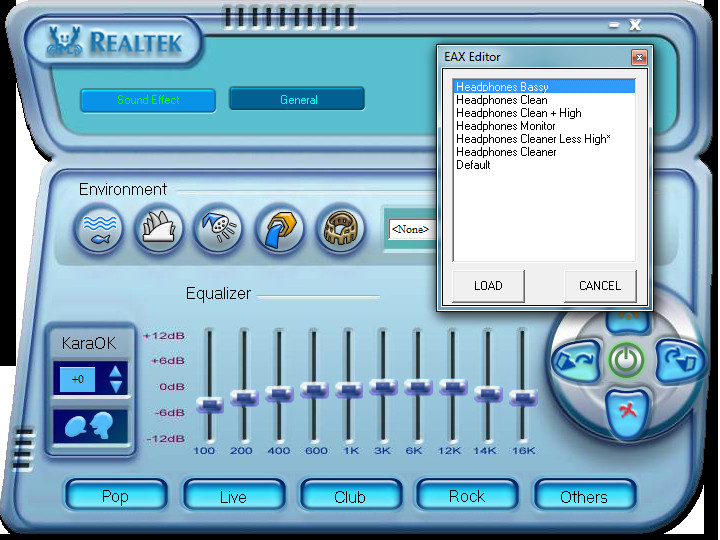
I want to remind you that this is not officially supported by Realtek, who state that they dropped multi-band equalizer support since Vista altogether. Hence, even though it seems to work perfectly fine for some, you might expect some unforeseen problems.
Download Realtek AC’97 Audio Codecs

Kindle won’t connect to wifi? Are you worried after seeing this error? It is just an acute issue, be calm. Our expert team will help you in fixing this error. Our helpline is open 24/7, so feel free to contact us anytime and to know more check out the website Ebook Helpline.
How to fix Hp Printer Not Printing in Black? To resolve Hp Printer Not Printing, Hp Printer Not Printing in Color, Hp Printer Won’t Print, Hp Printer Not Responding, Hp Printer Won’t Connect, etc, grab your phone and reach Hp Printer Customer Support Number Toll-Free, available 24/7 to take calls.
How to Connect Alexa to WiFi? To Connect Alexa to WiFi or Connect Amazon Echo to WiFi just reach Alexa Helpline Number Toll-Free, available 24/7, experts help you fix Alexa Won’t Connect to WiFi, and help you in Connecting Alexa to WiFi, Connecting Amazon Echo to WiFi, and Alexa WiFi Setup. So be sure to call us anytime.
Don’t look further than Geeks for Tech if you want your computer repaired online! Geeks for Tech is a group of expert technicians who can fix your computer online. Our technicians can fix your device in a short span of time. Geek customer servce .
Are you getting frustrated just because your Echo device is offline? Don’t worry! Echo Offline is here to help you. We provide you the best troubleshooting and repair service online at very affordable price. Echo helpline
Are you facing problems while doing registration error on your Amazon Alexa Device? If yes, then don’t look further than Alexa Helpline. Alexa Helpline is a group of expert technicians. All of them are well qualified and experienced. Amazon Echo Error 73001
will this work for sound baster? do they have one?
Still works fine – many thanks!
Bogus info here.
It doesn’t work properly. None of the sliders indicate the correct frequency, and when you slide one up or down too far, it automatically “compresses” the overall volume as though you’ve actually moved all the OTHER sliders in the opposite direction.
It’s really broken, and someone needs to make something that works properly for Windows 7. Please, do NOT waste your time on this download. Equalizer APO works for some systems. Other programs exist, but people like to charge money.
Install the rtlcpl.exe file to where ? It doesn’t work…
Has anyone tested this on Windows 10?
ok so im a computer tech, if the new version is installed of realtex applicatiom and drivers, it will not repeat WILL NOT work, Because that file is not associate with the actual drivers.
Good thought it doesnt work yi
Just did this (March 2015). It still works. Thanks
thanks to this. working perfectly.
I’m currently using windows 7 64 Bit, and in the Zip file, only thing there is a Vista folder… What about Windows 7? Im pretty sure I downloaded the correct file. But when I go to the vista folder and look for RTLCPL.exe, and open it, the sound manager isnt there. only the “general” tab. DirectX is red with 10.0, and I’m running DirectX 11, and DirectX is backwards compatible. HALP.
same here help…
At last! Thanks!
IMPORTANT!!- I have an ASUS PC1000HE netbook, of course, Windows 7 no EQ. This didn’t work until I FIRST right clicked on the .exe BEFORE INSTALLING and chose COMPATIBILITY MODE- and selected Windows XP. I also RAN as ADMINISTRATOR. It was very frustrating because it would not work and show me the EQ until I did this.
Doesn’t really work with Win7 x64 and the latest realtek drivers..
Does it work on Windows xp?
Thanks, this is working like a charm 🙂
extract to desktop, then move to drive C. Dont forget to RUN AS ADMINISTRATOR. :))
Worked! Thanks a bunch!
My Windows 7 computer did not come with an EQ. I wanted an equalizer for my windows 7 64 bit Realtek High Definition (not AC 97) drivers on my laptop. I downloaded the file 6305_Vista_Win7_PG537.zip and clicked on 6305_Vista_PG537 then clicked on Vista, then extracted rtlcpl.exe.
It worked!!!!!!!!!!!!!!!!!!!!!!!!!!!!!!!!!!!!!!!!!!!
I first have to click on to sound effect and click on one of the presets at the bottom, after that it starts working.
The equalizer is still here…originally, but the acces is not easy to find:
Control Panel>Hardware and Sound>Sound
A new window opens, Click on the Sound setting you are using ( realtek High definition audio most likely )
Click Properties
Go to ehancements tab
Make sure equalizer is checked
Highlight the Equalizer line once checked
Now on the bottom of the page there is a line that says:
Setting: and a box with little dots on it
Click on the box ….and there you go
THANK YOU SO VERY VERY VERY VERY VERY VERY MUCH!!!
didn’t work for acer aspire 5810T … hope you folks have better luck
i did that but it came up with just the general blue box. It has nothing for audio driver version and nothing for audio codec. Directx version is 10.0 and shows N/A for the audio controller. What do i do next?
As already mentioned – works straight out of the box for Win7. Of the Presets; Live works best for me for most genre of my music files. It doesn’t matter where you store the rtlcpl.exe file – just drag it to the Start Menu and create a shortcut there for easy access. Great stuff – many thanks!
If you’re having trouble, make sure that the “proper” Realtek Control Panel is not running, try launching the old exe with Administrative rights, and also be sure to press the IO-looking button after tweaking the equalizer, otherwise it will appear that nothing happened.
This loader is a pre loader for multiple programs. It does not give you the option to select what you want to download specificly but forces a download and change of your homepage. Just fair warning.
You know what, I have been stuck on XP STRICTLY because the EQ is gone from 7. Thank you greatly for this article! I can’t wait to give it a shot. 🙂
Can i have a video tutorial for it? Please? Thanks..and people who want the same could like my post.
Hey guys don’t fool yourselves…..!
There is still a working quality equalizer for windows from realtek.
1- In win7 Go to ‘Control Panel’.
2- In the top right corner change ‘View By’ to ‘Small Icons’.
3- Now click on ‘Sound Effect Manager’ and set the equalizer according to your taste. I’m a bass lover so I set the 1st band to +12db, next 2 bands to 0db and rest to -12db(minus12) and its awesome. Download vlc media player and do the same in its equalizer. You’ll never believe the effects.
Any queries mail me to
dangerjaison@gmail.com
Try it out…………. Every realtek drivers have it.
Thank You.
yes but they won’t make the sliders available anymore for any future windows version
There IS no “Sound Effect Manager” in the Control Panel of Windows 7. There is just Sound.
this is a pain in the fargin’ arse.
thanks it really works !!!!!!!!!!!!!!!!!!!!!!!!!!!
how to download it ?
Thanks, this works great with my windows 7, you are a Saviour.
fantastic it works perfectly i just add the file to the directory and double clicked it to start the tuning.
Works great for me, thanks!
@Chris: You must have a different version of RtHDVCpl, as there is no graphical equalizer in mine.
Fantastic, worked for me. Thank you.
Work?!?
brandnew netbook, and it doesn’t even get through the install field.
MS OS loosing the simple equalizer is a downgrade indeed.
i’m getting my old stuff back. at least that was reliable…
Excellent, this really works. 😀
Is there any previous version with which the equaliser still works in Windows 7?
very good work folks.
Or without doing that, you could go into Program Files, Realtek, Audio, HDA then select RtHDVCpl.
Once inside click sound effects and then there is a small image of a graphical equalizer beside where it says Karaoke, just above rock, click it and wahoooah! It’s still there… they just hid it and updated it… lol…
Hope this helps,
TS
f… good, i jus pin it to my star menu
found it. Yep, still there!
this great! thanks!
I’ve tried it and it doesn’t affect the sound at all. I slide the bars all the way up or down and no audible difference. I have very nice speakers, so that’s not the problem. Also, is there a version that goes below 100 Hz? The reason I’m looking for an equalizer is to fix the bass range of my sound system.
This worked great. I’m furious at MS charging left and right yet DOWNGRADING the OS!!! We’ve had EQ since Win 3.1 !!!
it doesnt work 🙁 i have R2.49 now
whitch driver i have to use ? R2.41 ???!!! or it doesnt matter whitch one?!
finally got bk the realteck eq after 6 months spent many hours searching for
an additonal eq but had no joy, not as good as the old one but im greatful to
have this eq as my sound quality was been pretty dull without it many thanks
Before i install the AC’97 Audio Codecs…….do i have to uninstall my previous realtek drivers?
Oh Thank you sooo much. Searched half the internet found nothing but this works.
The Control Panel that Windows 7 installs automatically for gigabyte onboard realteks or which i can download as “hd audio software” from realtek has no real equalizer, but the one in the ac97 zips works out of the box.
Thank you, man! I’ve been looking for a realtime EQ with no success. Tried SRS to make custom adjustments, but it sucks.
Your solution is simple e flawless. No issues at all.
What I did?
Uninstalled Realtek HD Audio Drivers, to remove the control panel and other things that are no longer necessary.
Did a manual driver installation with the native device manager, to get minimal realtek software installed. After that, you can also disable any “.exe” related to the audio device (msconfig).
I just put the rtlcpl.exe (AC97) into Realtek’s HD folder, created a shortcut for it and pinned it to the task bar.
The best of all, no more panels and icons loading with Windows startup. The Realtek HD drivers memorize every custom set of EQ you make with the AC97 panel and keeps it even after a reboot. Amazing! So, just click at pinned shortcut if you want to tune your 10-band graphic equalization.
Thank you very much!
Doesn’t seem to work anymore. I extracted rtlcpl.exe only and copied it to the realtek folder in program files. It just gives me a blue panel with no equalizer nor any other options. Any one got any better ideas?
Used to work they updated the driver. No workie no more. Tom if you read this and you have a fix let me know please I’d really like some info.
I have the shell but no graphic??
It wont let me add audio codec, controller, or driver version and i cannot continue on to edit the equalizer
Nice! it works fine Thanks!
Ok, i change the equalizer values but they do nothing to my actual sound.. no matter what values even presets. my sound isn't affected by it
where do you extract the rtlcpl.exe to?
Thank you, this really works!
Thank you, this really works!
Thank you, this really works!
ALL THESE PEOPLE SAY “GREAT AUDIO SOFTWARE” , “WORKS GREAT”! ETC. YOU HAVE LIE-ARRHEA!