Get Windows 7 Start Menu, Explorer And Task Manager In Windows 8
If you are one of the first users who grabbed the latest Windows 8 developer preview, you will find that a lot has changed since Windows 7. Among the visible changes are the Start Menu, Windows Explorer Ribbon, and Task Manager, all of which have been totally revamped by Microsoft. If you are a big fan of Windows 7 and want to bring back Windows 7 Start Menu, Windows Explorer (without Ribbon), and Task Manager in Windows 8, the result is just a few clicks away since it requires a simple registry tweak.
Important Note: This tweak is for those users who are using Windows 8 Developer Preview. Windows 8 does not include Start Menu any more. There is only Start Screen which can be accessed by hitting the Windows key or moving the cursor to lower-left corner of the your screen.
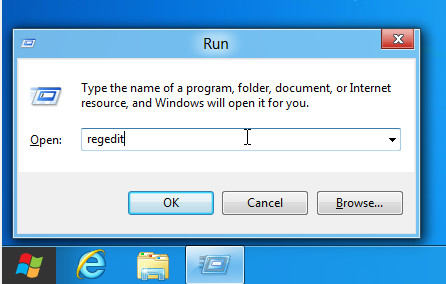
Open the Run Dialog box using Win+R hotkey. Type regedit and hit Enter. This will launch the Registry Editor.
Now navigate to HKEY_CURRENT_USER\Software\Microsoft\Windows\CurrentVersion\Explorer from the left sidebar.
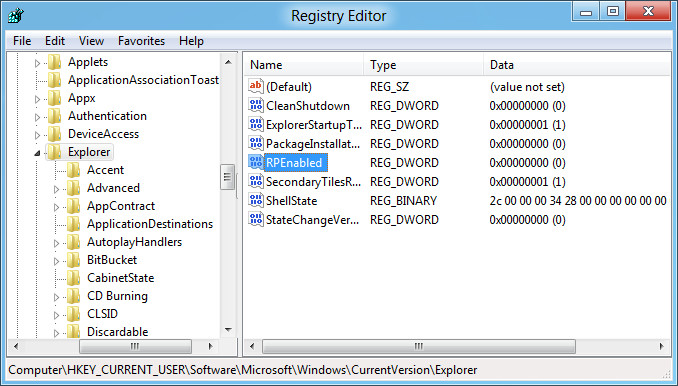
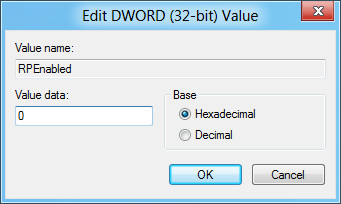
On the main interface, double-click RPEnabled, change the DWORD Value data to 0, and click OK.
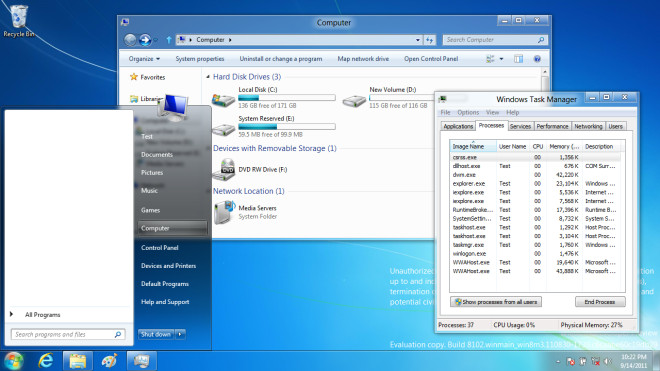
Now restart Windows Explorer, or log off the system and login again to view the change. The Windows 8 start orb, start menu, windows explorer, and task manager will be replaced with that of Windows 7. User won’t be able to tell if you are using Windows 7 or Windows 8.
To revert back the changes, double-click RPEnabled in Registry Editor and change the value back to 1. It’s that simple. Enjoy!

THANKS! This was very helpful and the start screen is not condusive in an enterprise environment.
not working anymore
not working anymore
Doesnt work anymore windows 8 sux. if you want to run apps just use chrmium
Microsoft has eliminated this registry key & it does nothing
Hmm…so the final Windows 8 cannot be reversed to the Win7 look?
Thats bad..downloading the consumer preview version right now.
..Wondering how long I can use it?
The boot screen size of Win8 on the youtube vids look a little bigger, looking forward to tweaking and hacking it! 😀 😀 😀 (anyone know about the .dll to hack?)
It can. I have done it on W8CP.
this function will disappear in win8 cp&later ver……
i cant find rpenabled
Have you tried adding RPEnabled as a Binary Key and then setting it to zero?
It is not working. i tried both methods. I restared several time. Can anyone help?
$ month old pos, look at the “Important Note:” part 🙂
And there is a freeware utility that automates this hack: http://www.superutils.com/products/win-eight-metro-ui-switcher/
I guess it is better for regular users to exploit it instead of direct altering the system registry.
It is not working.
Personally, I still miss Windows 98SE. 😉
That’s why I run it in a VM!
Mmmmm, I didnt like Metro, but I was ok with the rest of features, looks I will have to simply give up, theres no way Im using that retarded and bloated screen; plus no wallpaper on it.
You don’t even have to log off, it’s effective immediately. The only reason why I wanted to do this was so that I could put Computer on my desktop.
The whole UI of windows 8 gets changed to back to win7 though (sadly, including the Explorer ^^)