HotKey Resolution Changer: Change Monitor Resolution Using Hot Keys
Just as monitors are designed in various sizes, their display resolution also varies from size to size. Larger displays usually sport higher the resolution and vice versa. Although, LCDs are designed to work best at their native resolutions, sometime we do find the need to change resolution (especially if you still own old CRTs). Thankfully, Windows allows you to change the resolution of your screen from its display properties, but you have to open display settings and change resolution manually, and then save the changes to completely apply it. Some people can find it to be somewhat a tedious task. Previously, we reviewed an application called Display Changer that allowed you to change to the resolution of your own choice, rather than the ones pre-included in Windows, by specifying the desired parameters including width, height, depth, refresh rate, fixed output, rotate and positions including left, right, top and bottom. Today, we have another app at your disposal called HotKey Resolution Changer. It is a portable application for Windows that lets you change the resolution of your monitor through hotkeys. Keep reading to find out more about the application.
The application has a collection of pre-specified resolutions ranging from 480 x 640 to as high as 1920 x 1080 (also the higher resolution level depends on your screen size and model). Support for resolutions for both 4:3 and 16:9 ratio monitors is included in the list. You can also assign the supported color settings and refresh rates of the monitor to the resolution hot key, such as 32 Bit – 4 Billion Colors, 16 Bit – 65k Colors and 8 Bit – 256 Colors, and refresh rate ranging from 25 Hertz to 60 Hertz (again, depending on the capability of your display device). 2 to 9 set of resolution, colors and refresh rate can be assigned to different hot keys, plenty enough even for power users. Minimizing the application will take it to the system tray, and can be accessed again by clicking the notification icon.
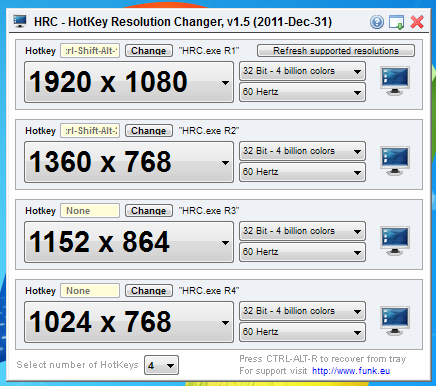
During our testing, we found the application to have some stability issues, which left us a bit disappointing. We hope that the developer will make the application more stable in the next release (testing was done on a 64-bit Windows 7 Ultimate system). HotKey Resolution Changer has a memory foot print of 4 MB, and works on Windows XP, Windows Vista and Windows 7. Both 32-bit and 64-bit OS editions are supported. You can use the download link below to grab it.
Download HotKey Resolution Changer
