How To Enable ‘Delete Confirmation Dialog’ In Windows 8
With additions like Metro based panels, Start Menu, and Ribbon Explorer, many Windows 8 UI elements have been revamped, such as, the auto run dialog, low battery on-screen notification, desktop snapping, full screen apps, and much more.. Talking of dialog boxes, the most significant improvement that you will notice is with copy/move conflict resolution dialog box, which seems more smart, intuitive and can handle conflicts from a single window. Other noticeable change is that Windows 8 no longer asks you to confirm the deletion of file and folder, i.e when you select a file/folder and hit Delete key, it sends the respective item straight to Recycle Bin without confirming the action. In this post, we will present a simple solution to bring Windows 8 default file/folder delete dialog box back.
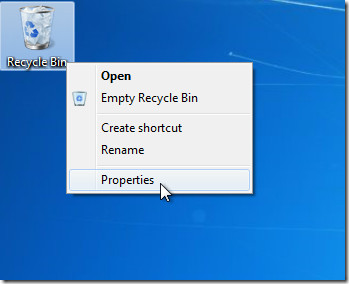
First off, right-click Recycle Bin and select Properties. You can also access Recycle Bin Properties from within the Recycle Bin from Recycle Bin Manage tab.
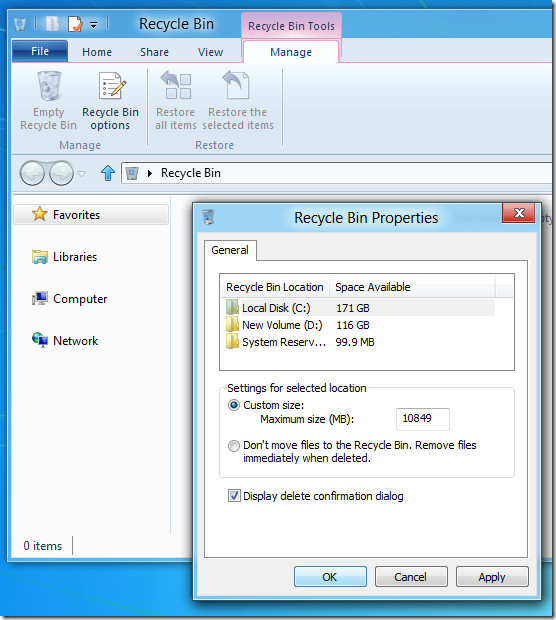
In Recycle Bin Properties dialog, enable Display delete confirmation dialog option and click OK to apply the change.
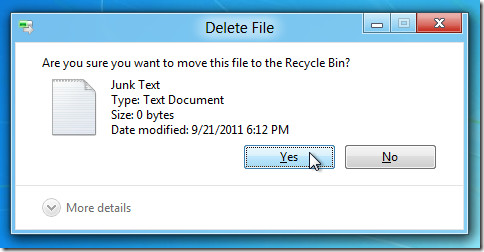
Now when you delete a file or folder, it will ask you to confirm the action before sending the item to Recycle Bin.

Yet another harebrained decision from MS…
Thank you!!!
And works in Windows “10” too. Thank you!
Thanks really helped
Umm, thank you! problem solved ! I thpught as if my new pc with window 8 has got some problems but actually not, thank you again. Blessed
Someone tell me, where do the files go when recycle bin is emptied. Coz i believe they are stored somewhere in the hard disk
They will still be exactly where they were on thd hard disk….. for a period of time, but you wont be able to see them without a disk scan/ recovery program.
A simple but usable explanation:
Imagine your HDD is a library, you find a file (book), by first going to the Index, finding the location and getting your file.
When you delete a file, its reference in the Index goes to the Recycle Bin, but the file is still in the same place in the library (HDD)
When you Empty the Recycle Bin, the rrference from the Index is destroyed. The file is still in exactly the same place, but you can’t see it, It won’t appear in the Explorer or anywhere. If this were a real library with shelves etc you could still find it by searching everywhere till you found it.
Same with the HDD, you could still find the file again with the correct software ……until a defrag / wipe free space is carried out. or the space where that file is, is needed again and it is overwritten.
thank you.. helps a lot!! :))
Thank you so much for this useful tip !
that helped me a lot
Considering how much Windows 8 panders to novice users, it’s surprising that this is disabled by default.
That is one of the first things I do when setting up Windows for as long as I can remember… Win 98…95 even…. Turn off that %#% confirmation box.
As has been pointed out, file (unless too big) goes to Recycle Bin
At last MS has stopped pandering to the dumbest user that needs that hand holding at every step.
Equally annoying as the Delete Confirmation box is the ‘Are you sure you want to quit?’ Dialogues. Chances are you have gone to task bar or Sys tray, right clicked an icon, moved to the bottom of menu then Left Clicked …,, then it asks you, usually in the middle of the screen If you really want to quit!. S%#t that annoyed me.
“At last MS has stopped pandering to the dumbest user that needs that hand holding at every step.”
Arguably, the dumbest users here are those who think it’s fine to be able to accidentally delete a file without even noticing due to a simple key slip.
You have to be doing something pretty dumb to accidentally hit the delete keys way up at the top of the keyboard. and anyway it goes in to the recycle bin..so not lost at all.
This constant confirmation boxes are just the nanny state mentality gone mad…if people would just take responsibility for their own actions.
So if someone, somehow, does accidentally manage to hit the delete key, then not realise, and then fails to realise they have done so, fails to miss that file and cannot get it back from the Recycle Bin, well they should just “man up” and accept the consequences of their own actions .
There is just no concept of ‘ self responsibility ‘ these days..it is always down to others to take the blame for, or put controls in place, to protect people from themselves AND THEIR OWN ACTIONS.
How did MS figure this would be better? Did they take a poll? Did they only poll their office mates? The fact that I had to Google this question is also annoying! Changes should be listed with an easy link to the remedy. After all these years even their Help function doesn’t help half the time. Sorry for the rant but Windows always ****es me off. Every new update, every dang day. Always. Ugh.
another dumb move. countless of times my jelly fingers accidentally hit the delete key. now i wont even aware i deleted something.
thank you for this help
Thanks
I don’t see confirmation dialog when I press Ctrl + D.. is there any way to enable confirmation window for this action in windows 8 ?
I can’t believe how horrible it is windows 8, why doing something worse than the other version?? windows 7 was fine, now my laptop comes with windows 8 damn!
Windows 8 is horrible!!
I can’t believe how horrible, stupid, annoying, awful, hateful and all negative adjetives are windows 8… I simply hate it
Thanks for this tip, Usman, it has helped me a couple of times…as I can get forgetful 😉
Whew. Thanks. With Windows getting more and more complex, I completely forgot how to turn this delete confirmation dialog box and spent quite some time going through all the screens and Control panel items…when all I had to do was to check the properties of the recycle bin itself. I remember when Bill Gates and Steve Jobs wanted to make computers easily usable by ordinary people – when at that time computers needed intimidating complex programming and only seasoned nerds can look at it in ease. It started with a simple MsDos where options were limited and a PC was not so imtimidating. Now it is slowly going back to being intimidating – only the size is much smaller than the Crayex… 🙂
Thanks for info, It’s very easy. But it’s another thing that may deter users from Windows 8.
THanks 🙂
thnx
Windows 8 will ask for confirmation if the file cannot go fit in the recycle bin. Otherwise, even though there’s no confirmation by default, users have a second chance to correct their mistake. More often than not, users do intend to delete the files, so why bother asking every time. Don’t manage to the exception.
I get a confirmation before I delete something and my files go to the recycle no problem.
many thanks 🙂
It’s really terrible that window make no delete confirmation dialogue by default .
Thanks for useful information.
thank you for the help.
thank you!
Thanks a lot for the info it really helped
Thanks!
Thanks.
Thanks for the Help
By removing the delete confirmation it makes it FEEL like the computer is much faster which is probably why they did it. But what an annoying “feature”… I turned it back on!
This is really true. I almost hesitated re-enabling the prompt because the couple instances in which I tested deleting files, it DID seem faster. At least, it felt more streamlined.
And ideally, if accidental deletion was literally impossible, the prompt would be obsolete. But it isn’t, and in those few cases where deleting files unknowingly or even choosing the wrong file to delete could be much more slowing, if not damning.
Thanks for this useful titbit. I thought it was dangerous to leave confirmation off by default.
I agree. With the silent deletion, even experienced users may delete something accidentally, not even noticing it. And many folks, myself included, have a habit of flushing the recycle bin every now and then, so…
wondering why microsoft make no delete confirmation default… so annoying
Because a principle of GUI design is – “assume the user knows what they are doing and don’t bother them with unneeded messages unless the action is severe AND irrevocable, OR has consequences the user will not anticipate OR may take considerable time”
Delete is a rather severe action by the user – but you can the user can undelete by using CTRL-Z, recycle bin etc. So it is not an irrevocable AND severe action.
Delete has a refinement – if you select “many” files then the chances the user did not actually mean to delete them increases. Also the time take to delete the files increases. So at some point it is reasonable to ask the user to confirm nefored deleting.
It is easy to hit the ‘delete’ button on the keyboard by accident. In such a case, you won’t notice that a file has been deleted and by the time you realize what happen, you might not be able to get it back.
The confirm dialog is not really intrusive – if you know its comming, you can confirm rapidly. If you don’t expect it, you souldn’t have the reflex to confirm.
This will remove your file completely, without putting it into Recycle Bin
What happens if I press Shift+Del instead Del key only?
Thanks!!!