JMC Photo Gallery – Alternative To Windows Live Gallery And Picasa
Picasa and Windows Live Gallery are two famous Photo Galleries where you can save and organize your photos. Most people you come across would either be using Picasa or Windows Live Gallery. There are tons of other small software that lets you organize your photos, but do not include complete functionalities. But this doesn’t mean that the innovation is over.
JMC Photo Gallery is a free Photo Gallery for Windows that can organize both photos and videos easily. It is both portable and opensource. You can view your photos with build-in slideshow and screensaver. It supports various image and video formats, such as bmp, gif, jpg, jpe, jpeg, jfif, png, tif, tiff, avi, wmv, mpeg, mpg, mp4, mov.
Just extract the zip file and click JMC Photo Gallery.exe to start When launching for the first time it will automatically add ‘My Pictures’ folder to your gallery, you can add more folders later by going to Preferences window.
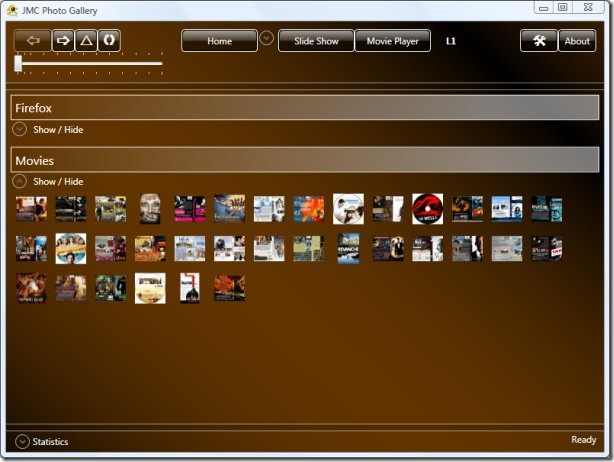
In the above screenshot you can clearly see that I have organized all Firefox Wallpapers and Movies. You cannot see the content of Firefox Folder because I have made it hidden.
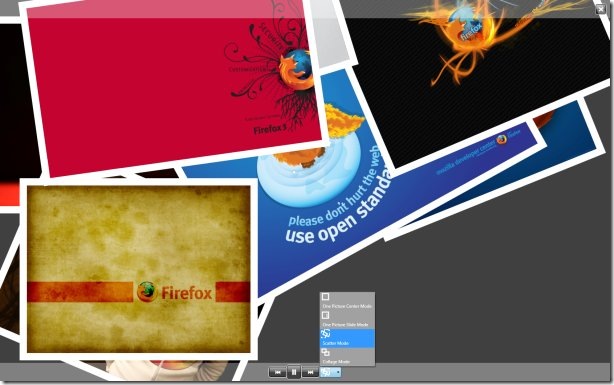
Both SlideShow and Movie Player buttons are given at the top of the Photo Gallery. There are 4 slideshow modes: scatter mode, collage mode, slide mode, and center mode.
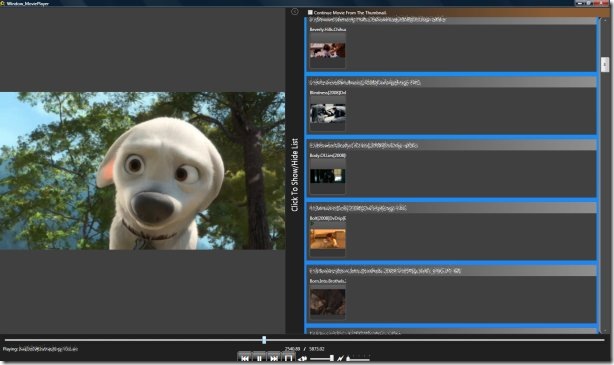
The build-in Movie Player is a place where you can watch videos quickly. When you take photos on vacations, you also make some videos. You can watch such videos in the build-in Movie Player. It displays all your videos on the right sidebar, where you can preview the videos before playing them, once a video has started, this sidebar will hide itself automatically.
It is not so professional when compared with both Windows Live Writer and Picasa, but it has a potential to reach great heights due to it’s opensource, customizable, and portable nature. Features include:
- Multi-threaded design to load image and generate thumb images dynamically
- Multi-threaded design to resize preview images
- Unique Special Modes for massive gallery viewing
- 3D Style Home Page
- Movie Player with cool interactive movie previews from the Playlist
- Slide Show / Screen Saver in 4 different styles
- Highly customizable
Enjoy!

http://jmcphotogallery.codeplex.com/ is the link to the download…just to help someone else. Thanks!
.NET framework are not portable. Sorry. See definitions for portable.
.NET framework are not portable. Sorry. See definitions for portable.
This requires the .Net framework and is therefore NOT portable.
Thanks for pointing it out, Nick!
But the app itself is portable, ofcourse it will work on any computer that has atleast .NET framework 2.0 installed.