SelfRestraint: Block Websites For Up To 24 Hours, View Countdown Timer
There is nothing worse than wasting your time during some important work. An interesting fact, its human nature that whenever we are doing something of great importance, something else continually tries to distract our mind, which can be a simple wish or something bothering us. Same holds true when your working on your computer. For instance, your boss has given you an important task but your mind is lurking on YouTube or 9gag. To combat such situation, FocalFilter is a website blocking application to avoid getting distracted with time wasting websites while working. When we reviewed it back in January, albeit it worked flawlessly, it had only a limited number of time presets to block websites. Today, we discovered an alternative solution simply labelled as SelfRestraint. It is an open source application developed by Parker Kuivila, which takes care of the problem by providing you with presets of 15 minute intervals for blocking websites, starting from 15 minutes, to up to 24 hours 45 minutes. Once you set the block, a countdown timer will be triggered and automatically pop up, allowing you to monitor how much time is left before the websites will be available again. More on the application after the jump.
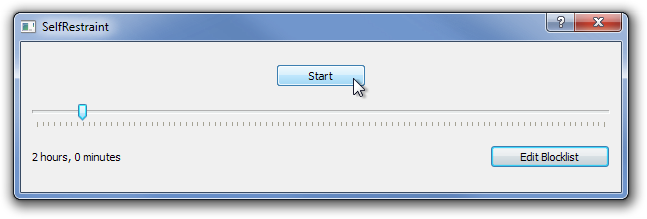
The application has a very simple and schematic interface design, allowing you to block time wasting websites without any hassle. The adjustment slider allows you to choose timer for blocking websites via dragging it left or right. The range starts from as low as 15 minutes to 24 hours 45 minutes with 15 minute intervals. Just set the slider, and click Start to block all the websites included in your Block list.
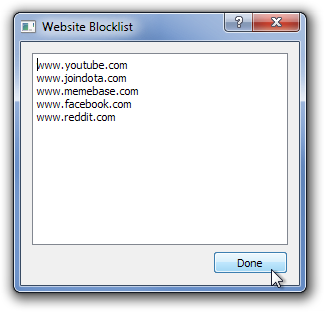
Click Edit Blocklist and you will be introduced with a separate console window. The block list can be easily edited by entering the URLs of the websites you want to block. It should be noted that you need to enter one URL in each line to add the websites. There seems to be no limit on how many website you can add. Do remember to click Done when all websites are added.
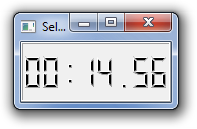
Once you block the websites, a timer will pop up, allowing you to monitor how much time is left before the blocked websites are available again.
Despite its small design, the application flawlessly performs everything advertised by the developer. It is a cross-platform application, and works on Windows XP, Windows Vista, Windows 7 and Linux. Testing was done on Windows 7 Ultimate 64-bit edition.

After I downloaded it, I accidentally put in a site I needed for work. So I deleted the program, but it was still running I believe. I set it for 16 hours. It’s been almost a whole day since I started the timer and all the sites I listed are still blocked. What should I do?
I set my timer to 15 minutes and then it changed to 24 hours for some strange reason. Come on man….
Its happening the same to me… I’m freaking out
I downloaded this thing around 24 hrs ago. I set it up to block sites for 14 hrs. I still can’t access the sites I blocked, even after removing the software. It is very difficult to find help or solutions. I wish I had never gotten this software!!
apparently by starting up self restraint and setting it back to 15 minutes should reset it and allow it to work again
Hey so I am still unable to access my blocked websites after the 2 hours I entered into self-restraint. I wasn’t able to find this program in my control panel – do you know how I could delete this program entirely? Right now I can’t access many sites that are really important – like gmail. Please let me know.
hi, after downloading this app, it blocks the site on Internet Explorer, but not on Firefox. What can i do? thanks.
Help! I downloaded this to use it, and it worked fine. After the time limit, it was still blocking my websites. I tried restarting it in both non-admin and admin privileges, but a timer would never appear again and I am permanently locked out!
@ Mike: See tMisha’s comment “Just start the program again, with the same websites loaded, and run it for 15 minutes. After that it will unblock them all.” I had the same problem and it worked for me!
Hey Parker! So it seems that my websites are permantently blocked because I exited out of the little app box :/ what exactly do I do to fix this?
I love this program! I’m a writer, and very technologically challenged. I did have to Google to find out how to “run as an administrator,” but then I realized he tells you right at the beginning. When you start the program, a pop-up appears telling you to right click on the program, choose “run as administrator,” and then it’ll work for you. So if your timer doesn’t appear, that’s what you need to do. It works really well! Thank you for this, Parker!
@ Sam White
Just start the program again, with the same websites loaded, and run it for 15 minutes. After that it will unblock them all.
The only annoying thing for me is that you can’t save a list of websites, but have to enter them again each time. I have a text file with my list, so it’s a simple copy-paste operation, but still, it would be nice to have the option of saving them.
Misha, I just pushed out a new version today that will save the websites for you 🙂
probably the most annoying software in history. If by mistake you click exit on the timer/software when its counting-down, for any reason i.e. battery turned off, change of location, or anything, the websites you blocked will be blocked indefinitely. Furthermore, our genius Parker Kuivila doesn’t reply to his emails on how to unblock it. Terribly software.
Flattered you think I’m a genius ;). But please check the website. I’ve said the software is in beta, and I list common issues and fixes. I’m not always able to reply within minutes, but as far as I’m aware I have no outstanding emails. Please email me if you still have issues! And again, I’m a Student, so I have other commitments to take care of. If theres something you don’t like about the software, you’re always free to contribute financially or with code changes of your own 🙂
i downloaded it and the timer isnt appearing automatically like it said so its not working for me
Make sure you run it as an Administrator, otherwise shoot me an email