Discover & Stream Free Music On The Go With Lively.fm For iPhone

Lively.fm has been around on the web for quite a long time, and has managed to established a decent reputation as a place where you can easily discover some good emerging artists. Much like Grooveshark, Lively.fm has a mobile-optimized website, so some of you might have been using the service on your iPhone through the browser already. Having said that, an HTML 5 website isn't always good enough to make up for the lack of a dedicated smartphone client. This is why the team behind Lively.fm has released the service’s very own iOS client. Now you can discover new music, browse through your activity feeds and listen to the best songs floating around the blogosphere, all on your iPhone. Read More

OBOTO Is A Smart, Augmented Reality Pet Robot For iPhone Users

Do you like those cute and interesting virtual talking pets for mobile devices? Forget Talking Tom Cat and Candy Flick, because the mighty OGGIE can annihilate all these with a single blast from its augmented reality laser. OBOTO is an iOS app that lets you have your very own pet robot that's capable of dancing, responding to external stimuli, and also going on its mean streak, which sometimes induces it to shoot laser beams at everything that comes in its path, and splat black ink onto your iPhone’s screen. Sounds a lot like Talking Tom Cat, doesn't it? The biggest positive OBOTO enjoys over other entertainment apps of this kinds is that it does everything in the real environment around its users. The app makes use of augmented reality to let you place the robot on top of any object in the vicinity. You can then capture OGGIE’s antics in the form of videos and photos. Read More

Forecast Is A Mobile-Optimised Weather Web App With Precipitation Maps

After being the only web app pinned to my iPhone’s SpringBoard for exactly a month, the Sun weather app finally has some competition. The newly launched Forecast might not be as colorful and good-looking as some of the other apps already available for smartphones, but it can certainly hold its own when it comes to uniqueness and features. Forecast is a web app but unlike Sun, it works on both desktop and mobile devices. Both versions are a bit different of course, but their core functionality remains the same. In addition to the usual weather data you can find in any app of this genre, Forecast offers animated weather indicators, access to weather archives of any location, and a precipitation chart that can be used to track the movement of clouds around the world. Read More

Evernote For Windows Phone Gets Checklists, Note Tiles & Improved UI

Thanks to OneNote and Windows Phone’s seamless integration with SkyDrive, a lot of people didn't think that Evernote for WP7 (and later for WP8) would gain a lot of popularity. Existing users of Evernote, however, are not likely to switch to a new service just because it has better integration with their smartphones. This has kept Evernote quite relevant for Windows Phone so far. Another contributing factor in the app's rise to fame in the WP Store is its Modern UI and regular updates. Despite all that, a few small but important features have been missing from the app's WP client so far. Evernote's latest update doesn't make it perfect, but it does bring some much-needed features to the mix. You can now pin notes to the app's main screen, browse through tags more conveniently, view your account's basic information in one place, and add checklists to your notes. Read More

How To Create & Share Your Own Flipboard Magazines On iOS

Flipboard has always been touted as a news app that displays stories in form of a beautiful, customizable magazine. While it has received many updates in the past, the basic concept behind Flipboard hasn't evolved to a great extent. Finally though, the team behind the popular news apps has decided to take things to the next level. Rather than bringing the changes to all platforms simultaneously, Flipboard's latest update has gone live just for iOS presently. There are other changes as well, but the biggest addition to the app is user-curated magazines. Rather than relying on Flipboard to come up with interesting news stories, now anyone can create and maintain a magazine of their own. Your friends and other users can then subscribe to your magazine if it suits their taste. Read More

Discover Events & Places While Travelling With TripWhat For iPhone

It is better to plan ahead of time if you are going to take a tour of a new city, but not everyone wants to spend a lot of time just trying to draw up plans that might not get followed at all. Besides, the whole point of sightseeing is to maintain a sense of adventure, which might be diminished if you try and plan too much. iOS apps like TimeTraveler are capable of automatically planning an entire trip just by looking at your destination and available time. TripWhat, on the other hand, lets users keep the control of their travels in their own hand, while providing assistance only when needed. Using this app, you can find worth-visiting places, concerts and tourist destinations anywhere in the world. Read More

Completely Personalize iOS App Icon Badges With Badge Customizer

Before seeing Badge Customizer, a lot of people must have considered Boover as the ultimate tweak for making icon badges appear just they way they want. The new tweak, however, completely kills the competition, thanks to its great features and the kind of customization that can be done with complete ease. Thanks to Badge Customizer, owners of jailbroken iDevices can alter badge colors, change badge position on app icons, and even apply a tint of their choice to them. Tinkering with the size of icon badges is something that we haven't previously seen in any tweak of this kind, but Badge Customizer even offers this feature, letting you properly show off your newly revamped badges. Read More

Get Lock Screen Widgets & Dynamic Wallpapers On Windows Phone 8

Lock screen widgets were available only for developer-unlocked devices in the days of WP7, but before releasing Windows Phone 8, Microsoft realized the true potential of an information-rich lock screen. WP8 supports automatically changing lock screen backgrounds, and widgets that shows real-time data. While there are a few very good apps that make your lock screen dynamic, not much work has been done on the widgets front. As has often been the case, the famed Windows Phone developer Jaxbot has come to the rescue. His newly released Lock Widgets app lets you set up a dynamic lock screen, and also offers real-time widgets for battery status and weather information. Thanks to this great app, users can set up dynamic wallpapers by using Bing or NASA images as sources. If you want to use the app only for its widgets, that can be done too. Read More

Set iPhone Apps To Auto-Update In The Background At Regular Intervals

No matter how annoying that App Store icon badge seems at first, app updates are important. If you are in the habit of ignoring updates for a long time (like many iOS users), you might be missing out on some great new features of your favorite apps and games. A majority of users don't like updating apps out of sheer laziness. It only takes about three or four taps to initiate an app's update process, but some people just don't consider even this much effort worthwhile. For such procrastinators, Cydia store now has the perfect tweak. Auto App Updater makes sure all of your apps are always up-to-date, and you don’t even have to launch the App Store for the tweak to work! Auto App Updater works in the background and installs updates for any app you want. Read More

LiveWire Adds A Cool New Unlock Animation To The iPhone Lock Screen

In the past, I have been an avid user of both PaperLock and Unlockize, but within a few weeks, the novelty factor wore off and I came back to the stock iOS lock screen. Another thing that contributed towards my getting bored of these tweaks was the lack of really unique animations. On that front, the newly released LiveWire should struggle (at least in theory) since it only offers one animation, but after using it, I can safely say that the tweak is sure to reside in my iPhone for the next few days at least. The unlocking animation offered by LiveWire is very simple, and does not cause any lag. After some time, you might even forget that it is not a default part of your iDevice. The tweak is extremely simple, requires no configuration and looks awesome in action. Read More

Google+ For iOS & Android Get Community Options, Photo Editing & More

It’s been a while since we last gave Google+ smartphone apps any coverage, the reason being that the app didn't receive a major update after the one that brought Pages support to it. Now, however, it has been updated with a number of really great features. Both the iOS and Android clients now focus a lot more on communities than they previously did, with options to share posts from your phone and popularizing a community coming to the mix. Another great new addition is the revamped photo editor that has been integrated with Google+ for iOS. Not only does it offer a lot of image effects, but also makes it possible to crop pictures before sharing them. Read More

Karma Is Among The Most Full-Featured iPhone Reddit Clients Out There

Despite the presence of the official Reddit app (iReddit) and a few good alternatives in the App Store, iOS doesn’t seem to have as many quality third-party Reddit apps compared to Android. If you like accessing the internet’s front page on your iPhone often, there is finally some good news. Karma is a new Reddit client that packs almost all the features that are available on the web version of the service. You can easily manage your account, follow subreddits, vote on posts, leave your comments and even submit a new post from within Karma quite easily. To make it perfect, the app doesn't come with too many unnecessary features that many people would never require, and has a really simple interface. The app looks a lot like Reddit’s desktop version, and can display many different types of media files. Read More

Add A Flip Clock Widget To The iPhone Notification Center

Flip clocks are pretty common on Android but for iOS devices (even jailbroken ones), these fancy time displays are still a bit of a novelty. The closest thing to an iPhone flip clock we have ever seen is iWidgets, which lets users add an HTML 5 time widget to their SpringBoard and lock screen. If you want a fully customizable flip clock widget though, your best bet is the newly released Flip Clock for Notification Center. The widget is capable of displaying time in the format of your choice as well as the the current date, and also lets you tinker with the color settings of the digits. The fact that you can use it with Dashboard X and other similar tweaks to place the flip clock on other areas of iOS makes the widget near-perfect. Read More

How To Import All Your Google Reader Feeds Into Rockmelt For iOS

It has taken a few days, but the news of Google Reader’s looming demise has finally started sinking in, and people are now coming to terms with the fact that there are other services out there that are more than capable of replacing Reader. As for the data you might have accumulated over time, that can easily be exported to the new service you decide to use. However, most people have discussed desktop-based replacements for Google Reader until now (although Feedly does have mobile clients), but there are also those who are open to the possibility of switching completely to their iPhone to check out all the latest news stories from around the world. The previously covered Rockmelt deals with RSS feeds, and lets users sift through interesting articles using gestures. The team behind the app has taken full advantage of Reader’s end, and has made it possible to import all your Reader feeds to Rockmelt in a few easy steps. Read More

addappt Updates Your iPhone Address Book When Contacts Edit Their Info

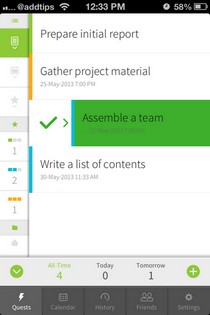
addappt made quite a splash when it was first released a few months back, but this contacts manager had the huge limitation of being invite-only. A lot of users also felt that the app has the potential to do more, but didn't fully realize that potential. Despite these shortcomings, people appreciated the fact that addappt is capable of automatically curating your address book. Basically, all your friends are supposed to keep their profiles up to date, and the changes are reflected in your account (much like in previously reviewed IntouchID). The app also offers a great way of managing groups with utmost ease. Though most of these features aren't really useful until a lot of your friends are on addappt - something that is difficult to accomplish with an invite-only app. Thankfully, the team behind addappt has finally realized this, making their awesome app open to all iOS users. Read More

Get A Gesture-Based, Predictive Keyboard On Your iPad With Path Input

There was a time when the famous Swype keyboard was available for iOS users with jailbroken devices, but it went the way of the dodo pretty quickly. The only possible option to use a gesture-based keyboard on an iPhone these days is to compose text in a third-party app and then copy it from there. TouchPal Keyboard does a pretty good job on that front, but it is not optimized for the iPad, and makes it tough to type on the tablet’s bigger screen. Path Input is another app that has been around for iPhone and iPod touch devices for quite a while, but has lacked iPad support. Not anymore! Path Input has just been released for the iPad, and its Swype-like typing and intelligent predictions are as good as they have always been. Read More

Apply Live Wallpapers & Scrolling Backgrounds To iPhone Home Screen

Live wallpapers are no longer completely new to iOS, thanks to Cydia apps like LivePapers and Go Desk. LivePapers is great, and comes with a bunch of options, but if you are not looking to spend a considerable amount of time navigating through a lot of complicated features, you might want to avoid that app. Go Desk faces too many issues and a lot of people have complained that it causes SpringBoard crashes. Fortunately, now jailbreak users have a new option to get animated and widescreen wallpapers for their Home screen. LiveWallpaper is a new app that offers a truly one-tap way of applying interactive live wallpapers and parallax-enabled backgrounds to your jailbroken iPhone's Home screen. Read More

Create & Send Doodles From The iPhone Messages App

The great thing about Cydia tweaks is that they make stock apps perform tasks that can usually be done only via third-party apps. A few days ago, we covered MessageMe - an iOS messenger with a pretty decent feature list. Among other great things, MessageMe can also let you draw freehand and share your drawings with your contacts. Doodle Message is a new tweak that adds a similar feature to the stock Messages app! Now you can create colorful drawings without moving away from the SMS app, and send them to your friends all in one go. The tweak even lets you choose between several brush sizes, and makes it possible to use a photo as the background for your doodles. Read More

Apple’s Podcasts iOS App Gets Playlists, Custom Stations & More

The standalone Podcasts app by Apple that was released last year has received its first major update. Previously, it just got a few minor updates to fix crashing issues, but the change log this time is a bit more substantial. Has it ever bothered you that while it is possible to easily organize songs into different playlists, the same can’t be done for podcasts? For instance I like catching up with football news while coming to work in the morning, while my evening listening sessions are all about informative shows. So, instead of manually selecting each episode, now I can take advantage of the new ‘My Stations’ feature to group particular podcasts together. The update has also added support for temporary stations, which can help people who don’t want to disrupt their playlist for a single episode. The overall look and feel of the app has been enhanced as well, and so has the iCloud syncing features. Read More

Make iPhone Alarms Read Aloud Weather, Battery, Time & Other Info

When it comes to third-party alarm apps for smartphones, there are some that won’t let you snooze the alarm until you thoroughly shake your device, or perform some complex logical tasks, but you won’t find many ways of adding similar capabilities to the stock Clock app in iOS. Unless you have a jailbroken device, of course. Wake Info is a new Cydia tweak that takes a gentle, yet effective approach towards making sure you don’t keep snoozing your alarm, and start your day with the right kind of motivation. The tweak endows the stock alarm app with the ability to read aloud any information you want to hear in the morning. The information can be anything from the battery level of your phone to the unread email messages waiting in your inbox. Read More