FindList: Dropdown List For Firefox Find-In-Page With History Feature
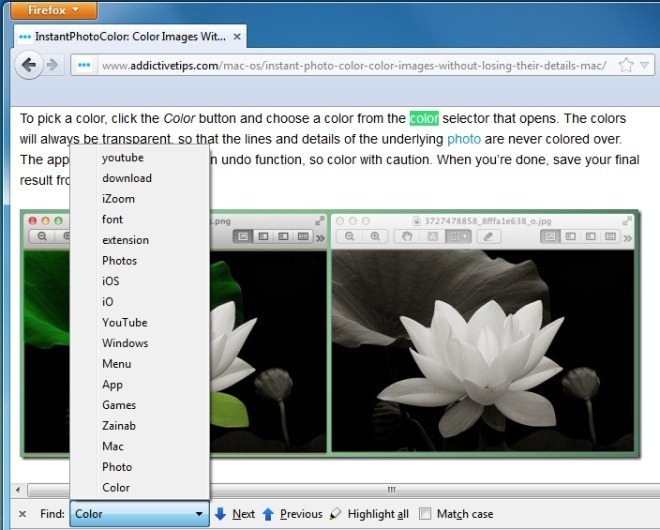
Firefox’s word search function can search one word after another, without keeping a history of the previously entered words. This means when you’re searching multiple webpages or websites, you have to enter the same search words over and over again. Not only can this be tiring, but also a time consuming process. FindList, a Firefox add-on, turns the find box to a drop-down history list, and saves the last 50 searches on a web page. So, while browsing the web, you can simply access and select words from this drop-down list. In addition to that, the number of entries can easily be changed from the FindList Preferences.
To find a particular word on a webpage, you either have to press F3 or use the Ctrl+F combination. Without the add-on, the search results are not saved, which means you have to enter the same words repeatedly to search for them on different websites. FindList lets you access previously entered search words from a drop-down menu, saving time and effort. Select text from the drop-down menu, and click the Next/Previous buttons to navigate the webpage.
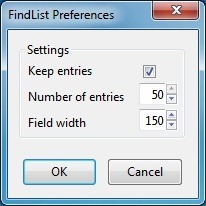
The FindList Preferences allow you to Keep entries and change the Number of entries. A maximum of 50 entries can be saved in the drop-down menu, and the field width, which is the length of the word/phrase you search, can also be easily changed. Once done with the settings, hit OK, and you’re good to go.
The extension is excellent; you might sit and debate whether or not you need it but, unless you actually install it and leave it running for a couple days you won’t realize just how useful it is. By extending the Find Bar’s functionality to include a history feature, you make it useful not just for when you need it, but for future uses as well. It will help you recall old search terms that might have led you to good resourceful page or, it might help you recall what you were searching for on a web page and help you retrace your online steps. In any case, it’s rather surprising that the feature can be added so easily yet Firefox doesn’t have it by default.
This is a small but quite helpful add-on, which can be used to quickly find words on webpages. Unfortunately, the add-on does not have a delete button for removing individual search results. Install the add-on from the link below, try it out, and let us know what you think.
Install FindList Add-On For Firefox
