Overlay Images On Any HTML/Website For Per Pixel Comparison [Chrome]
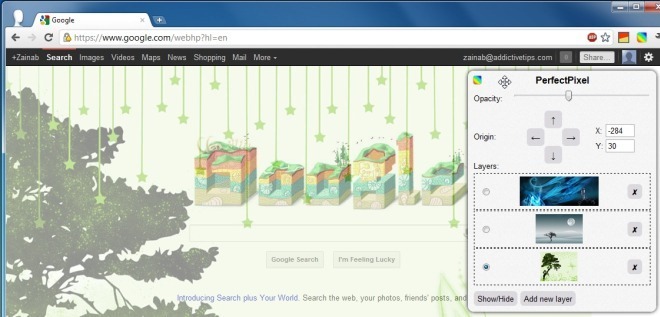
PerfectPixel, a Chrome extension, allows web developers and designers to easily overlay a semi-transparent image over the top of a developed HTML website. By moving the image around on a webpage, developers can visually see the difference in the pixels. The extension also has an opacity option, which allows you to view both the overlay and the developed HTML. As you move the image around, the coordinates are automatically updated in the PerfectPixel pop-up, which can then be copied and used by web developers.
Once you’ve installed the extension, click the button in the toolbar and a pop-up will appear on your webpage. Click Add new layer and select a file from your local system. This image will instantly be added as a layer over the webpage. You can Show/Hide images and also choose different ones. Move the image around to test it in different positions, and the coordinates will automatically be updated in the pop-up. You may add as many images as you like, and select particular ones by clicking them. Once the image is correctly positioned, you can use the updated coordinates to position your image through CSS. The developer has mentioned multiple overlay support; however, our testing yielded inability to add multiple layers.
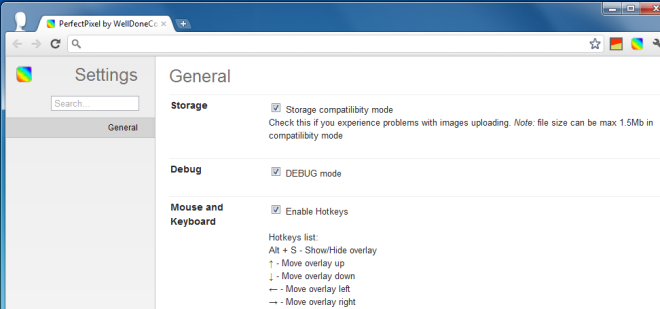
The PerfectPixel Options allow you to enable the Storage Compatibility Mode, which is there to fix compatibility issues with uploading images. One limitation of using compatibility mode, however, is that file size is restricted to a maximum of 1.5 MB. You may also enable the Debug mode and Hotkeys.
however, our testing showed that while you can add multiple layers, you can only view one layer at a time on a given page. This is an unfortunate limitation and the developer should consider changing it so that several layers can be viewed at once. The ‘Lock’ button saves the position of an image layer that you’ve added and even if you exit the extension (click its button again so that the panel disappears) it will remember the position for those images when you next open it.
PerfectPixel extension is quite a handy tool for web developers and designers, and available at the Chrome Web Store link below.
Install PerfectPixel For Google Chrome
