Map Local Drive Letter To Live SkyDrive Using Office 2010
With smooth integration of SkyDrive with Office 2010, you are now able to upload & save Office documents directly to SkyDrive, which offers 25GB of free storage. Previously we have reviewed 3rd party tools, such as, Live SkyDrive Upload Tool & SkyDrive Explorer. Wouldn’t it be easy if you could map Network Drive with SkyDrive and access documents, images, music, etc., right from Windows Explorer? This post is a detailed walk-through of mapping Network Drive with Live SkyDrive without requiring any 3rd party tool for this very sole purpose.
Update: We use Office 2010 only to get the WebDAV address, if you don’t want to purchase Office 2010, there is still another way to get the WebDAV address. Simple SkyDrive Viewer is a Windows application that lets anyone with a Windows Live account grab the personal WebDAV address quickly, and best of all, it is open source and free.
To begin, open Word 2010 document, Excel 2010 spreadsheet, or a PowerPoint 2010 presentation. On File menu, click Save & Send. In main window, click Save to Web. Now, click Sign In button, which can be found on the right side of the window.
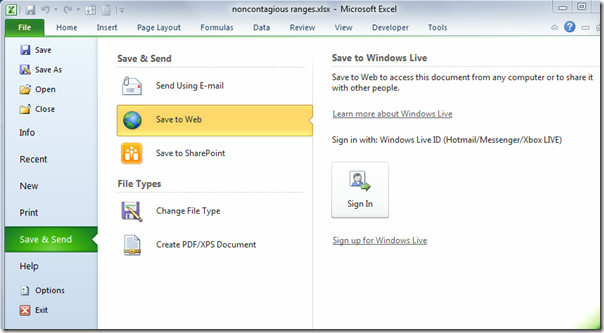
Now login with Windows Live credentials.

Choose a folder which you want to map as Network Drive in Windows Explorer. As we are intending to access a secure folder, therefore, we will click My Documents.
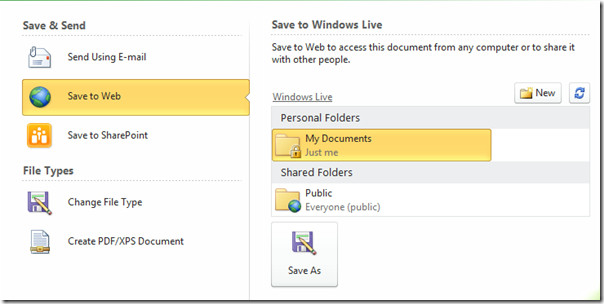
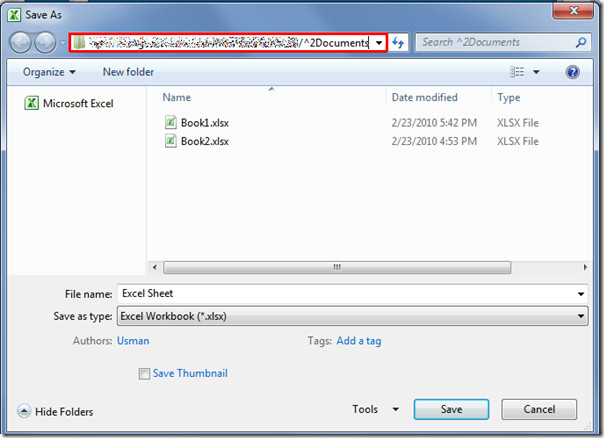
It will bring up Save as dialog, now copy the selected folder path (SkyDrive My Document folder path) from the address bar and click Save.
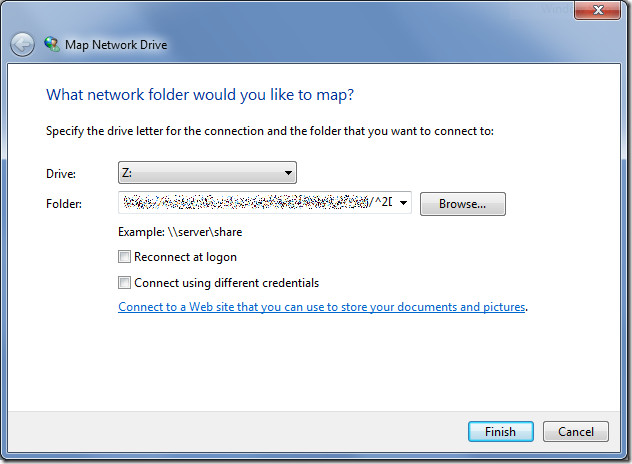
In Windows Explorer, on left sidebar, right-click Network and click Map network drive.

It will bring Map Network Drive dialog, from Drive list, specify Drive letter. In Folder pane, paste the recently copied SkyDrive My Documents folder path. For reconnecting network drive on Windows account login, enable Reconnect at logon option, but sometimes it takes way longer to connect with the SkyDrive Network drive on Windows logon, eventually making the system login a bit slower. Once done, click Finish.
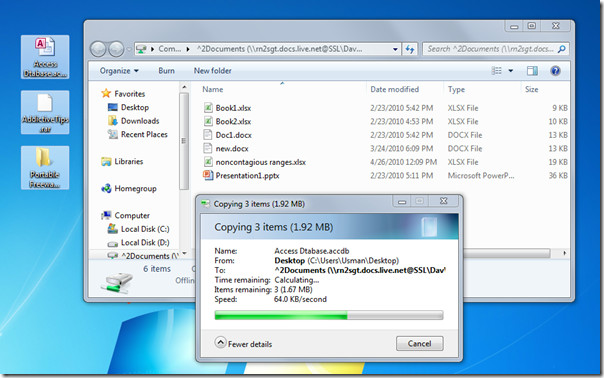
It will open up SkyDrive My Documents folder in Windows Explorer. Now start uploading folder & files in SkyDrive cloud directly.
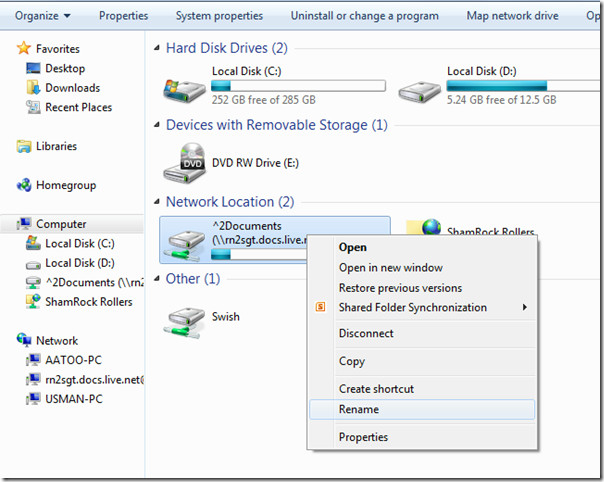
Give the Network drive an appropriate name to conceal the SkyDrive login address.

The only issue I’ve found with mounting the drives in this way is that the file name (address) is too long and prevents anything from being uploaded. I’ve used SDExplorer instead which seems to work fine.
Pasting any file in Skydrive mapped Drive is not possible, says it’s too large for the destination. even 15 KB file.
It doesn’t work it says “Could not open” and then it tells me the link, I tried adding that link but it doesn’t work, what can I do??
Thanks in Advance!
Hey it wont work at all for me it just keeps asking for my credidentials. the problem happens when i click finish to map the network folder. Thx for ur help in advance
Great work Usman B-)
As for j question about asking for credentials, this sometimes is a problem with network drives. As you didn’t mentioned what window OS you are using, it take guessing. Go to Window Control Panel, (For window 7, Vista), select show large icons on top right corner.
Double click the Credential Manager (it looks like a yellow stick), you will find 3 types of credentials, Windows, Certificate Based and Generic. Under Generic looks for the skydrive one (normally sorted to the top if you just tried mapping the network drive), expand it (the arrow on the right) and you should see the persistence : Enterprise
a) If it is persistence : local then edit it to Enterprise and try using the network drive again.
b) If it still doesn’t work, delete it. Go back to the network drive and try to enter the credential again
c) if still doesn’t work, delete it again, and this time inside the credential Manager, try to “add a generic credential” and enter the information again. Then go to the network drive and see if works.
d) If not, reboot the compute and try the above 3 again.
If still can’t work, then I can’t help you as cannot see your computer and the programs/window updates/drives etc, any of these may have caused the discconection
Hi,
I’ve been searching for a similar solution since a long time. Thank you so much. But my question is after mapping as network drive will it display existing folders or it will not display anything. I have plenty of files uploaded to skydrive. In explorer it says 15gb full (though it’s not) but when I open, it displays nothing..
any idea?
It seems that Webdav requires the mapped location be sent to a specific folder. You can’t just point it at the root and display everything on Skydrive.