Fix 3-Button Combo Download & Recovery Mode In Samsung Galaxy S GT-I9000
There was an unlucky batch of some Samsung GT-I9000 Galaxy S phones that cannot be put into download and recovery modes using the standard three-button combos. This poses a huge problem for the users of these phones, as they cannot literally apply any mods, leaked firmware etc whatsoever.
The problem is caused by a faulty SBL (secondary bootloader) in these devices. Luckily, a fix exists for this issue, involving flashing a custom ‘fixed’ secondary bootloader to your device, that should enable the 3-button combos once again.
Discalimer: Please note this process is highly dangerous, and can permanently brick your device if not follow properly. While the success rate is over 99%, proceed at your own risk.The instructions provided herein are ‘as is’ only, with no liability on AddictiveTips part.
Pre-requisites:
Make sure that you have:
- Samsung drivers preinstalled (verify this by checking that Kies actually recognizes your phone)
- ADB installed on your machine (refer to this guide here to ensure that)
- USB Debugging mode turned on in device’s settings (go to “Settings –> Applications –> Development” menu)
- Without plugging in the USB cable, type *#0228# in the phone dialer, and ensure that Voltage value is AT LEAST 3800 (mV). (This must be done WITHOUT plugging in the USB cable).
- Odin3 Multi-downloader v1.3 (can be downloaded here)
- Modified SBL tar file (Download (https://www.addictivetips.com/app/uploads/android/P-SBL.tar.md5.tar) here)
- Removed SIM and external microSD cards
When all set, start Odin in administrator mode (or run it with an admin account). Load the downloaded TAR file as PDA, and make sure that Re-partition is UNCHECKED and Phone Bootloader Update is CHECKED.
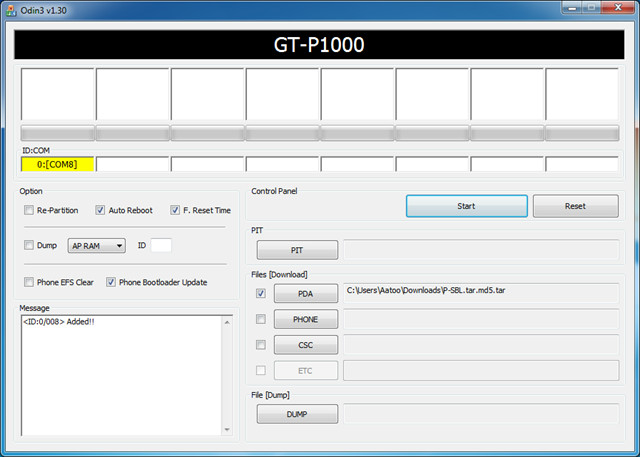
Now plug the USB cable into the phone. Start a new command prompt window and navigate to the folder/directory where you have installed ADB.
Put the phone in download mode using adb method. Enter the following command:
adb reboot download
This will put your phone in download mode. Check Odin now, and if ID:COM has turned yellow, you’re good to go. (Again ensure that you have not selected any other files that the one in PDA, and that re-partition and bootloader update options are correct)
Once you’re satisfied, press the Start button on Odin. The flash will take about three seconds, after which your phone will reboot automatically.
That’s it. This should fix your download and recovery mode 3-button combo issue. You can now apply any mods with the normal procedure.
Reference:
To go in Download mode, press and hold Volume Down + Home + Power Button
For Recovery mode, press and hold Volume Up + Home + Power Button
Also check out our guide on flashing Froyo on your Samsung Galaxy S phone via Odin.
[VIA XDA]

what should i do if i have forgotten my pattern cuse i ant turn on my deburging
my phone does not go into download mode it automatically restart my phone
Hi All,
I did everything according to steps.
I installed and I got success 1 with green color.
After instaling I got automatic reboot but phone stopped on dark screen without any contact.
Now I do not have any contact with phone during charging, conecting to computer. No any light, no vibration.
Please help me – I do not have any idea. My phone is Samsung I9003.
Thanks.
hello everyone my smart phone samsung galaxy
win gt-i8552 not going to downloading mod by pressing volume
down+home+power buttons and volume up+power buttons both option are not
working kindly plz help me…
For Ubuntu users:
1. Install adb tools by running $ sudo apt-get install android-tools-adb
2. Connect the usb cable and make sure the usb debugging is on.
3. Check if Ubuntu can see your phone by running $ adb devices
4. Download mode run $ adb reboot download
Recovery mode run $ adb reboot recovery
please help id:com not found
Excellent, helped me alot!
I am new to android and i have a galaxy S2 GT-19100
And i am sure that the 3 buttons combo doesnt work on my phone
So i did all the steps above and everything was fine but when i put adb reboot download in the cmd my phone doesnt go into the download mode it just reboots normally
And my id:com doesnt turn yellow
Am i doing something wrong???
Any bit of help will be appreciated
I am new to android and i have a galaxy S2 GT-19100
And i am sure that the 3 buttons combo doesnt work on my phone
So i did all the steps above and everything was fine but when i put adb reboot download in the cmd my phone doesnt go into the download mode it just reboots normally
And my id:com doesnt turn yellow
Am i doing something wrong???
Any bit of help will be appreciated
Thanks very much!
I got my phone back alive
i love u
Thanx man!! Work Perfectly for me, Great Job
love u love love u crappy orange os gone gone gone
i did it..but my now my samsung galxy s is not even turning on.. =( its compltly dead nothing at all..
plz advice
this doesn’t work on my SGS GT-I9000 nothing has so far everything i try my phone still keeps going to the start screen where it says GALAXY S GT-I9000 then samsung at the bottom and it remains at this screen until the phone’s battery is depleted ive tried the recovery buttons but it still shows the same screen it just blinks and download mode goes to a screen where it says do not turn off target!!! ive tried to connect it both to my laptop and pc but they refuse to connect what can i to do ?
works on GT-i9000!
thank you worked great, 28 dec 2012
http://www.mediafire.com/?gq1bm3ajymu2jve try this for all people that they have problem with (3 keys(steps) download mode) Make shure you have the right version and its not corrupted. If you have problems with your update msg me. I’ve got the update 2.3.6 and odin3 for that firmware. I was stuck all day to figure it out.
do we download the files on the samsung galaxy s or the computer?
thanks, it works like a charm.. now my gt-i9000 can go to download mode.. you saved my time for making home made jig dongle and/or money for buying jig.. thanks.. cheers.. 😀
Awesome!! Thanks a ton!!
Oops, just messed up my galaxy s 4g using this SBL and it will not start in any mode? HELP anyone?
Gr8!!!! its working
Thank you soooooo much
Thank you so much, initially had a few problems with Odin – it was turning yellow but was getting a ‘can’t open the serial com port’ message. Switched the usb cable to a port rather than the hub, got same message, so went into msconfig and switched off all start up programs and rebooted. Worked like a charm!
can i use this on galaxy S II?
Hi folks,
I did exactly what’s said and it worked perfectly on my Galaxy S GTi9000.
Before, all button combinations found in the net just didn’t work…
Thanks.
so this does not work for samsung galaxy s 4g.. or not?
Thanks heaps! followed instructions EXACTLY and my galaxy s can now go into recovery and download with 3 buttons
AWESOME
This is stupid! All I got is a bricked samsung galaxy s!
@stanley: you’re so stupid, this is for galaxy S, not SL
I did what’s mentioned above on my GT 19003. Odin showed PASS and my phone refused to restart. Its shows a black screen and I had to remove the battery. Now, my phone doesn’t turn on!
Help me!!!
same problem here!! my phone doesn’t turn on anymore!!
any ideas?!
its outa battery.?
Thanks man! Worked flawlessly, you’re a genius!
Confirmed to be working on I9000T, thank you VERY much!!! 🙂
EYYYYYYYYYY you just saved my phone 😀 thanks a lot… you are the best man
LIKE MENTIONED ABOVE, DO NOT TRY THIS IF YOU JUST GOT A NEW SAMSUNG GALAXY S 4G – IT WILL HARD BRICK YOUR PHONE. YOU HAVE NOW BEEN WARNED.
Thanks man, best guide for doing this on the internet.
I Recently upgrade my Phone ( Samsung Galaxy S Canada Bell) to Gingerbread which i later discorverd that it was a wrong firmware to it. Now the state of my phone is, It can only enter to Download Mode, So i tried To downgrade back to JH2 which is original firmware of Canada Bell. After using Odin PIT 215, after downgrading the phone can now it never reboot it self but it only get back to recovery mode.
If i click reboot, it will show S logo and everything will become blank.
Pls some one tell me what to to get my phone working perfectly.
Thanks
Hello There, I recently Upgrade my Samsung galaxy S Bell to gingerbread and which is wrong firmware to the phone, But after a while it started bricking. And now my phone can only enter download mode. Pls what can i do to get back a perfect firmware for my Bell phone.
Thanks
Lekan
Hi,
I Tried applying this fix but…
Added!!
Odin v.3 engine (ID:3)..
File analysis..
SetupConnection..
Initialzation..
Get PIT for mapping..
Firmware update start..
boot.bin
Complete(Write) operation failed.
All threads completed. (succeed 0 / failed 1)
All threads completed. (succeed 0 / failed 0)
Removed!!
Then it lost connection to my phone and now i cant connect to ADB, its sitting on the Mobile-!-Computer picture… What can i do?
Thanks a lot man…
you saved me……………
:))
i love you man your the best!!
Do not try this if you have a newer “Samsung Galaxy S 4G” it will full brick your phone , with no way to recovey, has to be sent to Samsung. I done this and now won’t even power on or give you the charging icon, and followed it step by step, seem like alot of people are getting the same result, lucky mines is under warranty.
JUST FOUND THIS OUT! SOB!!!!! =(
I wish I would have read this before I did it! *sigh* Oh well, thank God for insurance?
hello everybody
i tried same procedure on my galaxy s for tmobile, it went through without any problem but my phone did not reboot and will not turn on at all. any help on that please………
I tried the same procedure on my Samsung Galaxy S 4G and like Navi everything completed on Odin without any problems except it didn’t reboot my phone and when I tried to switch it on it wouldn’t power up. Why is this happening? I wish I had read this post before attempting this.
plz hellp, adb is working fine, it recognize my device in cmd and odin too, but whene i put my SGS in download mode, it goes unrecognized in odin and in windows
Everything works great, but when i put my phone in download with adb command, odin looses connection with my phone…what to do ?
thanks dude, worked like a charm!!
gingerbread updated….thnx 4 ur gr8 information…. ha ha ha ha!!!!
thnx dude!!! finally my sgs rocks…going to update gingerbread… 🙂
why does it have a screen full of line when i turn on my phone ?
hey…awesome man.. you save my day…thanks a lot…
So glad I found this guide.
Worked like a charm.
Thanks so much.
Worked Like a Charm dude! Thanks for all the effort! Appreciate it!
I followed all the steps.
Although Odin turns yellow after “adb reboot download” my device isnt attached.
After hitting start, Odin reports:
Added!!
Odin v.3 engine (ID:8)..
File analysis..
SetupConnection..
All threads completed. (succeed 0 / failed 1)
Nothing happened.
Any ideas ?
Ok, tried this and it got the download mode working, but recovery mode still doesn’t. And I also not a problem when i boot up, the screen goes all mutlicoloured, all stripeyvertical lines, then the galaxy logo and it boots, not normal. I also get that mutlcoloured screen when trying the camera, so instead of image through viewfinder, i get couloured screen. Tried rebooting a few times, all the same. Maybe i did it in wrong order, or file was corrupted but i used a download usb jig to force download mode then upgraded to gingerbread. Then when all seemed ok, no funny coloured screen etc, the instructions said to force recovery mode to clear the cache, which is where i followed instructions above. Should i have done the above first, then updgrade firmware? Or dodgy file from above download? Need help, phone keeps turnings itself off now too. Should i just try again. One thing i noticed now, when checking the voltage, mine says 3780, not at least 3800mv, could that be the problem and how can i fix that, battery is at 50%. Any help and advice is much appreciated.
Hi Simon, not sure if your issue is fixed or not. I upgraded mine and my partner’s Galaxy S to gingerbread without issue, but when I used the same method for a friends, they got the same issue with the camera as you.
We followed these steps:
1. Reboot phone – if issue is still there go to step 2
2. Go into Gallery, then tap on the camera app icon to access the camera – if issue is still there go to step 3
3. Reinstall gingerbread using the same method. Once completed, if issue is still there go to step 4
4. Reboot phone – if issue is still there go to step 5
5. Go into Gallery, then tap on the camera app icon to access the camera – this should resolve the issue.
What I recommend you do first before reinstalling gingerbread is testing whether going into Gallery, then tapping on the camera app icon resolves it, if not you might want to reboot the phone and try it again.
They no longer have any issues, wish you luck.
I have the solution for this issue, which happened to me after using this guide.
worked great! brilliant!!
worked like a charm 🙂 thanks
HOLY!! THANKS!!
Thank you.
Went through as described except:
when the adb-reboot-download command was given, instead of 1 ID:COM, many (4!) were showing yellow. Tried to see any reference to such an outcome but couldn’t see any. The mobile was showing “downloading-don’t switch off target” message. For some time I didn’t know what to do next. Finally, decided and proceeded with bated breath. 1.. 2 and 3 seconds passed and gracefully, mobile restarted and the odin screen showed PASSED! in green color in only ID:COM slot (first one).
To be sure, pressed the 3 button combination, and viola.. it went to the downloading mode (which wasn’t working before!)
Thanks again..
This is heaven sent. Not only did it fixed the 3 button reset, it also fixed my wifi connection issue. I don’t know if its related, but all I know is that its working. Because the work around that I did before was to connect to allshare for AP’s that I had problems, now, its a breeze. Thanks for this..
I have the Samsung GT-I9000 Gal S… The phone is awsome BUT! Im having a problem when connecting it to my laptop…. Once connected my phone will say it is connected but Keis just carrys on trying to connect and it is not showing any connection at all on the laptop? what do I do???
:-s
Hi!
I made all the steps, but when I hit “adb reboot download”, Windows tells me it’s not working properly and it’s an unknown device and nothing else works, Hitting “adb reboot” doesn’t do anything as the system doesn’t see the device (Oding tells me it has been disconnected right after I hit “adb reboot download”).
As it doesn’t do anything, I have to remove the battery.
Any advice?
btw, I don’t see it in the Device manager as an adb interface… =/
you should check that the drivers for your phone are correctly installed on your system
I’ve checked my voltage and I’ve seen that my voltage is under 3800mV.
How I can improve that?
just put your phone on charging dude
that for the guides
its works on me
Hi,
the links to download ADB (android SDK http://dl.google.com/android/android-sdk_r09-windows.zip) is broken or its not working!
do you have another link where I can get the android SDK.
thanks guys
during flashing with odin v 3 I have turn off my battery, after that I cant start my samsung i 5801 phone. is there any solution to bring my phone at download mode? pls! help me!!!!!!
…..quick update for on my serial comm error issue; I had the Kies program running in the background, so once I closed the Kies app and retried the Odin flash upgrade it worked. Yippeee!!!
Hiya, I have followed the instructions (which are excellent) and all works well except the last step. The phone goes into download mode but encounters a serial com error when Odin tries the flash. I have pasted below the message output from Odin. Your help would be greatly appreciated:
Added!!
Odin v.3 engine (ID:5)..
File analysis..
SetupConnection..
Can’t open the serial(COM) port.
All threads completed. (succeed 0 / failed 1)
P.S. I am a complete newbie at this.
Thanks,
KD
Awsome, worked great!
Thank you so much for this guide!
(samsung galaxy s ,2.2 europe)
(( had to send it to recovery to mobile phones lab.
would trhis work in the captivate??
( had same problem. except logo. i see only computer and phone with ! triangle. ( any combination of buttons make phone reboot to same logo.
cannot see phone not in device manager, not in kies, not in odin.
i’m on samsung vibrant 9000 from tmobile.
pleeeeeease help. i’m desperate.
thnx a lot!
Aatif isn’t around and I couldn’t find a solution for this issue despite searching. I guess you’ll just have to wait for a while. I’ll notify him in the meantime, and see if he can come online for a while to check this out.
Thanks Haroon,
I will wait for Aatif to return.
My phone cant be reset using the 3 button method.
Its stuck in the logo screen and vibarate once and a while after installing the OCLF.
PLEASE HELP ME
Aatif is on a break these days, as you might have noticed. He will help you with your issue as soon as he returns. I would have helped you myself but despite searching, I couldn’t find a fix for your issue.
Hi
I have battled getting with the following issues:
1. the 3 button combo does not work and hence my attempt to apply this fix
2. the adb command returns ” error device not found” message. i have loaded usb drivers and the PC can identify the my galaxy in windows 7.
3. kies cannot connect to my device anymore though it once did
4. odin ID: COM field does go yellow and message box say Added but the adb reboot download command returns ” error : device not found” message
My device has std android 2.1 and never been upgraded before
What must i do in order to upgrade from
Regards
Mbuzzz
Would have loved to help you but I’m more of an HTC expert rather than a Samsung one. Aatif rocks with Samsung devices but he is on a break these days.
“adb reboot download” doesn’t seem to work on my device (debug mode on).
Although id:com turns yellow.
When i hit start i get
Added!!
Odin v.3 engine (ID:8)..
File analysis..
SetupConnection..
All threads completed. (succeed 0 / failed 1)
Nothing happened.
Any ideas ?
does this work on the gt-9000t?
This is too good ! Thank you soo much , Now I am able to use 3 button modes .
Works perfectly on Android 2.2 official update .
Where to enter the command “adb boot recovery”. I have all the files on my computer but adb is not opening.
Open a Command Prompt window and enter the command there. ADB must be added to your path variable. To set that, refer to https://www.addictivetips.com/mobile/what-is-adb-and-how-to-install-it-android/
Aweome man Ive been looking for a solution for so long and you really saved my SGS I9000 and made my day…cant thank you enough bro…yeppeeee
Thank you very much. Your guide is the easiest one that I found in the internet and it helped me fix the 3 buttons issue.
excellent – after a lot of research this was the best advice and worked faultlessly
Thanks for this guide! I thought my Galaxy S is lost. You where my lifesaver!