Hacker’s Keyboard Is A Full 5-Row On-Screen Keyboard For Android
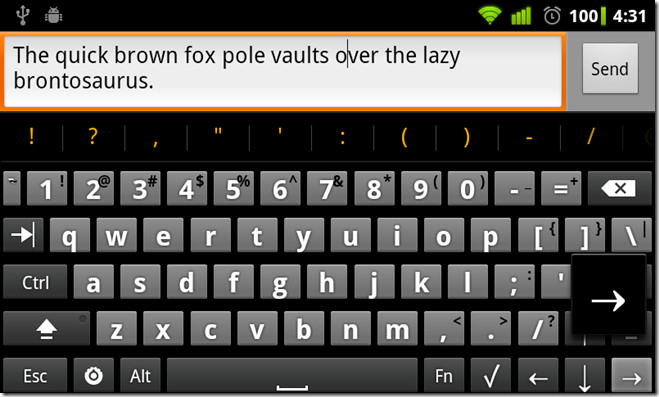
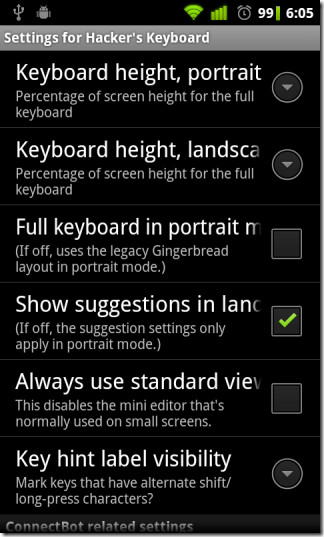
Android is a mobile operating system that thrives on customization. Ranging from changing the looks of your device’s home screen to altering the amount of items to be appearing on it, and tweaking your preferred system settings to resorting to an alternative system app, Google’s mobile operating system puts in control over modification of virtually the entire firmware. Same applies to custom keyboard replacement apps as well. While Swype is my all-time personal favorite among custom Android keyboard alternatives, there are certain solutions that have attracted many a user with their own set of features.Primarily meant for ConnectBot users yet a handy solution for users who wish to do extensive typing and/or command entry on their Android devices and particularly useful for tablet users, Hacker’s Keyboard is an onscreen input method for Android that simulates the conventional desktop computer keyboard. In addition to the conventional set of customizable options (settings button visibility, suggestions, auto-complete etc.), the IME comes packed with a few handy options of its own. These include altering the portrait and landscape height of the keyboard and the option to disable the full keyboard layout for portrait orientation.
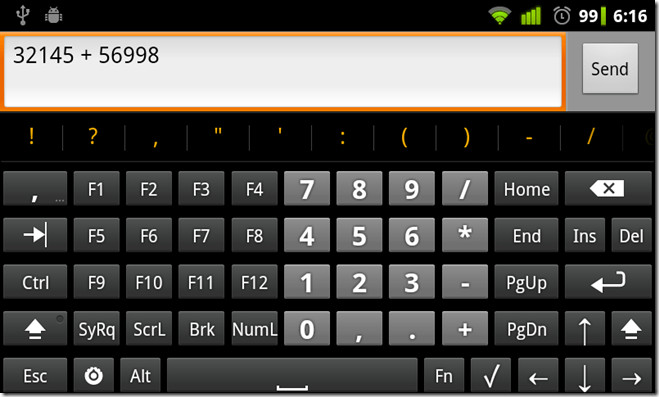
The arrow keys are particularly useful for devices that do not sport a trackball for quickly moving the cursor through typed text. The Fn key reveals the function keys (F1 – F12), navigation keys (Home, End, Ins, Del, PgUp and PgDn) and the numpad. Did we forget to mention that Hacker’s Keyboard is multilingual? Of course not. The app supports many global languages, including Arabic, Bulgarian, Danish, Finnish, French, German, Greek, Hebrew, Italian, Lao, Norwegian, Persian , Portuguese, Romanian, Russian, Russian, Serbian, Slovak, Slovenian, Serbian, Spanish, Swedish, Thai, Turkish, Ukrainian and many more. Switching between the required languages is as simple as swiping across the keyboard and making your choice.
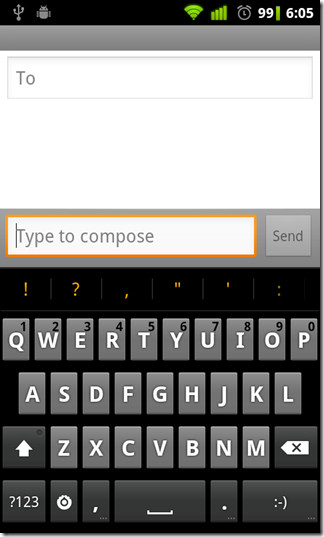
The IME is best used in landscape orientation, especially if you’re using it on a 3.7” screen Android smartphone. However, you won’t have to worry about switching back and forth between the default input method and Hacker’s Keyboard while shifting orientation. Simply uncheck the Full keyboard in portrait mode option from within the IME’s settings menu and the keyboard will automatically change its layout to that of the default gingerbread keyboard upon switching to portrait mode.
Hacker’s Keyboard is based on the AOSP Gingerbread soft keyboard. You can grab the IME for free from the Android Market via the provided link code.
Download Hacker’s Keyboard For Android

Only the problem is how to inter the code character just like in nepali ङ and ट्र its character code is ‘Alt+0170’ and ‘6 Alt+0171. Please tell me the solution.
Why does it need access to my contacts? Sorry, but that’s not going to happen.
Almost all keyboards in the Android ecosystem need access to your contacts, so they can give you suggestions for recipients when putting in email addresses, SMS messages, Google Talk chat sessions and lots more. That’s hardly surprising at all.
sucks on smaller screen devices but i can see it’s usefulness on tablets or maybe phones with 4+” screens
My only complaint is that I can’t choose the input method for portrait vs landscape. I don’t like the gingerbread keyboard in portrait, I prefer Swype for quick messages, but the landscape functionality of this keyboard is well worth keeping it around.
@Rick All replacement keyboards give the same warning. The permissions of the app don’t allow it to access the internet, so how is it going to do anything malicious with your keystroke data?
Perfect companion for gmote.
Unfortunately the keyboard installation warns that it can log all key strokes…. with this app not being open source or subject to some sort of security review, I would stay away if you do anything that requires secure data entry.
great i like it works good