Increase iPhone, iPod Touch, iPad Volume With Volume Booster
While portable devices are great for listening to music on the go with your earphones, they just don’t cut it usually when there are multiple listeners and you want to play something out loud, due to the small size of speakers they usually sport. However, if you have an iPhone, iPod Touch or iPad, there’s an app a Cydia tweak for that! For boosting the volume of your iPhone, iPod Touch and iPad, Volume Booster 4.0 is your solution. Read on for details.
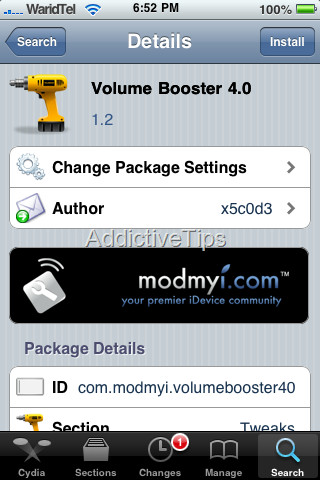
This tweak is only applicable on jailbroken iDevices with Cydia installed so if your device isn’t jailbroken yet, just search here at AddictiveTips for the guide applicable to your device and its current firmware version first. Once jailbroken, proceed with the following.
Here is the step by step guide on increasing your iOS device’s volume with Volume Booster:
- First of all, launch Cydia on your device.
- Now go to ‘Search’, type “ Volume Booster” and hit the search button.
- In the search results, you will see Volume Booster 4.0 amongst the top results. Tap it and press the Install button.
- Once the installation is done, exit Cydia.
- Now launch WinterBoard and go to its Themes section. You will see several options amongst WinterBoard themes. Simply check Volume Boost 4.0, and it should get enabled.
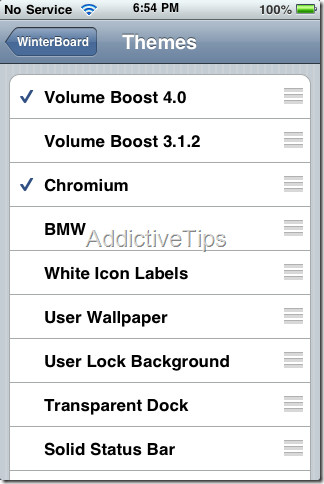
If you don’t have winterboard installed, don’t worry; it will be automatically installed with Volume Booster installation. That’s pretty much it – you should start hearing a noticeable difference in the volume of your iOS device from now onward. Go ahead, be the DJ and play some music for you and your friends to sway together to.
There is also Volume Boost 3.1.2 available in Cydia but we have found Volume Booster 4.0 to be more effective. Please do let us know if this tweak helped increasing your device’s volume.
