ShakeCall For Android Lets You Receive And End Calls With A Shake
Do you often find yourself fighting with the receive/end slider whenever you receive a call on your Android phone? or do you hate waiting for the screen to wake after you take it off your ear to end an ongoing call? ShakeCall for Android is a free, handy tool that allows you to receive incoming calls by giving your phone a quick shake or simply holding it to your ear and lets you end both incoming and outgoing calls with a shake. More after the break.
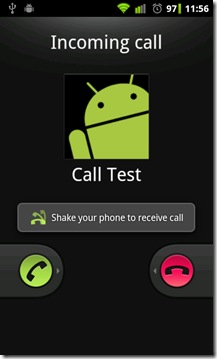
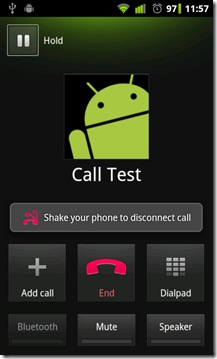
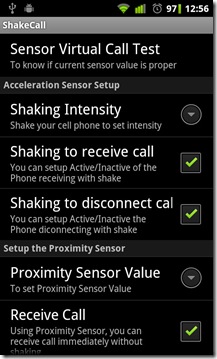
Although ShakeCall is not the only app to be taking advantage of the Android’s proximity sensor, it is among the few ones that actually tie that particular aspect of your device with the calling functionality.
The app begins to monitor feedback from your phone’s accelerometer and proximity sensor in the event of a incoming/outgoing call and receives/ends a call whenever the monitored values match or exceed those defined by the user, subsequently causing the phone to vibrate (as per default settings). Launch the app from your app drawer to alter the required Shaking Intensity and Proximity Sensor Value, toggle vibration on call receive/end, toggle the toast suggestion that appears whenever a call is connected and test if the settings suit you via the Sensor Virtual Call Test option.
The Disconnect Call Fix option, when enabled, ensures that calls do not disconnect while you’re holding the phone to your ear. Should you somehow forget, the app’s on-screen indications about receiving and ending calls via shaking might prove to be more than helpful to remind you about its functionality.
As of this writing, receiving calls via the proximity sensor (holding the phone to your ear or placing your hand over the ear piece) only works when the Shaking to receive call option is enabled. Hopefully, future updates will allow the users to use one or both of the options at a time. The only blemish with ShakeCall, or any other app that uses your Android’s proximity sensor, is that you can’t afford to rigorously shake your device upon receiving or during calls, as doing so would result in immediate carrying out of the corresponding action associated with the sensor, which, in this case, happens to be ending or receiving calls on your Android.
Note: If you are looking for a similar app that uses your Android’s proximity sensor to automatically switch calls between the earpiece and speaker, you might be interested to go through our detailed review of SpeakerProximity For Android.
Download ShakeCall For Android

After installing and setting the threshold, I shake and shake, it won’t answer.
But for an active call, just putting the phone to my ear, is enough to disconnect the call, which I didn’t want.
works nice on desire hd
shake answer doesn’t work on HTC Desire HD with Android 2.3 and Sense 2.1…. end call shaking works good.
Does not work with MIUI Roms (N1)