How To Get Siri Legally On iPhone 4, iPhone 3GS, iPad, iPod touch 4G/3G With Spire
A lot of people were expecting something big from the iOS dev community around Christmas, and like so many other instances, they have not disappointed all the iPhone jailbreak users across the world. A few hours ago, Spire was released, which is a legal port for the much-awaited Siri on unsupported, legacy devices. The world fell in love with Siri as soon as it was released alongside iOS 5. As it was among the most obvious distinguishing features of iPhone 4S, users of older iPhones, iPad and iPod touch wanted it on their devices straightaway, but turned out that it wasn’t legal to port Siri to any other device because of the encryption used in iOS 5. However, with the release of unencrypted keys in one of iOS beta firmwares around Christmas, all such limitations went down the drain, and thanks to the developers of Spire, it is possible to legally use Siri on jailbroken iPhone 4, iPod touch 4G, iPod touch 3G and first gen iPad.
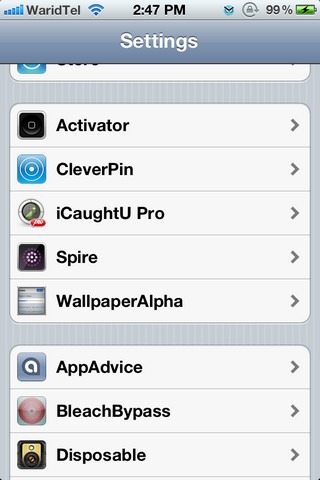
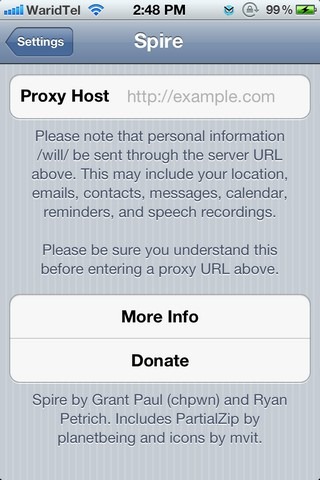
On the surface, using Spire might look like as simple a task as installing a Cydia tweak, but you need to do much more than that before you can have a friendly and helpful chat with Siri. Also, it must be noted that this tweak will only run on devices running iOS 5 jailbroken properly, as semi-tethered jailbreak is not supported. Here are the steps that need to be followed to get Spire up and running on any compatible device.

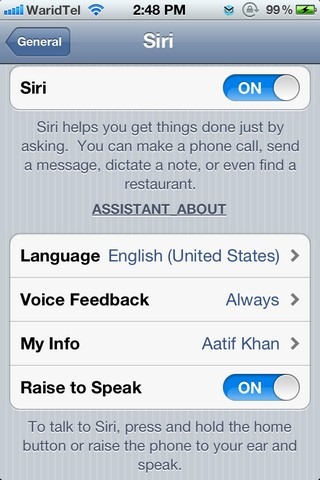
Instructions:
- Go to the Cydia store, and from the BigBoss repo, download the newly released Spire package. The tweak uses about 100MB of data, so it is better if you download it over a stable Wi-Fi connection (as suggested by the developer as well).
- The installation of the tweak will require you to reboot your device. If you’re tethered jailbroken still, you’ll need a tool like redsn0w or iBooty to perform a reboot.
- After the download and installation procedure is complete, a separate menu will appear for Spire in the Extensions tab of the Settings menu.
- Now comes the tricky part of using Spire, that is, setting up a proxy server for the tweak. While Spire will install Siri on a device, access to Apple’s official server is still required for Siri to work. Hence, we need to set up a proxy, which will make the server think that your device is actually a 4S. Even though theoretically there are more than one methods for accomplishing this, as you can read here at the developer’s blog, the most intuitive and practical method seems to be the copying of proxy settings from an actual iPhone 4S. Chpwn, the co-developer of Spire, lists some techniques for that on his blog, and you can check them out.
That’s about it. You should now be able to use Siri on on your device. Spire is available for free in the Cydia store’s Big Boss repo.

Comment this when it is available on iOS 5.1. I appreciate it.
does spire works in 5.1 ios ?
done every thing but don’t show on general settings siri .. still work with normal voice command as. siri option button won’t ther
wtf why dowload spire when you need a iphone 4s? if we already own one why woould we need spire
You don’t need an iPhone 4S, just it’s certification keys. So all you have to do is ask for any 4S owner for a temporary favour.
What do I enter fr proxy host, or what do I do once I get to that screen ? Please help.
downloaded it put in a proxy now were do i find and use it can not find it at all
downloaded it put in a proxy now were do i find and use it can not find it at all
I ask from mobile store about this subject but he said:siri is a hardware and you can’t inistal on your iphone 4
Probably more than half the stuff they tell you at the mobile store isn’t true. The hardware that they’re talking about is the mic…and older devices have it. You probably heard this from them just to buy the iPhone 4s from them.
Spire is in my settings but it hasn’t replaced voice control, I’m using a 3GS with an unteathered version of redsn0w, could the version of my jailbreak be preventing spire taking over?
My phone is on 5.0.1 untethered iPhone 4 so will it work??
Ok so when I try to install spire I get “I wasn’t able to locate the file for th com.chpwn.spire package. This might mean you need to manually fix this package.” What does this mean?? How do I manually fix the package?
i can’t get siri to come up on my iPod under settings
Worked For Me Thanks Root Hack I Dont Have Any 4S Just install certificate From Root hack Then Copy Url 1000-1009 To Spire in Preferances Then Wait Activate By Respring Reboot Wait Untill Certificate Allow To Use Siri Proxy Cool
can you explain more?
If you have cydia go to the search and type siri. Wait for it to update and then install. Then follow instructions
i can’t get the certificate to open from Root Hack
Don’t you just love it? Unless I’m missing something here, it’s legal for illegal (broken) IPhone 3XXs but not for legal phones.
Don’t you just love it? Unless I’m missing something here, it’s legal for illegal (broken) IPhone 3XXs but not for legal phones.
Jailbreaking your phone isn’t illegal by any means.
jailbreaking your phone is completely legal
True, but much of the post-jailbreaking activity is illegal.
wrong, jailbreaking is legal you retard
Moderator: Please mind your language.
You have to love how the mods are editing a troll thread.
when did I say anything different, guys? I agreed that jailbreak is legal
When I’m installing it, I get this:
Failed removing file at path:
Failed removing file at path:
Failed removing file at path:
Failed removing file at path:
Failed removing file at path:
Failed removing file at path:
Failed removing file at path:
Failed removing file at path:
Failed removing file at path:
Failed removing file at path:
Failed removing file at path:
Failed removing file at path:
Failed removing file at path:
Failed removing file at path:
Failed removing file at path:
Failed removing file at path:
Failed removing file at path:
Failed removing file at path:
Failed removing file at path:
Failed removing file at path:
Failed removing file at path:
Failed removing file at path:
iPod Touch 4G, 5.0.1 Untethered Jailbreak
bump
I can’t find Spire in Cydia.
what device are you running on? and also, what ios? are you jailbroken?
How could he have cydia if he is not jailbroken *facepalm*
Reload your sources than search for Spire
Unauthorized access of Apple’s servers isn’t legal.
Anyway, Siri’s not that great … the fanbois excuse its shortcomings with “it’s in beta” … it was a very clever marketing ploy for Apple to slap that label on it so they could pretend it’s a lot better than it is (“I know Artificial Intelligence and you, madam, are no Artificial Intelligence”) and use it to sell iPhone 4S’s.
Uhhh…. Deja Vu?
Siri is groundbreaking technology, to suggest otherwise is foolish.
it won’t work for many ppl who don’t have no access to 4s keys
nice grammar retard
It’s a good thing my life doesn’t depend on English grammar, notice the name dumbass. I am not a native english speaker.
that was articulated beautifully sir!
I can’t more agree. It was artichoked well very.
nice job dissing him back… im not a native english speaker either
Darts1080 sounds like a fat retard himself. What a shite name, has Darts180 been taken? Get into a more active sport pot mouth!