What Is MIUI ROM For Android? [Complete Guide]
If you’re new to the Android world, chances are high that you’d have come across the term MIUI ROM or MIUI Port when browsing the web. Many users are left wondering as to what this means, what an MIUI Rom is and why is it any better than your current Android operating system.
In this article, we’ll attempt to explore the concept of MIUI, what are the pros and cons and the future of the project.
WHAT IS MIUI?
On the very basic, it is a Chinese customized version of the Android OS, built from stock with additional goodies taken from manufacturer modifications like Samsung’s TouchWiz launcher, iPhone’s looks and the full potential of Android 2.2 platform. If you were to translate the name ‘MIUI’ to English, it would probably sound something like ‘meeooee’. This ROM was initially developed only for Chinese users, based on the FroYo build of Android and totally localized with Chinese locale and language. The group behind the ROM had no intention of bringing it to other devices at the beginning, but as of now, several ports have surfaced for various other devices and with translations.
Check out a video of MIUI ROM for HTC Desire and Nexus One after the jump.
WHAT ARE THE PERKS?
The biggest advantage that you get with the MIUI ROM is speed. Just like the CyanogenMod, it is based on an AOSP build of Froyo (Android 2.2) and hence brings unparalleled speed utilizing the hardware to its fullest.
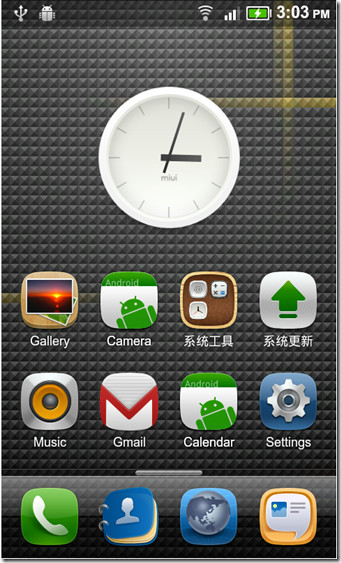
Then, you get the customizations. As you can see in the video preview above, the MIUI ROM does not resemble any of the currently available customized builds of Android OS, neither does it look similar to the stock FroYo build. It borrows heavily from the iOS platform, like having no app drawer at all, but at the same time it offers customizations like themes, effects etc. that iPhone users can only dream of. It also allows you to change the look of almost any aspect of the interface, ranging from the order of home screens to icons in the dock. MIUI features squarish icons, giving it an even more similar look to the iOS, but definitely better.
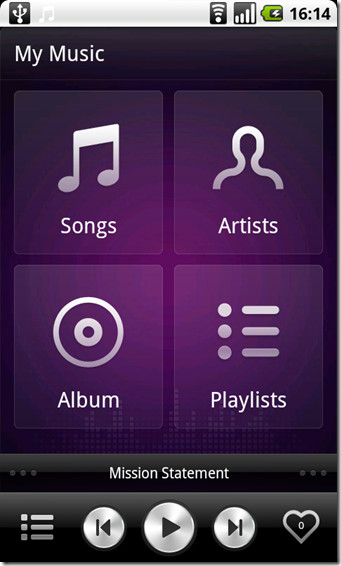
The developers behind the MIUI ROM also brought in some of their own applications, most notably, the FM app and the MIUI music player, which work better than any other offering (including the stock ones). They look beautiful, are more user friendly, and use less memory. Some of these have been incorporated in CyanogenMod builds as well, while others can be used independently with almost any other device, Check out a preview of the MIUI music player below.
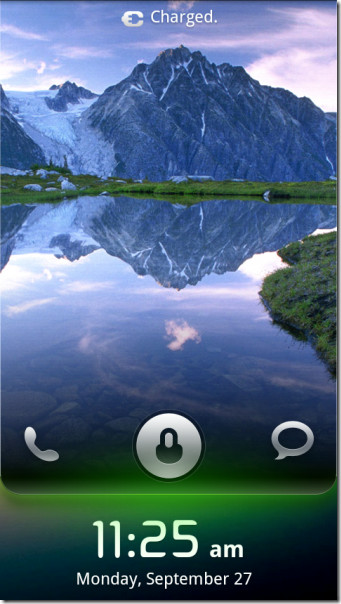
MIUI ROM also features dedicated call and message icons on the lockscreen, which can take you to these applications without having to unlock your handset – very useful in our opinion. Their lockscreen customizations also surpass any other Android build, and in fact, Samsung with their Galaxy S variants seems to have taken a leaf out of their book, offering four different lockscreen settings that other manufacturers have yet to catch up to.
DISADVANTAGES OF MIUI ROM
As with any modification, there are some catches, and MIUI is no exception. For starters, most of the ROM is in Chinese, and while ports to other devices and locales have been done, part of the ROM remains in Chinese yet. This can be a huge setback for most of the users across the globe where Chinese isn’t the native language and cannot be used as freely.
The second major disadvantage, as many users have pointed out, is faster battery drains. This does make sense taking into account the heavy customizations that have been done to the user interface, but the reviews are mixed in this regard. In my opinion, users who do not flash the MIUI ROM with fully charged battery, or those who do not calibrate their phone’s battery afterwards, face the battery problem more than those that follow otherwise.
Furthermore, and this may not strictly be a disadvantage, but since many Android fan boys are die-hard iPhone haters, the similarities in appearance of the two may be a huge turn off for them. Indeed, many users have already complained that it is too much ‘iPhone-alike’. Personally, I like the new touch. The iOS looks great, to begin with, and MIUI ROM has only taken the best elements of both platforms combining them with the raw power of the hardware – hardly sounds like a deal-breaker to me.
FUTURE OF THE MIUI ROM
While the project was initially meant only for the Nexus One and HTC Desire, and the original developers still don’t intend to take it beyond these two devices, the user community has ported the ROM to various other Android phones, including the Droid X, Evo 4G and others. Cyanogen has expressed a keen interest in the development of MIUI ROMs, and so is the XDA-Developers community working on porting it as quickly as possible to other devices. While the biggest challenges are the language and locale limitations, the future of MIUI ROM looks promising.
As for the original ROM, weekly updates are released over-the-air (OTA) that bring the newest enhancements, bug fixes and other goodies to users running the ROM.
The MIUI project brings a new dimension to the power of the already-brilliant Android platform. Despite its minor shortcomings, it works wonders and brings out the true potential of your Android devices, which in some cases, surpasses even the CyanogenMod’s blunt, stock-interface.

This helped me understand basically what it is without going in to more technical facts.
This is my first android…..I switched from apple. I’ve heard about “ROOTING”…. I currently have the galaxy s2 and I was wondering how do I go about to root my phone…..
the miui is a fan-made rom
it has nothing to do with the Chinese government…
super hacker worries? LOL
Hi guys you should all be worried…………check out CIQ
david and dj are dicks
Hopefully miui will implement data spoofing to overcome shortages in permission revocation
There are some settings and ideologies of miui that I would like seem implemented or install in cm4dx
David never heard of clearing data and dalvik cache before installing a custom rom…… it does look great but a built that kills battery fast is a no go for me…. if only theres a fix 🙂
I appreciate all your works and thanks , kindly do let us out from having a camera fix for miui v1.6.17 on x10. All are working well except camera & cam corder
Excellent review!
You can get this ROM in english at http://miui.us
They have developers on their site that port MIUI to devices that they don’t officially support!
MIUI is iPhone on Android, i hate it.
It will only look like an iPhone if you keep the launcher. There are other launchers you can download from the market.
“Long-and-short: David (my name as well) was right on. Eddie and Rick have their heads in the sane. I would not want any OS that unknown sources update over the air–”weekly updates are released over-the-air (OTA)”–particularly sources HQ’d in China.”
The man says as he boots up his handset made in (Taiwan, Korea, China, India…) Does anyone really believe that China or anyone else for that matter would sit “hoping” that some unassuming Westerner “might” flash a ROM — which by the way is created solely for Chinese users and only ported for Western application — when they control the manufacture of the actual hardware!? If they really want your private info, building some sort of spyware into the hardware would be much simpler and more effective than hoping that “David” installs MIUI so we can find out his mom’s phone number. Ooooh, aaaahhh!
BTW, for the author, MIUI is an acronym for Mobile Internet User Interface, so it couldn’t be “translated into English” anymore than NASA could be translated into Chinese. That said, pretty much can be pronounced anyway you like.
Hey dj, on android we don’t do sync with desktop anymore….
News reports say the Chinese government–military–has about 25,000 hackers whose job is to penetrate sensitive and critical sites in other countries–i.e., the United States. “Unspecified hackers” from URLs “originating in China” have penetrated the Pentagon and a significant chunk of America’s critical infrastructure. No one seems to know who they are, their intent, or what they have done–although, purely coincidentally, China recently showcased an oversized knock off of the F-22.
Long-and-short: David (my name as well) was right on. Eddie and Rick have their heads in the sane. I would not want any OS that unknown sources update over the air–“weekly updates are released over-the-air (OTA)”–particularly sources HQ’d in China.
BTW, do any of your trusting folks Synch their MIUI rooted Android with their desktop?
DJ
Make that “heads in the sand”; chalk that up to a “spell checker” error.
dj
DJ,
I have got a question for you,
DO U HAVE ANY EVIDENCE?
from your comment, I can see NO proof but DISCRIMINATION!
I just talk about the MIUI ROM.
For the Chinese government, I’ve no idea…
@DJ Not like the United States does anything of the sort right?… right? You would be kidding yourself if you don’t think we don’t do the exact same thing to other countries as well, even ones we call our allies. We also don’t seem to have any issues messing with the governments of other countries either.
/quote “Long-and-short: David (my name as well) was right on. Eddie and Rick have their heads in the sane. I would not want any OS that unknown sources update over the air–”weekly updates are released over-the-air (OTA)”–particularly sources HQ’d in China.
BTW, do any of your trusting folks Synch their MIUI rooted Android with their desktop?” end quote/
I don’t think the OTA weekly updates are automatic or mandatory unless you set them to auto install?
So I take it you are a hard core linux/freebsd/android person who reviews every line of source code of the os and every update, yes? I mean you wouldn’t want to have any important information on some silly closed source os like windows with it’s closed source updates….. oops! uhh guess most of the tin foil people forgot about that one, lol.
I just put it on my HTC Evo and I think its great. I wont keep it on just because I lost my 4G with it. I did jump in points on the bench test going from 1011 to 1207 and that put me in 3rd place just under nexus one2.2 and the droid x2.2. So it is fast and my battery life is better with the giui. Lets hope the 2.3 will do the same for us when it comes out. And David,,,,,,,, LMAO your a dink
i ran this miui rom. beautiful. like the article said, drained battery faster than current rom but developers have worked very hard on this. dont judge something before you use it. this rom has a huge future in the android development circuit.
Is a good summary, thanks
Saw the interface, really nice ROM they have there.
YOU HAVE GOT TO BE KIDDING? Install a Chinese bourne OS on my phone where most of my PII is kept (securely on my current OS)? NO THANKS! All so I can customize some themes and crap with a apple looking UI? NO THANKS! I can’t believe you’re even running this article.
We are not forcing you to install it. This guide is for those users who are wondering what MIUI is? This term has been used widely in forums and various sites so beginners are not sure what this ROM is exactly. We wrote a guide to make it easier for them to understand what all the fuss is about.
and david is a douche.
A dOUCHE BAG FULL OF CRAP
I really appreciate free, succinct, rleliabe data like this.
pretty stupid comment. Seems you do not like it mostly because the developers are Chinese. I think it being closed source is an issue, but bashing it because of the developers nationality is just asinine.
You can customize it however you want, you can customize pretty much every android rom however you want. I’m sure you can make it look non “iphone” ish. Though if the iphone OS has anything going for it, looks would be about it…well that and only having to develop for one device (well a handful maybe) makes optimizing easier i guess.
Also pretty much any phone / os combo you run, having extremely sensitive information is probably not the smartest thing you can do anyways.
It’s a nice rom, the only thing to debate really is security and that would be over it being mostly closed sourced. I haven’t heard or read of anyone using this rom having any type of identity theft or breech of private data yet so anyone getting their panties all in a bunch over the developers being Chinese are just a bunch of racists…
I found more info about android here http://techworld-today.com/2011/08/what-is-android/