Disable Typing Animation In All Office 2013 Applications [Tip]

If you’ve started using the new Office 2013 (or version 15, as some may call it), you might have noticed the new typing animation. As you type, the animation is pretty obvious to note. Some may term it as a modern and contemporary addition to the flavor of the new Microsoft Office Suite while others would simply get annoyed. It is for such people that we present a registry hack to get rid of the fancy typing animation. This hack has a reversible effect and if you feel the need to revert to the default graphics, you are just a click away. Moreover, this will apply not only to Microsoft Word, Excel, PowerPoint and the like, the impact would hold for the entire suite. Through this post, we are in no way undermining the typing animation, but only presenting an alternative for the annoyed ones, out there. Read More

Edit Right-Click Context Menu Of Any File Extension With ContextEdit

The right-click context menu of Windows is aimed at increasing the productivity of users by providing easy access to different file/folder related options. Apart from some general options like copy, cut, rename etc., it provides you with additional options related to the specific file type. The information required to recognize the file type and display its related options in context menu is saved in the Windows Registry. Last week, we covered a context menu editor called 7CMenuEditor.INC (reviewed here), which allows you to add custom application shortcuts and URLs to the desktop context menu. The HKEY_CLASSES_ROOT registry hive contains information about all file extensions and lets you add & remove context menu entries of any selected file extension. However, if you want to add entries to the context menu of multiple file types, it becomes quite a tedious and time consuming task. Moreover, messing around with the Windows Registry is not advisable for novice users. Read More

Remove Third Party Application Options Or Tabs From File/Folder Properties Dialog [Tip]

There are numerous applications and scripts available out there, which integrate their most useful functions and options in Windows right click context menu to let users easily access them and perform the required operations over selected files and folders. The context menu certainly provides a quick way to access app’s features, but when such applications are uninstalled, they often fail to unregister their context menu entries. Likewise, there are some applications like SKTimeStamp(reviewed here), MediaTab (reviewed here) and AveFolderBG (reviewed here), which provide all of their features in folder/file Properties dialog, letting users quickly perform different tasks on files/folders and specific file extensions. Such applications not only increase the file properties dialog load time, but also add hidden information to files’ meta tags. If you’re dealing with an application that doesn’t provide an option to disintegrate or remove its features from folder or file properties dialog, here is how you can remove its options from file/folder Properties dialog. Read More

RegMerge: Compare Registry Files With Windows Registry & Merge Changes

Windows Registry is a database that is used to store the configuration settings of Windows native system utilities and user applications. It includes default settings for the operating system components and user applications, as well as information related to hardware connected to the computer. It  is used by device drivers, kernal, UI, SAM and other third party applications. As various processes and services are continuously running in the background, changes made by these components are also reflected in real-time in Windows Registry. Windows doesn't provide any way to monitor these changes in real-time, however, back in January, we covered an application for Windows called RegFromApp, which let users monitor the changes made to registry by any selected application. Although quite handy, it did not provide you any kind of option to check and compare the changes made to Windows Registry. We have another software for our readers that might cope with this problem. Labeled as RegMerge,  it is an application for Windows that allows you to compare one or more Windows registry (REG) files with current values in Windows Registry. This may come helpful in situations where you need to compare the changes between exported registry keys and current registry keys to decide whether the exported registry hives are to be restored or not. Additionally, it provides you with an option to merge all the selected changed registry keys into Windows registry. Read More

Delete Record Of Previously Connected USB Devices Using USBOblivion

One of the frequently used data transfer medium these days are USB flash drives. USBs are smaller in size, so are easy to keep. Although, now becoming compatible with various devices, their major use is still with computers. Do you know that whenever you connect a USB to your computer, Windows keeps a record of it? It all seems okay if you do it on your personal computer, this can cause some privacy issues if you're plugging the USB to someone else PC, for instance, on an internet cafe. This can result in compromise of your confidential data, because anyone, who knows where to look, can find out which devices were connected to the computer at what times. Should you're unaware, these records are stored in the Windows Registry and are easily accessible using any registry explorer. In such situations, you might want to delete the data about which USB devices were connected to a particular device in the past. To your luck, you can easily do this by using a third-party application. One such we found is USBOblivion. It is an open source application for Windows that allows you to erase all traces of USB connected devices and CD-ROMs from the registry. Keep reading. Read More

SMARegisTry: Backup And Restore Windows Registry Hives & Keys With A Click

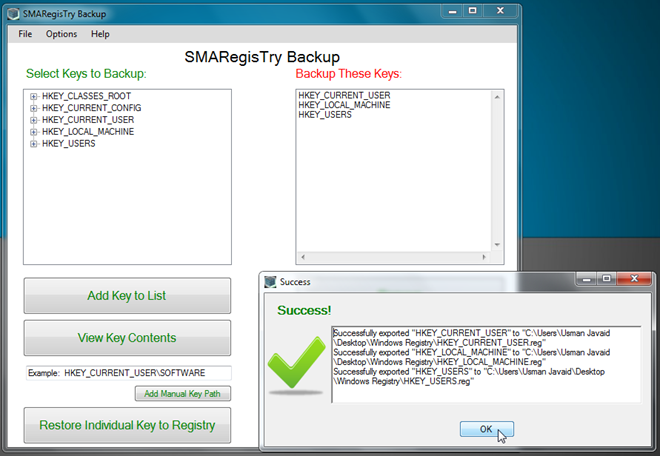
Unlike Mac OS X and Linux-based operating systems, Windows includes quite a smart, yet vulnerable, database of configuration settings for user profiles, system utilities, user apps and device drivers called Registry. Windows Registry acts a central database repository for almost all applications and system utilities that are allowed to access and make changes to system-wide locations. Since malicious scripts, viruses and malwares attempt to modify Windows Registry for exploiting administrator rights to perform low-level operations, it’s highly advisable to backup critical Windows Registry hives, so that when a virus/malware modifies Windows Registry, you can restore them to prevent any irreparable Windows faults. SMARegisTry Backup is a miniscule, portable application that allows you to not only backup entire registry hives and sub keys, but also restore the backed up registry hives with a click. Read More

Monitor & Export Registry Changes Made By A Process Using RegFromApp

Windows Registry is an operating system database that stores the configuration settings in Windows. It contains settings for operating system components, as well as information about hardware. In fact, every application you install on your PC, gets registered in the registry. Just like you'd keep a written record of your finances on a physical register, Windows registry works pretty much the same. Sometimes, you need check certain changes they may have been made to the registry, such as an infected file or a malfunctioning file.  RegFromApp is a portable application for Windows that may help you in this very task. Developed by NirSoft, the application monitors the changes made to registry by any selected application. Should you unaware of NirSoft, the company originated from its original developer Nir Sofer, an active Windows developer.  RegFromApp allows you to create a standard RegEdit registration file that includes all the changes made by the chosen application. The changes are saved in a standard Window Registry File (REG), that can be used to import/export the changes to another system. Read past the jump for more details and screenshots. Read More

Integra System Monitor Compares System State, Files & Registry Changes

Want to find out differences between current and previous system state without having to use folder watch applications that scan only for changes in files and folders? Integra System Monitor is a powerful application which deploys an efficient system state comparing mechanism in order to find out major system changes, updates and new additions to your PC. The application workability is based on simple principle; it allows you to create a snapshot of defined drives and registry hives. Once created, you can compare it with current system state to check what has been changed since last scan. It generates easy-to-understand report in shareable HTML format to view both file and folder changes and new additions to defined registry hives.

Recover Deleted Windows Registry Keys From Selected Hives With Yaru

Tweaking with Windows Registry requires in-depth knowledge about registry hives. Users who need to tweak with Windows or installed applications behaviors, reveal hidden features, and change non-customizable utilities’ settings are always advised to backup all relevant registry keys before making changes, so they can be easily restored if any system catastrophe happens. But what if you failed to backup your registry? Yaru (Yet Another Registry Utility) helps in restoring previously deleted keys from user-selected registry hives.
Note: Yaru is a low-level registry tool which is only meant for proficient Windows users. Before tweaking with keys and settings through it, make sure that you’ve ample understanding of Windows core registry hives.
Read More

StartupPanel: Manage Windows Startup Folder, Registry, Services

Some applications that start with Windows Startup reside in the Startup Folder, while most of them reside in the registry. To access the startup folder you need to first find it from the All Programs menu inside the Start menu. To access the Startup Registry keys you need to head over to the Startup tab inside the System Configuration Window. Accessing Windows Services is another story of it’s own. Read More

RegShot Now Supports 64-bit, Works With Windows 7

RegShot is a great portable tool that allow users to quickly backup and compare the changes in registry. If you don't know it already: it's the best alternative to making a quick (customizable) snapshot of you system's registry and files (can use file checksums), do some changes and then compare the differences. Gives nice undo/redo registry files, an HTML report of the changes and the option to save the snapshots. It helps users find which changes have been made to the registry by any software. Read More

Disable Low Disk Space Notification Alert In Windows 7 / Vista

You might have noticed that whenever you run short of disk space on some particular drive on your system then Windows shows you a notification message. This is no doubt a very useful feature but on the other hand it also becomes annoying as it keeps disturbing you again and again. Below we have covered a simple way to disable such alerts via the Windows Registry. Read More

How To Find A Registry Key In Windows Registry Quickly

If you are tech geek you would probably have modified, tweaked, or removed a bunch of registry keys manually. Every time you go to Windows Registry Editor to find some key, it is too difficult to find one, you have to keep pressing F3 to jump to the next key and so on until you finally find the key you are looking for.

Read More

How To Transfer Registry Favorites To Another Computer

Do you access the same registry key again and again while using the Registry Editor and now want to transfer it to another  computer? In Windows Registry there is an option that you can use to add registry keys as Favorites, this can be done using the Add to Favorites option in the Favorites menu, so that the branch is automatically opened when you select the corresponding favorite item. To Transfer your favorites to another computer or operating system, follow this procedure.

Read More