Giver Makes Transfer of Files Easier On A Linux Network
Giver is a simple file sharing desktop application for Ubuntu Linux users. It automatically detects other users running Giver on a network and allows sending files and folders to them via simple drag and drop. There is no need to learn about complex network file sharing procedures. Anyone on the network can send files by dragging and dropping a file or folder next to the icon and name of a computer user visible on the main interface.
After Giver is installed, it shows you other computers on the network that have it installed as well, along with their computer name, IP and picture (provided the user has set one using Gravatar).
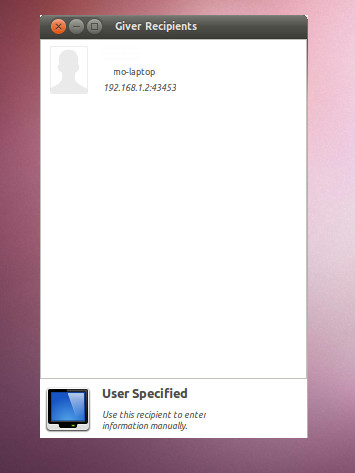
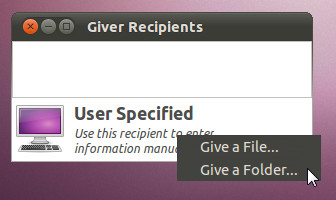
To transfer data to a user either, drag and drop the file or folder to the image icon of the specific person or select a user, choose an option (Give a File/Give a Folder) from the bottom of the main interface and select the file/folder from a directory to transfer it.
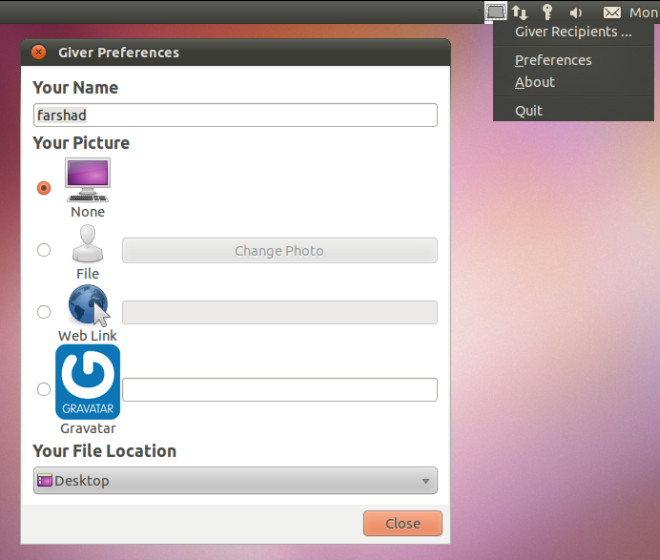
To access Giver options, select “Preferences” from the system tray. The Giver Preferences allows adding a web link, image file, or Gravatar to display an image icon that is visible by other users on the network. This makes it easier to identify users on a network.
Giver is open source and lightweight (below 465KB in size).

Note that giver is also available for openSUSE, and presumably other distros, and has been for some time, which you might not have realised from the article’s Ubuntu emphasis.
nope, not working here either. app is from 2007, maybe thats got something to do with it ¬¬ edit: and I just realized this too is a really old article….
nope, not working here either. app is from 2007, maybe thats got something to do with it ¬¬ edit: and I just realized this too is a really old article….
Neither does it work for me. >.>
It doesn’t work, at least for me…