Launch Application Menu In Ubuntu With Windows Key
If you have migrated from Windows to Ubuntu then you might be missing the Windows key. In Windows OS if you hit the Windows Key, the Start Menu shows up instantly but this is not the case in Ubuntu. Ubuntu keeps the launcher shortcuts for applications in the Application menu which is located in the left side of the Panel. Let me share an easy way to configure the Windows Key to launch the Application Menu.
First go to System > Preferences > Keyboard shortcuts. The Keyboard Shortcuts window will be displayed, from here you are able to create custom keyboard shortcuts and can also modify the existing shortcuts. Now locate the Show the panel’s main menu option, click on it, then hit the Windows key, and you will see that the Windows Key will be set as the shortcut key for the Application Menu.
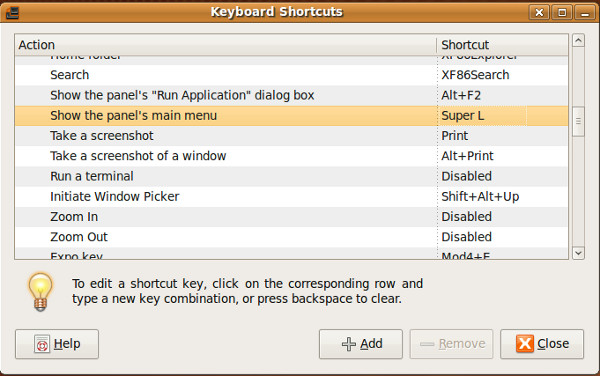
Now, you will be able to load the Applications menu with the Windows Key.
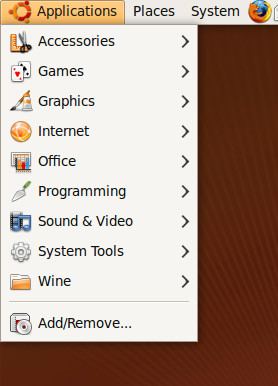
Enjoy!
Editor’s Notes: We believe small tips like these can help Ubuntu users increase their productivity. After using Windows for so long, they might want to adjust Ubuntu a little bit.

This doesn’t seem to work running Ubuntu 10.10 Netbook edition. I’m currently running it on a laptop, and the Windows key refuses to assign through any method. I can however use the key in combination with any other, for example Mod4+Menu, or Mod4+Z, (the Win key is named Mod4 for me rather than Super L), which isn’t a problem but it’s quite unnecessary having to assign two keys to a task which in any other OS can be performed with just one. I personally don’t use the menu though as I’ve installed Docky (similar to ObjectDock) and Synapse launcher (similar to Launchy).
Only gripe I have about this is that if you do that no other shortcuts based on the Super key work. For example if you set something to Super + Tab, it will no longer work because the Super will open the applications menu. I should probably ask if someone know how to change the way shortcut keys are processed so that for single key shortcuts its on key up not key down.